numeric_results create fft
Allows you to use FFT (Fast Fourier Transform) to change a result set component from the time domain to the frequency domain, and back.
Because the FFT algorithm requires an evenly spaced sampling of elements and the number of elements must be a power of two (512, 1024, and so on), the data is interpolated before the FFT. The default interpolation method is the Akima method with 1024 elements. These values can be overridden.
If the input is a real component with N interpolated elements, this operation generates a complex component of (N+1)/2 elements with the name specified in the NEW_RESULTS_NAME parameter. It also generates the real components, FREQUENCY and one named 'name'_MAGNITUDE of size N/2, and places these components in the same result set as the complex component. For example, the command:
numeric_results create fft result_set_component_name=Res.timeDomain &
new_result_set_name=fft.x
new_result_set_name=fft.x
results in:
fft.x - complex result in the frequency domain
fft.x_MAGNITUDE - mag (fft.x)
fft.FREQUENCY
If the input is a complex component, this command performs an inverse FFT, and generates a real component with the name specified in the new_results_set_name parameter. It also generates the real component TIME. For example:
numeric_results create fft result_set_component_name=res.frequencyDomain &
new_result_set_name=inverseFFT.x
new_result_set_name=inverseFFT.x
Note: | If you perform an FFT on a component, and then perform an inverse FFT on the result, Adams View does not return the same data, because the original data is interpolated |
There is no interpolation for an inverse FFT.
Format:
numeric_results create fft | |
|---|---|
new_result_set_component_name = | new result_set |
result_set_component_names = | existing result set components |
interpolate_type = | interpolation_type |
number_of_points = | integer |
units = | type of units |
Example:
numerical_results create fft & | |
|---|---|
new_result_set_component_name = | dingdong.bell & |
result_set_component_name = | res101.x, res102.y & |
interpolate_type = | linear & |
number_of_points = | 1024 |
Description:
Parameter | Value Type | Description |
|---|---|---|
new_result_set_component_name | New Result Set Name | Identifies the new result set component. |
result_set_component_names | Existing Result Set Components | Identifies two result set components on which to perform the operation. |
Interpolate_type | Linear, Cubic, Akima, Cspline | Specifies the method to interpolate the result set component. |
Number_of_points | Integer | Specifies the number of interpolation points used in the fitting of data contained in a result set component. You might want to use this curve-fitting operation in preparation for an FFT operation, and so on. |
Units | No_units, Calculate, Length, Angle, Mass, Density, Time, Area, Volume, Velocity, Acceleration, Angular_velocity, Angular_acceleration, Inertia, Area_inertia, Damping, Stiffness, Torsion_stiffness, Torsion_damping, Force, Torque, Pressure, Force_time, Torque_time | Specifies the type of units to be used for the new result set component. Once you set the unit type, Adams View can perform the proper unit conversion on the data. |
Extended Definition:
1. The hierarchy of a model's results is shown below with the components of a result set under the result set:
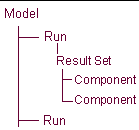
If you want to store the component:
■In an existing result set, the name must include the result set. For example, assume you have a request file called SHIFT.REQ, and it contains the result set REQ1. If you want to store the new result set component in result set REQ1 with the component name NEW, enter:
.SHIFT.REQ1.NEW (It is not necessary to include .SHIFT., if SHIFT is the current analysis_name).
■In a new results set, named REQ99, for example, in the analysis run SHIFT, enter .SHIFT.REQ99.NEW. The number of components to be stored is inferred by the number of components named in this parameter. You can enter multiple names separated with commas (,).
The component name must be unique, even though it can be stored in an existing result set. A result set name can be any length and any combination of alphanumeric characters. The leading character must be a letter.
Result sets are associated with an analysis and can be identified as such. A result set associated with request 101 from an analysis named test is often referred to as .test.req101.
The table below illustrates the default names assigned to result sets and result set components, read from request (.req) and results (.res) files.
Result set type | Result set name | Component names | File that result is from |
|---|---|---|---|
part | PARxxx... | x y z e1 e2 e3 e4 mag vx vy vz wx wy wz accx accy accz wdx wdy wdz | results file |
diff | DIFxxx... | q dq | results file |
joint | JOIxxx... | fx fy fz tx ty tz fmag tmag | results file |
jprim | JPRxxx... | fx fy fz tx ty tz fmag tmag | results file |
motion | MOTxxx... | fx fy fz tx ty tz fmag tmag | results file |
gear | GEAxxx... | fx fy fz | results file |
coupler | COUxxx... | fx1 fy1 fz1 tx1 ty1 tz1 fmag1 tmag1 fx2 fy2 fz2 tx2 ty2 tz2 fmag2 tmag2 fx3 fy3 fz3 tx3 ty3 tz3 fmag3 tmag3 | results file |
sforce | SFOxxx... | fx fy fz tx ty tz fmag tmag | results file |
spring damp | SPRxxx... | fx fy fz tx ty tz fmag tmag | results file |
bushing | BUSxxx... | fx fy fz tx ty tz fmag tmag | results file |
beam | BEAxxx... | fx fy fz tx ty tz fmag tmag | results file |
field | FIExxx... | fx fy fz tx ty tz fmag tmag | results file |
user request | UREQxxx... | u1 u2 u3 u4 u5 u6 u7 u8 | results file |
request | REQxxx... | x y z r1 r2 r3 mag amag | request file |
ucon | (not implemented) |
2. If the value for the “units” parameter is calculate, Adams View tries to determine the units to use for this operation. For example, if velocities are added (length/time), then the calculated “units” parameter for the new result set component is velocity (length/time). If the derivative of a velocity is taken, the calculated “units” parameter is acceleration (length/time**2).
Adams View can only handle calculated units with a maximum exponent for the base units (force, length, mass, time) of plus or minus four. For example, if a result set component with the units (length/time**3) is multiplied with a result set component having the same units, it gives the calculated units (length**2/time**6). Because the exponent of time is greater than four, Adams View uses no_units and issues a warning.
Values are: no_units, calculate, length, angle, mass, density, time, area, volume, velocity, acceleration, angular_velocity, angular_acceleration, inertia, area_inertia, damping, stiffness, torsion_stiffness, torsion_damping, force, torque, pressure, force_time, torque_time.
3. If the interpolation operation is in preparation for an FFT, then the number of points must be an even power of two (for example, 256, 512, and 1024).
If you do not specify this parameter, it defaults to 1024.
If you specify this parameter, you must use a positive integer.
Once you change the value of this parameter, Adams View will remember the new value and use it as the default the next time you need this parameter.