numeric_results read_from_file
Allows you to read components from an ASCII file into an existing result set or into a new result set. You can specify the names of the components, as well as the name of the result set.
To accommodate a wide variety of formats used by third-party software, the format of the file to be read is intentionally general. Adams View only reads the lines that begin with a number. All other lines are considered comments and are ignored. Using this command, output files generated from finite element, modal analysis, or custom programs can be read into Adams View and combined with data read from the Adams output files. You can use files that numeric_results write command generates with this command. This allows for the saving of important data between Adams View sessions.
The format supported by the Adams View file reader is a flexible one.
All lines that do not begin with a number are considered comments.
Other lines are read by Adams View. Adams View starts at the first line of the file and reads one line at a time. Lines that do not begin with a number (digit,-,+,decimal point) are considered comments and are ignored. The number of components to be read is determined by the number of components that are named in the NEW_RESULT_SET_COMPONENT_NAME parameter. If only 3 components are named in this parameter, then, only the first three components are read and all others in the file are ignored.
Format:
numeric_results read_from_file | |
|---|---|
new_result_set_component_name= | new component |
number_of_steps= | integer |
units= | string |
file_name= | string |
Example:
numeric_results read_from_file & | |
|---|---|
new_result_component_name = | res_01 & |
number_of_steps = | 15 & |
file_name = | “c:\sample_file.txt” |
This sample file contains three components. The first two columns of numbers, beginning with 1 and 10.0, are the first two components and the third column of numbers, beginning with 22, is the third component.
If you do not specify the number of steps, Adams View uses a blank line to delimit the end of a component. In the following example, the first two components have ten numbers each. If you specify the number of steps to be read, Adams View continues to read lines until the requested number of steps have been stored in the component. For example, if only one component was read from the following file and the number of steps was specified to be 15, the component would contain the values 1, 2, 3.4, -4, 5, 6, 7, 8, 9, 10, 22, 23, .24, 25, 26.
>>>>>> beginning of file <<<<<<< This is a test file for the NUMERIC_RESULT READ command. | |
1 | 10.0 |
2 | 11.0 |
3.4 | 12.5 |
-4 | 13.0 |
5 | +14.0 |
6 | 15.5 |
7 | 17 |
8 | 18 |
9 | 19 |
10 | 20 |
22 | |
23 | |
.24 | |
25 | |
26 | |
27 | |
28 | |
29 | |
30 | |
31 | |
>>>>>> end of file <<<<<<< | |
Description:
Parameter | Value Type | Description |
|---|---|---|
new_result_set_component_name, | New component | Allows you to identify where the new data components are to be stored. |
number_of_steps, | Integer | Shows the number of values to be stored in each component of a result set being read from a file. |
units, | String | Specifies the type of units to be used for the new result set component. |
file_name | String | Specifies the name of the file to which the information is to be sent. |
Extended Definition:
1. The hierarchy of a model's results is shown below with the components of a result set under the result set:
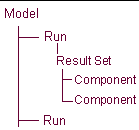
If you want to store the component:
■In an existing result set, the name must include the result set. For example, assume you have a request file called SHIFT.REQ, and it contains the result set REQ1. If you want to store the new result set component in result set REQ1 with the component name NEW, enter:
.SHIFT.REQ1.NEW (It is not necessary to include .SHIFT., if SHIFT is the current analysis_name).
■In a new results set, for example named REQ99 in the analysis run SHIFT, enter .SHIFT.REQ99.NEW. The number of components to be stored is inferred by the number of components named in this parameter. You can enter multiple names separated with commas (,).
The component name must be unique, even though it can be stored in an existing result set. A result set name can be of any length and any combination of alphanumeric characters. The leading character must be a letter.
Result sets are associated with an analysis and can be identified as such. A result set associated with request 101 from an analysis named test is often referred to as .test.req101.
The table below illustrates the default names assigned to result sets and result set components, read from request (.req) and results (.res) files.
(.RES) files.
Result set type | Result set name | Component names | File that result is from |
|---|---|---|---|
part | PARxxx... | x y z e1 e2 e3 e4 mag vx vy vz wx wy wz accx accy accz wdx wdy wdz | results file |
diff | DIFxxx... | q dq | results file |
joint | JOIxxx... | fx fy fz tx ty tz fmag tmag | results file |
jprim | JPRxxx... | fx fy fz tx ty tz fmag tmag | results file |
motion | MOTxxx... | fx fy fz tx ty tz fmag tmag | results file |
gear | GEAxxx... | fx fy fz | results file |
coupler | COUxxx... | fx1 fy1 fz1 tx1 ty1 tz1 fmag1 tmag1 fx2 fy2 fz2 tx2 ty2 tz2 fmag2 tmag2 fx3 fy3 fz3 tx3 ty3 tz3 fmag3 tmag3 | results file |
sforce | SFOxxx... | fx fy fz tx ty tz fmag tmag | results file |
spring damp | SPRxxx... | fx fy fz tx ty tz fmag tmag | results file |
bushing | BUSxxx... | fx fy fz tx ty tz fmag tmag | results file |
beam | BEAxxx... | fx fy fz tx ty tz fmag tmag | results file |
field | FIExxx... | fx fy fz tx ty tz fmag tmag | results file |
user request | UREQxxx... | u1 u2 u3 u4 u5 u6 u7 u8 | results file |
request | REQxxx... | x y z r1 r2 r3 mag amag | request file |
ucon | (not implemented) |
2. All components being read from a file must have the same number of steps.
Lines that do not begin with a number are considered comments and are ignored.
If you do not specify this parameter, Adams View will infer the size of the components from the format of the file. Adams View will read a component from a file until it encounters a comment line. A comment line marks the end of the component.
3. Once you set the unit type, Adams View can perform the proper unit conversion on the data. Values are: no_units, calculate, length, angle, mass, density, time, area, volume, velocity, acceleration, angular_velocity, angular_acceleration, inertia, area_inertia, damping, stiffness, torsion_stiffness, torsion_damping, force, torque, pressure, force_time, torque_time.
Cautions:
1. If a paragraph of text contains a line that begins with a number, Adams View tries to read the line. To avoid this, precede lines that are to be ignored with a non-numeric character. Do not use +, -, or . because these characters are valid as the first characters in a real number
>>>>>> beginning of file <<<<<<<
This sample file contains only one component but contains the number
3 at the beginning of a line in this header paragraph. Adams View will
try to read this line because it is not considered a comment.
3 at the beginning of a line in this header paragraph. Adams View will
try to read this line because it is not considered a comment.
1.5
3.0
4.5
6.0
3.0
4.5
6.0
>>>>>> end of file <<<<<<<
>>>>>> beginning of file <<<<<<<
The same file, without a numerical character, ensures that Adams View does not try to read the paragraph of text.
1.5
3.0
4.5
6.0
3.0
4.5
6.0
>>>>>> end of file <<<<<<<
Tips:
1. Numbers can be separated by a comma (,) and they do not have to be lined up in even columns.