numeric_results write
Allows you to write the contents of one or more result set components to the information window, a file, or both.
Format:
numeric_results write | |
|---|---|
result_set_component_names = | existing result set components |
sort_by= | results_sort |
order= | sort_order |
write_to_terminal= | on/off |
file_name= | string |
above_value= | real |
below_value= | real |
Example:
numerical_results write & | |
|---|---|
result_set_component_name = | dingdong.bell & |
sort_by = | by_value & |
order = | ascending & |
file_name = | “c:\result_set_file” & |
write_to_terminal = | on & |
above_value = | 5.0 & |
below_value = | 100.9 |
The result set specified will be written in the file specified as well as on the screen. Only the values above 5.0 and below 100.9 will be printed and sorted in the ascending order.
Description:
Parameter | Value Type | Description |
|---|---|---|
result_set_component_name | Existing Result Set Component | Identifies the existing result set. |
Sort_by | By_time/By_value | Specifies how numerical results are sorted as they are written to the terminal or to a file using the NUMERICAL_RESULTS WRITE command. |
Order | Sort_order | Specifies whether the result set component is to be listed in ascending or descending order. |
Write_to_terminal | On, Off | Specifies if the information requested is to be sent to the informational window or not. This parameter is most likely to be used in conjunction with the FILE_NAME parameter to get the information put into a file. |
Above_value | Real | The ABOVE_VALUE parameter is used as a critical value evaluator in the operation to be performed. |
Below_value | Real | The BELOW_VALUE parameter is used as a critical value evaluator in the operation to be performed. |
Extended Definition:
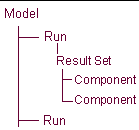
1. The hierarchy of a model's results is shown below with the components of a result set under the result set:
If you want to store the component:
■In an existing result set, the name must include the result set. For example, assume you have a request file called SHIFT.REQ, and it contains the result set REQ1. If you want to store the new result set component in result set REQ1 with the component name NEW, enter:
.SHIFT.REQ1.NEW (It is not necessary to include .SHIFT., if SHIFT is the current analysis_name).
■In a new results set, for example named REQ99 in the analysis run SHIFT, enter .SHIFT.REQ99.NEW. The number of components to be stored is inferred by the number of components named in this parameter. You can enter multiple names separated with commas (,).
The component name must be unique, even though it can be stored in an existing result set. A result set name can be of any length and any combination of alphanumeric characters. The leading character must be a letter.
Result sets are associated with an analysis and can be identified as such. A result set associated with request 101 from an analysis named test is often referred to as .test.req101.
The table below illustrates the default names assigned to result sets and result set components, read from request (.req) and results (.res) files.
Result set type | Result set name | Component names | File that result is from |
|---|---|---|---|
part | PARxxx... | x y z e1 e2 e3 e4 mag vx vy vz wx wy wz accx accy accz wdx wdy wdz | results file |
diff | DIFxxx... | q dq | results file |
joint | JOIxxx... | fx fy fz tx ty tz fmag tmag | results file |
jprim | JPRxxx... | fx fy fz tx ty tz fmag tmag | results file |
motion | MOTxxx... | fx fy fz tx ty tz fmag tmag | results file |
gear | GEAxxx... | fx fy fz | results file |
coupler | COUxxx... | fx1 fy1 fz1 tx1 ty1 tz1 fmag1 tmag1 fx2 fy2 fz2 tx2 ty2 tz2 fmag2 tmag2 fx3 fy3 fz3 tx3 ty3 tz3 fmag3 tmag3 | results file |
sforce | SFOxxx... | fx fy fz tx ty tz fmag tmag | results file |
spring damp | SPRxxx... | fx fy fz tx ty tz fmag tmag | results file |
bushing | BUSxxx... | fx fy fz tx ty tz fmag tmag | results file |
beam | BEAxxx... | fx fy fz tx ty tz fmag tmag | results file |
field | FIExxx... | fx fy fz tx ty tz fmag tmag | results file |
user request | UREQxxx... | u1 u2 u3 u4 u5 u6 u7 u8 | results file |
request | REQxxx... | x y z r1 r2 r3 mag amag | request file |
ucon (not implemented) | |||
2. The legal values for the “sort_by” parameter are BY_VALUE and BY_TIME. If BY_VALUE is entered, then the values will be sorted by the magnitude of the result set component being written. If BY_TIME is entered, then the values will be sorted by the simulation time associated with the result set component being written.
This is an optional parameter and if not entered, the SORT_BY option will not be set to any value. The result set component will be written in the order it appears in the result set.
3. If entered, the “order” parameter is used regardless of whether the values are to be printed to the terminal or to a file.
This parameter is optional and if not entered, it will default to "ascending" order. The only legal values for the ORDER parameter is "ascending" and "descending".
4. The “above_value” parameter determines the threshold above which a particular numeric value will be modified, printed, etc. (depending on the operation to be performed).
This parameter is optional and if not entered, no value will be passed to the application, and therefore, no action will be taken based on the ABOVE_VALUE parameter. If entered, the ABOVE_VALUE parameter must be a real number.
5. The “Below_value” parameter determines the threshold below which a particular numeric value will be modified, printed, etc. (depending on the operation to be performed).
This parameter is optional and if not entered, no value will be passed to the application, and therefore, no action will be taken based on the BELOW_VALUE parameter. If entered, the BELOW_VALUE parameter must be a real number.