panel set twindow_function impact
The IMPACT function models collisions. It evaluates a function that turns on when the distance between the I and the J markers falls below a nominal FREE_LENGTH (i.e. x1), (i.e. when two parts collide). As long as the distance between the I and the J markers is greater than the FREE_LENGTH, the force is zero. An example of a system you can model with the IMPACT function is a ball impacting the ground.
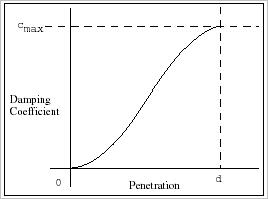
The force has two components, a spring or STIFFNESS component and a damping or viscous component. The STIFFNESS component (i.e. k) with the FORCE_EXPONENT (i.e. e) is a function of the penetration of the I_MARKER within the free length distance from the J_MARKER. The stiffness component opposes the penetration. The damping component of the force is a function of the speed of penetration. The damping opposes the direction of relative motion. To prevent a discontinuity in the damping force at contact, the damping coefficient is, by definition, a cubic step function of the penetration. Thus at zero penetration, the damping coefficient is always zero. The damping coefficient achieves a MAX_DAMPING_COEFFICIENT (i.e. cmax), at a user-defined penetration, BOUNDARY_PENETRATION (that is, d).
The equation for this function can be mathematically expressed as follows:
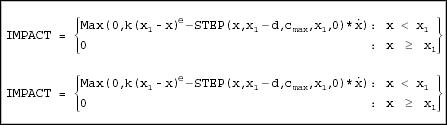
Note that when:
■x > x1, no penetration occurs and the force is zero (penetration p = 0)
■x < x1, penetration occurs at the end closer to the J marker, and the force is > 0 (penetration p = x1 - x).
Also note that when p < d, the instantaneous damping coefficient is a cubic step function of the penetration p.
When p > d, the instantaneous damping coefficient is cmax.
Adams Solver (FORTRAN) never returns a negative force for IMPACT. If the above expression is negative, Adams Solver (FORTRAN) returns a value of zero.
Figure 2, below, is a plot of damping coefficient versus penetration.
Figure 2. Damping Coefficient versus Penetration
Format:
panel set twindow_function impact | |
|---|---|
x= | run time function |
dx= | function |
free_length= | real |
boundary_penetration= | real |
angular_free_length= | angle |
angular_boundary_penetration= | angle |
stiffness= | real |
force_exponent= | real |
max_damping_coefficient= | real |
Description:
Parameter | Value Type | Description |
|---|---|---|
x | Run Time Function | Specifies the run time function. |
dx | Function | Specifies a real variable that communicates the time derivative of x to the function. |
free_length | Real | Specifies the non-angular FREE_LENGTH of the independent variable, x. |
boundary_penetration | Real | Specifies a positive real variable that is the non-angular boundary penetration at which Adams applies full damping. |
angular_free_length | Angle | Specifies the ANGULAR_FREE_LENGTH of the independent variable, x. |
angular_boundary_penetration | Angle | Specifies a positive real variable that is the angular boundary penetration at which Adams applies full damping. |
stiffness | Real | A non-negative real variable that specifies the stiffness of boundary surface interaction. |
force_exponent | Real | Specifies a positive real variable that is the exponent of the force deformation characteristic. |
max_damping_coefficient | Real | Specifies a non-negative real variable that is the maximum damping coefficient. |
Extended Definition:
1. IMPACT models collisions and contact. It evaluates a force that turns on when a distance falls below a nominal free length (that is, when two parts collide).
The force has two components: a spring or stiffness component and a damping or viscous component. The stiffness component opposes the penetration. The damping component of the force is a function of the speed of penetration. The damping opposes the direction of relative motion. To prevent a discontinuity in the damping force at contact, the damping coefficient is, by definition, a cubic step function of the penetration. Thus, at zero penetration, the damping coefficient is always zero. The damping coefficient achieves a maximum, cmax, at a user-defined penetration, d.
An object colliding with ground is an example of a system that can be modeled with the IMPACT function.
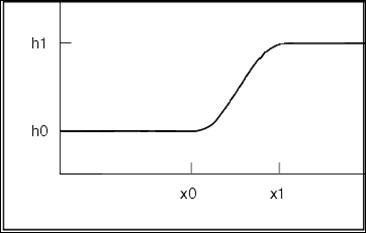
Let x be the instantaneous distance, x1 be the free length (when x is less than x1, the force turns on), x1 - x be the penetration, and d be the penetration at which Adams/Solver applies full damping (cmax).
■When x 

 x1, force = 0.
x1, force = 0. ■When x < x1, force is positive.
■When (x1-d) < x < x1, force is positive; there is damping, but it is less than cmax.
■When x 

 (x1-d), force is positive and damping = cmax.
(x1-d), force is positive and damping = cmax. The following equation defines IMPACT:


2. You compute the value of the dx parameter by using a function expression.
For example, if x (the distance variable you use to compute the force) is compute using the distance function DX(0201,0301) then, dx is computed using the velocity function VX(0201,0301).
3. To enter a function expression you enter a series of quoted strings.
The easiest way to enter a function expression in Adams View is to use the text editor in combination with the function builder. To invoke the text editor for entering a function expression, highlight the function field and then either pick the "EDIT" button at the top of the panel or type a ^t (control-t). The Adams View "function builder" is discussed below.
The syntactical correctness of a function expression can be investigated by using the "VERIFY" button at the upper right of the text editor. If there is a syntax error, a message is printed and the cursor is put near the problem. Proper unit consistency is not checked during function expression verification.
The remainder of this explanation will cover the components of FUNCTION expressions as summarized in the following table:
.
Components | Examples |
|---|---|
Numbers | FUNCTION = 1E2 + 3.4 + 6 |
Operators | FUNCTION = 3*6/2 + 3 - 2**2 |
System constants | FUNCTION = PI + 20 |
System variables | FUNCTION = AX(1040, 2010) |
Arithmetic IFs | FUNCTION = IF(DX(3, 5): -1, 0, 1) |
FORTRAN-77 functions | FUNCTION = ABS(NUM) - 6 |
Blanks | FUNCTION = 1 + 2 |
Continuation commas | FUNCTION = 1 + 1 + 1 + 1 + 1 + 1, + 1 + 1 + 1 + 1 + 1 + 1 + 1 |
Adams functions | FUNCTION = POLY(0, 0, 6.28) |
NUMBERS
FUNCTION expressions can include integers, real numbers, and exponents. In other words, any numbers that are legal in Adams are legal in a FUNCTION expression.
OPERATORS
In a FUNCTION expression, Adams allows any of the operators **, *, /, +, and -. Adams executes these operators according to the following precedence rules:
From greatest to least, the operators have the following
■priorities. ** then * / then + -. In other words, Adams executes exponentiation (**) before all other operators and executes multiplication (*) and division (/) before addition (+) and subtraction (-).
When a statement has operators of the same priority, Adams executes them from left to right.
You can use parentheses to alter the precedence of operators.
For example, in the equation
FUNCTION = (1-TIME)*30/PI
Adams subtracts TIME from one before it performs multiplication and division.
SYSTEM CONSTANTS
You can include the following system constants in a FUNCTION expression:
■PI Value of pi (to eighteen significant digits)
■DTOR Value of pi/180 for converting degrees to radians
■RTOD Value of 180/pi for converting radians to degrees
The following example of a FUNCTION with a system constant multiplies the system constant PI by the displacement of marker 10 with respect to marker 14:
FUNCTION = PI*DM(10,14)
BLANKS
A FUNCTION expression can contain any number of blank spaces. Five consecutive blank spaces in an expression do not terminate input of the expression (by indicating that what follows is a comment) as they do in an Adams statement. However, you should remember these two restrictions.
■You cannot put a blank space in the middle of a number.
■Adams does not accept a blank space between a function and its left bracket. (This is true for both FORTRAN-77 functions and Adams functions.)
CONTINUATION COMMAS
You can use a comma to continue FUNCTION expressions. You can break the expression anywhere except in the middle of a number, in the middle of a name, or between a function and its left bracket. Put a continuation comma in column one of the following line before the rest of the expression. If you break the expression at a comma that is part of the expression, you must use both the expression comma and the continuation comma. You may use more than one continuation comma to extend an expression over several lines.
FUNCTION BUILDER
The FUNCTIONS button on the right side of the Adams View text editor provides a means of constructing an Adams function string. These functions are briefly described below. Upon picking the FUNCTIONS button, you will be presented with the list of available functions in the "selection window". After you select the desired function, a panel will appear with fields representing the various parameters for the function. You will have full access to on-line help with this panel just like you have with regular panels. After you have completed the panel and selected the DONE button on the panel, the function string will be constructed and inserted at the current text cursor location in the text edit window.
SYSTEM VARIABLES
A FUNCTION expression may access the current value of a system variable and use the value in computations. These values are accessed through a collection of functions. The accessible system variables include the following: Time, Mode, Displacements (Translational and Rotational), Velocities (Translational and Rotational), Accelerations (Translational and Rotational), Forces (Translational and Rotational), and User-defined variables. Invoke the text edit window and pick the FUNCTIONS button to get a list of functions that can be accessed.
In general, you use a function character string (such as DM, VX, or FZ) and a list of values (e.g. i1, i2, and i3) to access a system variable in an expression. For example, the value i1 may be the name of the marker for which you want to measure a quantity (such as displacement, velocity, acceleration, or force), i2 is the name of the marker with respect to which you want to measure the quantity, and i3 is the name of the marker you want to use to resolve the components of the quantity. If you do not specify marker i3, Adams computes the result in the ground reference frame.
ARITHMETIC IFS
Arithmetic IFs allow you to conditionally define FUNCTION. The format for arithmetic IFs follows.
IF (expression 1: expression 2, expression 3, expression 4)
Adams evaluates expression 1. If expression 1 is less than zero, the arithmetic IF equals expression 2; if expression 1 equals zero, the arithmetic IF equals expression 3; and if expression 1 is greater than zero, the arithmetic IF equals expression 4.
A FUNCTION expression with an arithmetic IF and its four expressions is below.
FUNCTION = 6 * IF(VR(10,31): 0 , 0 , 100)
If the radial velocity between markers 10 and 31 is less than or equal to zero, the value of the FUNCTION expression is zero; but if the radial velocity between markers 10 and 31 is greater than zero, the value of the FUNCTION expression is six hundred.
In some ways, you may treat IF as a variable. For example, you can place it anywhere in the expression. In addition, you can nest arithmetic IFs nine levels deep.
FORTRAN-77 FUNCTIONS
You can use the FORTRAN functions ABS, ATAN, ATAN2, COS, EXP, LOG, LOG10, MIN, MAX, SIN, SQRT, and TAN in your expression. For more information about these functions, see a FORTRAN reference manual.
Invoke the text edit window and pick the FUNCTIONS button to get a list of functions that can be accessed.
Adams FUNCTIONS
In general, an Adams function evaluates a mathematical equation and returns a value to your FUNCTION expression. The following table lists all the Adams functions and their purposes. Invoke the text edit window and pick the FUNCTIONS button to get a list of functions that can be accessed.
Names | Purposes |
|---|---|
AKISPL | Accesses the data in a SPLINE statement and uses the Akima cubic method to fit a cubic curve (a spline) to the data. |
BISTOP | Evaluates a force restricting displacement of a part in two opposite directions. |
CHEBY | Evaluates a Chebyshev polynomial |
CUBSPL | Accesses the data in a SPLINE statement and uses the traditional cubic method to fit a cubic curve (a spline) to the data. |
FORCOS | Evaluates a Fourier cosine series |
FORSIN | Evaluates a Fourier sine series |
HAVSIN | Evaluates a haversine function |
IMPACT | Evaluates a force restricting displacement of a part in one direction. |
POLY | Evaluates a polynomial |
SHF | Evaluates a simple harmonic function |
STEP | Approximates a step function with a cubic polynomial. |
4. For an impact force, the free_length parameter specifies the distance above which there is no contact, and therefore, no force is generated. Specifically, if x is less than the FREE_LENGTH (i.e. x1), Adams calculates a positive value for the force. Otherwise, the force value is zero.
5. The BOUNDARY_PENETRATION parameter is given as "d" in the BISTOP_SLOT and IMPACT equations below.


6. For an impact force, the angular_free_length is the distance above which there is no contact, and therefore no force, is generated. Specifically, if x is less than the FREE_LENGTH (i.e. x1), Adams calculates a positive value for the force. Otherwise, the force value is zero.
7. For a stiffening spring characteristic, FORCE_EXPONENT (i.e. e in the equations below) is greater than 1.0. For a softening spring characteristic, 0 < FORCE_EXPONENT < 1.0.
The FORCE_EXPONENT parameter is used in the BISTOP_SLOT and IMPACT equations below:


8. The maximum damping is reached when the BOUNDARY_PENETRATION (i.e. d) value is reached.
The MAX_DAMPING_COEFFICIENT (i.e. cmax) parameter is used in the BISTOP_SLOT and IMPACT equations.
Cautions:
1. IMPACT is only used to determine force or torque magnitudes.
2. The force value and the distance measure must both be positive in the same direction.
3. When e is less than or equal to one, the rate of change of the force is discontinuous at contact. This may cause convergence problems.