simulation single_run assemble
Ensures proper assembly of your model before other simulations. It checks to ensure that all constraints and initial conditions are allowable and consistent. If it finds any discrepancies, it corrects them so that there is a consistent set of values representing the state of the model and assembles the model in a more appropriate way.
For example, if initial values for displacements and velocities violate the constraint equations, Adams View modifies the input displacement and velocity data to satisfy the constraint equations while minimizing the change in the input data.
Format:
simulation single_run assemble | |
|---|---|
model_name = | existing model |
Example:
simulation single_run assemble & | |
|---|---|
model_name = | MODEL_1 |
Description:
Parameter | Value Type | Description |
|---|---|---|
model_name | Existing Model | Specifies an existing model. |
Extended Definition:
1. You may identify a model by typing its name or by picking it from the screen.
If the model is not visible on the screen, you must type the name. You may also find it convenient to type the name even if the model is displayed.
You must separate multiple model names by commas.
If the model is visible in one of your views, you may identify it by picking on any of the graphics associated with it.
You need not separate multiple model picks by commas.
2. You can perform an initial conditions simulation to check for any inconsistencies in your model. The initial conditions simulation is often referred to as an assemble model operation. An initial conditions simulation tries to reconcile any positioning inconsistencies that exist in your model at its design configuration and make it suitable for performing a nonlinear or linear simulation. Most importantly, the initial conditions simulation tries to ensure that all joint connections are defined properly.
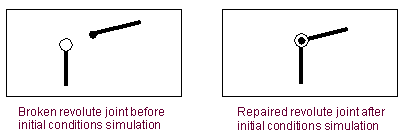
For example, for a revolute joint to be defined properly, the origins of the markers that define the joint must be coincident throughout a simulation. If the markers are not coincident, the joint is broken and needs to be repaired. In this example, the initial conditions simulation helps repair the broken revolute joint by moving the origins of the two markers until they are coincident, as shown in the following figure.
Repaired Revolute Joint
You can also use the initial conditions simulation if you are creating parts in exploded view. Exploded view is simply creating the individual parts separately and then assembling them together into a model. You might find this convenient if you have several complicated parts that you want to create individually without seeing how they work together until much later. Adams View provides options for specifying that you are creating your model in exploded view as you create constraints.