simulation single_run mkb
Specifies that Adams Solver (C++) calculates the M, K, B, C and D matrices for the Adams model. These matrices are used as inputs to an MSC Nastran model.
Format:
simulation single_run mkb | |
|---|---|
model_name = | existing model |
mkb_matrices_name = | New linear result |
plant_input_name = | existing plant input |
plant_output_name = | existing plant output |
plant_state_name = | existing plant state |
reference_marker = | existing marker |
matrix_format = | matrix_x/matlab |
file_name = | Any file |
Description:
Parameter | Value Type | Description |
|---|---|---|
model_name | Existing Model | Specifies an existing model. |
mkb_matrices_name | New Linear Result | Specifies the name of a new linear result. |
plant_input_name | Existing Plant Input | Specifies the plant input that Adams View uses as plant inputs in the state matrices computation. If you do not specify a plant input, Adams View does not give the B and D matrices as output. |
plant_output_name | Existing Plant Output | Specifies the plant output that Adams View uses as plant outputs in the state matrices computation. If you do not specify a plant output, Adams View does not give the C and D matrices as output. |
plant_state_name | Existing Plant_state | Specifies a plant state to be used to define a set of states that are to be used in the linearization scheme. |
reference_marker | Existing Marker | Specifies the reference marker. |
matrix_format | Matrix_x/matlab | Currently, two software formats are supported: 1. matrix_x specifies the MATRIXx (FSAVE format) 2. matlab specifies the MATLAB (ASCII flat file format). |
file_name | Any File | Specifies the name of the software in whose input format Adams View is to give the state matrices as output. |
Extended Definition:
1. You may identify a model by typing its name or by picking it from the screen. If the model is not visible on the screen, you must type the name.
You may also find it convenient to type the name even if the model is displayed. You must separate multiple model names by commas.
If the model is visible in one of your views, you may identify it by picking on any of the graphics associated with it. You need not separate multiple model picks by commas.
2. Plant output defines the set of measured outputs from the system and Plant input defines a set of inputs to the mechanical system. Adams Linear linearizes the system equations to the following form:
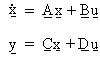
where:
■x is the linearized system state array.
■u is the array of system inputs defined by plant input.
■y is the array of system outputs defined by plant output.
This form is commonly referred to as the state-space form of the system equations in control theory. Adams Solver outputs the A, B, C, and D matrices for use in a control-system design or any other linear system analysis software. If only the A matrix is required, plant input and plant output are not necessary.
3. The plant outputs with the plant inputs, variables, arrays, transfer functions, linear state equations, and general state equations define the interface between Adams and control design and analysis packages such as MATRIXx and MATLAB.
As shown below, plant inputs and outputs act as sockets for input and output to your controller, organizing the variable wires.
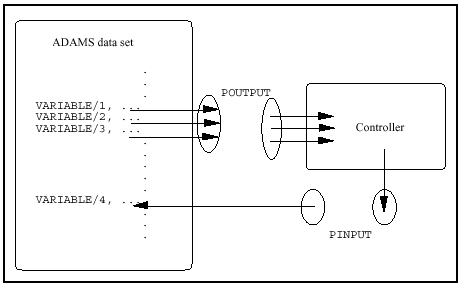
Adams Linear uses plant inputs and outputs to identify which variables to consider system inputs and outputs when generating state matrices. A control design program can use these matrices to design a controller for the system. The resulting controller can then be included in the model using variables, arrays, transfer functions, linear state equations, or general state equations.