Creating the Three Mini-Maneuvers
To complete the braking-in-turn event, you must create three mini-maneuvers.
To create the mini-maneuvers:
1. To go to the mini-maneuver table editor, select  .
.
.The mini-maneuver table editor appears. Note that by default, the first mini-maneuver, MINI_1, is already defined.
2. To create one more mini-maneuver, in the Name text box at the bottom of the Event Builder window, enter MINI_2, and then select Add.
3. To create the last mini-maneuver, in the Name text box, enter MINI_3, and then select Add.
The mini-maneuver window appears as follows:
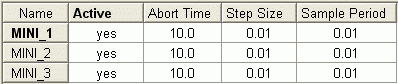
4. In the Abort Time for MINI_2, change the abort time to 5.
5. To save the event file with the 3 mini-maneuvers, select Save.
Your Adams product saves the file, braking_in_a_turn.xml, in your current working directory.