Open the Model
1. The realtime_shared.cdb database required for this tutorial can be found in the Adams installation at: \install_dir\realtime\.The set_state_var_id.cmd and sim_throttle_brake_steerang.xml are available at \install_dir\realtime\examples\SCALEXIO\. Copy them to your working directory.
2. Start Adams Car (Standard Interface).
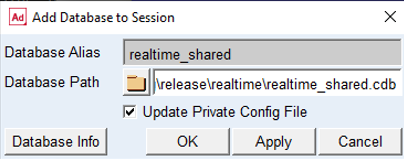
3. Add the realtime_shared.cdb database to the Adams Car session. Click on Tools → Database Management → Add to Session, fill out the dialog box as shown below and click on OK.
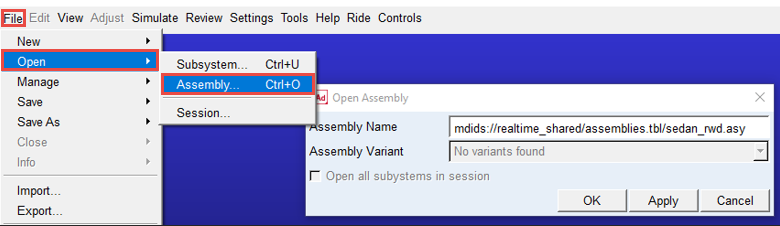
4. The realtime_shared.cdb database contains the following full-vehicle assembly:
sedan_rwd.asy: vehicle model with compliance double wishbone front and rear wheel suspensions. The PAC2002 transient tire model is used for the tires.
Open this assembly.
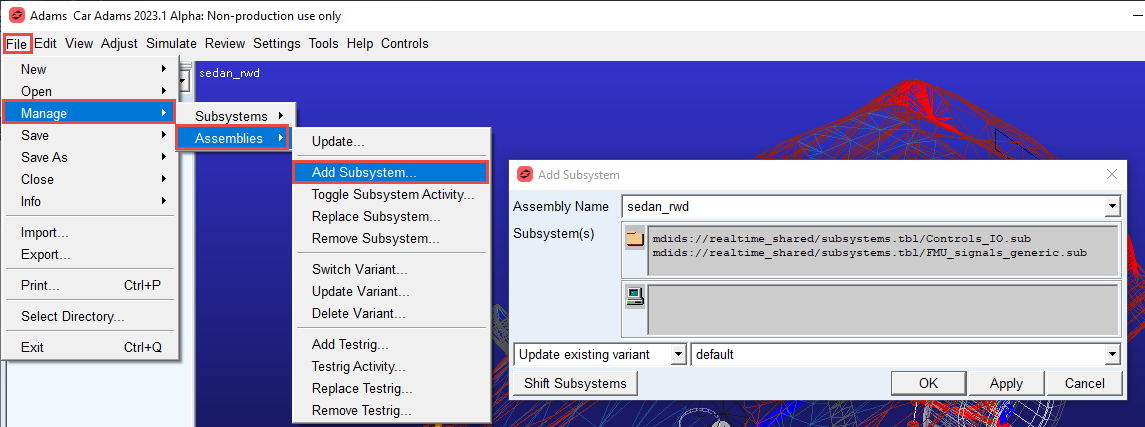
5. Add Subsystem Controls_IO.sub and FMU_signals_generic.sub to the Assembly as shown below: