What You Will Learn
The tutorial leads you through the design process steps outlined in the following figure. These are the basic steps you should follow whenever you use Adams Vibration to build and test models. The Vibration menu in Adams View is organized to facilitate the Build-Test-Review-Improve process.
■Step 1 - Build: Add input channels and vibration actuators to an existing Adams model to vibrate the system. Add output channels to measure response.
■Step 2 - Test: Define the input range and run a vibration analysis to obtain free and forced responses.
■Step 3 - Review: For free response, look at mode shapes and transient response. For forced response, look at overall response animation, transfer function, frequency response function, and modal participation tables.
■Step 4 - Improve: Add force in the lateral direction and check the transmitted accelerations. Change the stiffness and damping characteristics for the bushing in the vibration fixture. Compare results to earlier results. Add a frequency-domain measure that you can use in further design studies and optimization.
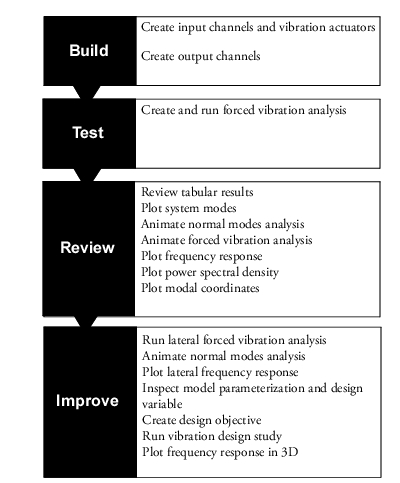
Figure 1 Design Process Steps for the Satellite Model