Simulating Your Model
Simulate your model to see if it is assembled properly and that the sensor works to stop the simulation when the overcenter_angle measure becomes less than or equal to 0, indicating that the latch has reached its toggle point.
To simulate your model:
1. Select the Simulation tool and run a 0.2-second simulation with 100 steps.
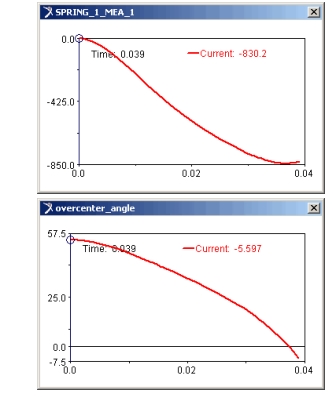
As the simulation proceeds, Adams View updates the strip charts for the spring force and angle measures to show that the sensor stopped the simulation.
A message window also appears alerting you that Adams View stopped the simulation because of the sensor.
These strip charts show that Adams View stopped the simulation as the latch reached the toggle point:
2. Select the Reset tool to return to the initial model configuration.