Modifying Your Plot Layout
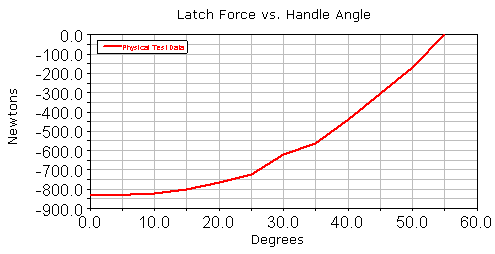
To make your plot ready for a report, you assign a title to the plot, assign units to the x- and y-axis, and modify the plot legend.
To assign units:
1. From the treeview, double-click page_1.
2. Select plot_1.
3. In the property editor, under the tab General, clear the selection of Auto Title.
4. In the Title text box, enter Latch Force vs. Handle Angle.
5. Press Enter.
6. From the treeview, double-click plot_1.
7. From the treeview, select haxis.
8. In the property editor, select the tab Labels.
9. In the Label text box, enter Degrees, and then press Enter.
10. Repeat the procedure for vaxis, labeling it Newtons.
To modify the plot legend:
1. From the treeview, select curve_1.
2. In the Legend text box, enter Physical Test Data, and then press Enter.
Your plot should look similar to the one shown next: