Creating Design Variables
You now create design variables to represent the design points in your model, except for POINT_4, the handle end point. You do not modify POINT_4, because doing so would not meet envelope requirements for the mechanism. In subsequent chapters you will use design variables to run design studies and optimization.
To create design variables:
1. Right-click the design point POINT_1 (0, 0, 0), point to Point: POINT_1, and then select Modify.
The Table Editor appears.
2. To set the display of the Table Editor, click any cell other than the top left cell.
3. Now, double-click the Loc_X cell for POINT_1.
4. Right-click the input box at the top of the Table Editor, point to Parameterize, point to Create Design Variable, and then select Real.
This creates a design variable named .Latch.DV_1 with the value of 0.
5. Select the Loc_Y cell for POINT_1.
6. Repeat Step 4.
7. Repeat the above procedure for the x and y locations of POINT_2, POINT_3, POINT_8, and POINT_8_2. Your Table Editor dialog box should look like the one shown here:
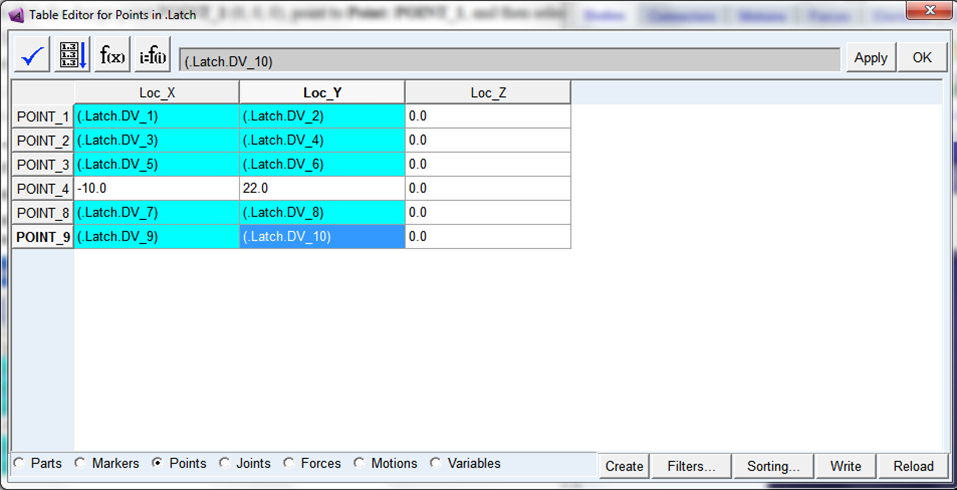
Note: | Make sure your design variable names map to the design point locations, as shown above. This becomes important later on as you perform your design study and optimization. |
8. Select Apply.
Design variables now control the locations of your design points, with the exception of the POINT_4 location.