Running an Optimization
At this point you will run an optimization to find the best design configuration. Before you run an optimization, display the spring force measure. If you imported refine.cmd, the spring force measure will already be displayed.
To display the spring force measure:
1. Click the Design Exploration tab on the Adams View ribbon.
2. From the Measures container, click Display a Measure tool  .
.
. The Database Navigator appears.
3. Select SPRING_1_MEA_1.
4. Select OK.
The SPRING_1_MEA_1 plot appears.
To display the overcenter_angle:
1. Click the Design Exploration tab on the Adams View ribbon.
2. From the Measures container, click Display a Measure tool .
. The Database Navigator appears.
3. Select overcenter_angle.
4. Select OK.
5. The overcenter_angle plot appears.
To run an optimization:
1. Click the Design Exploration tab on the Adams View ribbon.
2. From the Design Evaluation container, click Design Evaluation tool  .
.
.The Design Evaluation Tools dialog box appears.
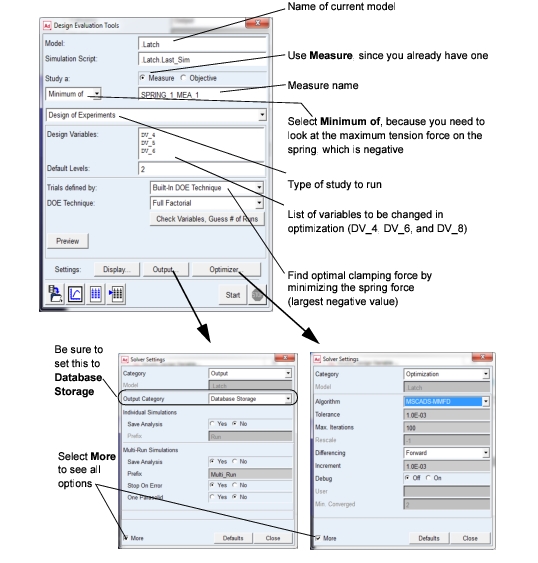
3. Fill in the dialog boxes as shown below and select Start after selecting Close from the two Solver Settings dialog boxes.
Note: | The optimization may take several minutes to complete, and will take several iterations. Look in the status bar for status information. |
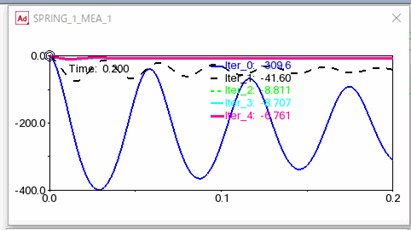
The spring force measure plot shows the optimal clamping force as a function of time. Note that the limits on the strip chart may be different if you worked through the entire tutorial or you loaded a command file and started from a particular chapter.
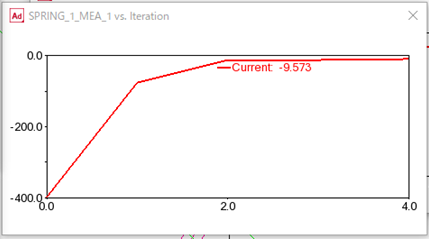
The SPRING_1_force versus iteration plot shows how the spring force changed with each iteration.
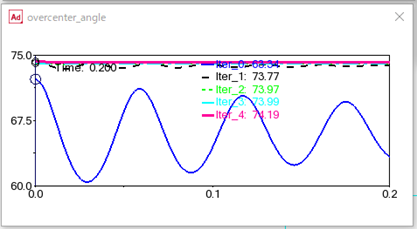
The overcenter_angle plot shows the cases in which the angle reached the toggle point.
To see the final variable values and the optimized clamping force value:
1. At the bottom of the Design Evaluation Tools dialog box, select the Tabular Report tool  .
.
.The Design Evaluation Results Table dialog box appears.
2. In the Result Set text box, enter .Latch.Multi_Run_001.Optimization_Results.
3. Select OK.
In the Information window that appears, you see all the data obtained from the optimization, including the initial and final values of the spring force and DV_4, DV_6, and DV_8.