Modifying Force Values
You now modify the clamping and release force values to find the optimal force magnitude. You also plot the force values to see at what point the handle comes down to rest on top of the hook and when the overcenter_angle measure drops slightly below zero, creating a toggle force.
You can try different settings for the clamping and release forces to verify that the handle can be closed and released per the requirements.
Notes: | If the sensor is causing problems with the investigation, you can deactivate it: Click the background to ensure that nothing is selected. ■From the Edit menu, select Deactivate. ■The Database Navigator appears. ■From the Database Navigator, select the sensor. |
To modify the clamping and release force values:
1. From the Model Browser window, click Forces and expand.
2. Select Force:SFORCE_1 from the list, right click and select Modify.
The Modify Force dialog box appears.
3. Next to the Function text box, select the More tool  .
.
.The Function Builder appears.
4. Clear the function text area located at the top of the Function Builder.
5. In the function text area, enter the STEP function as shown next:
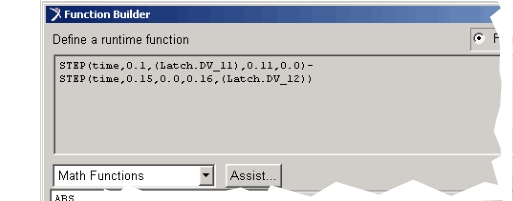
6. Select Apply.
Plotting the force values:
1. From the Function Builder, select Plot Limits.
The Function Builder Plot Limits dialog box appears.
2. Change the End Value to 0.2.
3. Select OK.
4. Select Plot.
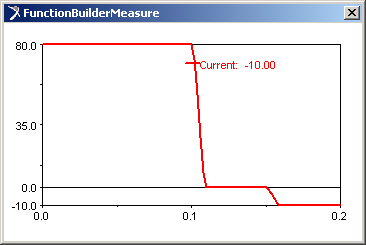
The Function Builder Measure plot displays the force function. This is the handle force you apply to the latch. The Down Force Value slider sets the clamping force. The Up Force Value slider sets the release force.