Function Type: Curve
When you set Function Type to Curve, complete the associated text boxes as follows.
For the option: | Do the following: |
|---|---|
File Type | Select one of the following: ■Time - The dyno function depends on a 2D spline read from the file. ■Angle_Velocity - The dyno function depends on a 3D spline read from the file. |
File Name | Specify the property file that contains the spline used in the dyno function. The file extension depends on the file_type (.dti for time, .dav for angle_velocity). Tips on Entering Object Names in Text Boxes. |
If you set File Type to Time, your template-based product displays the following options (see function description at the end of the file): | |
Time Offset | Enter the time offset in the current time units. |
Direction | Specify if the function should work clockwise or counterclockwise around the z-axis of the dyno. |
If you set Dyno Type to Torque, and File Type to Angle_Velocity, your template-based product displays the following options (see function description at the end of the file): | |
Angle Offset | Enter the angle offset in the current angle units. |
Velocity Offset | Enter the velocity offset in RPM. |
Velocity Ratio | Enter the velocity ratio. This ratio is not used for the motion. |
Direction | Specify if the function should work clockwise or counterclockwise around the z-axis of the dyno. |
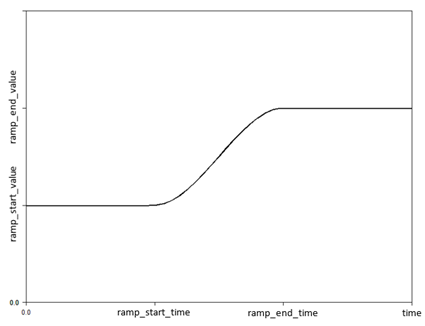
Initial Ramp Up | Select this option to smooth the initial application of the dyno torque using a STEP function. |
Ramp Start Time | Enter the start time for the STEP function. |
Ramp End Time | Enter the final time for the STEP function. |
Ramp Start Value | Enter the starting value of the STEP function. |
Ramp End Value | Enter the final value of the STEP function. |
RPM Smoothing | Select this option to use a moving average speed for computing the current dyno torque. |
Revs for Mean RPM | Enter the number of revolutions to use in computing the moving average speed. |
File Type = Time
The torque function is an akima spline function:
direction * AKISPL(time + time_offset, 0, spline, 0)
The motion velocity function is a cubic spline function:
direction * CUBSPL(time + time_offset, 0, spline, 0)
File Type = Angle_Velocity
If the Dyno Type is Torque, the torque function is an akima spline function:
direction * AKISPL(MOD(AZ + angle_offset, 720d), WZ * velocity_ratio + velocity_offset, spline)
where:
■AZ is the magnitude of the angular displacement between the i and j marker of the dyno
■WZ is the magnitude of the angular velocity between the i and j marker of the dyno
■MOD() is the remainder of the angle expression when divided by 720d
If Initial Ramp Up is selected, the above function is multiplied by a STEP function:
step(time, ramp_start_time, ramp_start_value, ramp_end_time, ramp_end_value)
If RPM Smoothing is selected, the WZ function above is replaced with a moving average of the angular velocity:
(Crank angle - delay(crank angle, delta_time) - 0.001) / (time - delay(time, delta_time, -0.001))
Note that because of the DELAY function, RPM Smoothing can only be used with Adams Solver (C++).
If the Dyno Type is Motion - Velocity, the velocity function is a cubic spline function:
direction * CUBSPL( MOD( velocity * time + angle_offset, 720d), velocity_offset, spline)
where, velocity is ABS(velocity_offset).
Note that the Initial Ramp Up and RPM Smoothing are not applicable for Motion - Velocity dynos.