Migrate Chassis Database
Migrates an entire Adams Chassis Database (*.vdb) into a compatible Adams Car Database (*.cdb). The conversion operates on the entire database and converts all system (assembly) and subsystem files. The original Chassis database is unmodified. After conversion, the newly generated database will automatically be registered as the default writable database.
Learn about Adams Chassis to Car Database Migration.
For the option: | Do the following: |
|---|---|
Database Path (*.vdb) | Select the database you would like to migrate to Adams Car. |
Target Method | Select one of the following options: ■Use *.vdb Parent Directory Adams Car database will be written to the parent directory of the specified vdb. ■Use Working directory Adams Car database will be written to the current working directory. ■Browse for Target Directory Select the (parent) folder for the Adams Car database using the file navigator. |
Target Folder Path | Displays the target path where the newly created Adams Car database will be written. |
 | Select to open the file browser to select (or optionally create) an alternative target database storage folder |
Convert assembly format to TeimOrbit | If selected, all assemblies in the migrated cdb will be converted to the TeimOrbit format. If subsystems are converted to TeimOrbit as well, the subsystem file references will be updated to point to the corresponding .sub files. |
Convert subsystem format to TeimOrbit | If selected, all subsystems in the migrated cdb will be converted to the TeimOrbit format. |
Convert template format | When converting an entire database, template table or individual template file, selecting this option will ignore the file format of the source file, and use the selected format instead: ■Ascii - Saves the file in human-readable TeimOrbit format. ■Binary - Saves the file in binary format (platform-independent). ■EDS - Saves the file in the Adams enhanced dataset format |
Note: | Format conversion is accomplished by importing the respective model files into the Adams Car session and saving them back to the target database using the desired new target format. Consequently, format conversion will add significant extra processing time, likely increasing the migration total time by a multiple. If the subsystem format (and hence the file’s extensions) are changed, the subsystem file references in the assembly files will only be updated if assembly file conversion is also selected. If an assembly conversion (and the resulting very significant extra processing time) is undesired, those subsystem file references may be more quickly updated by editing the assembly files manually in a text editor. If the subsystem(s) being migrated contain a leaf spring, and the leaf spring property file (.ltf) is not defined in the subsystem, Adams Car will prompt the user to select the property file. 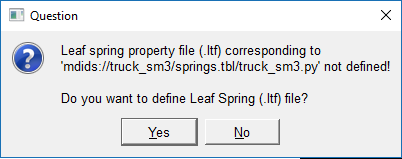 In most cases, users should select Yes, and Adams Car will prompt for the leaf spring property file. This file will be copied to the migrated database. (If this file existed in the original Adams Chassis (.vdb), database, user should select the file from the Adams Car (.cdb) database created at the beginning of the migration process). If the property file is not available, the user can select No and a default property file will be used. However, this property file likely will not correspond to the current leaf spring geometry and leaf spring generation will fail. |