Working with the ViewFlex Dialog Box
The ViewFlex dialog box is the generic interface to access all features of ViewFlex.
Its layout changes according to the options selected. Data rows displaying the flexible body in question can be added and deleted from the data table via the options menu.
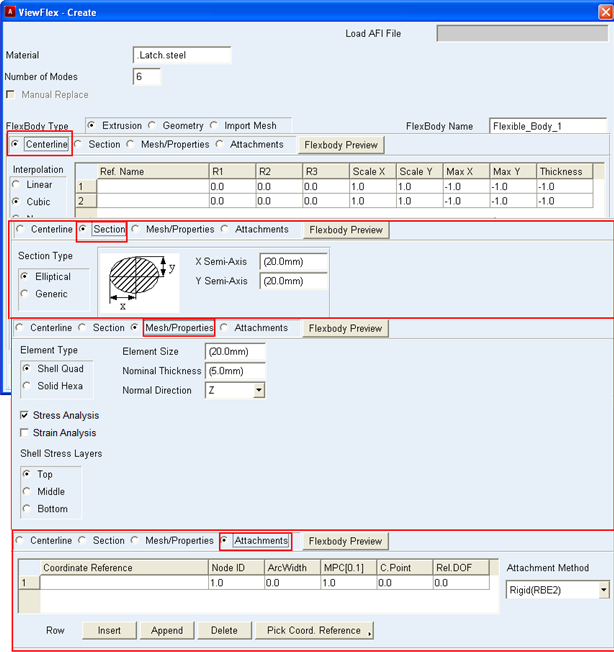
In Adams View, coordinate information can be entered into the cells by means of a marker. ViewFlex displays the orientation of the selected marker in the cell, and stores the location for future use. Entering a hard-point in a template-based product, however, only stores the location of the hard-point, but not its orientation. During the creation of a flexible body the position of the centerline points can be entered manually or automatically using the Auto Align feature.
Note: | ViewFlex does not display the results of the auto-alignment in the ViewFlex dialog box. They cannot be modified, thus preserving the parameterization. |
Working with tables in ViewFlex:
■Insert a new row before and existing one
■Insert a new row after an existing one
■Delete a row
■Display existing marker or construction point in data table
To insert a new row before an existing one:
■Select a cell in an existing row of the data table.
■Below the table in the ViewFlex dialog box, select Insert.
To insert a new row after an existing one:
■Select a cell in an existing row of the data table.
■Below the table in the ViewFlex dialog box, select Append.
To delete a row:
■Select a cell in the row you want to delete.
■Below the table in the ViewFlex dialog box, select Delete.
To select an existing marker or construction point and display its location in the data table:
■Select the cell in which the location should be inserted.
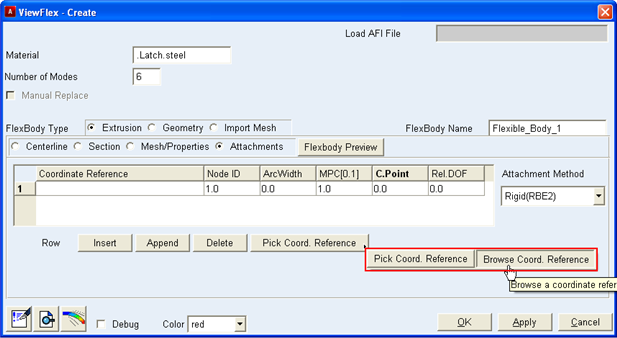
■Select Pick Coord. Reference to select a marker on the screen, or select Browse Coord. Reference to select a marker from the Database Navigator. (Often, to access Browse Coord. Reference you must right-click Pick Coord. Reference.)
■From the screen or Database Navigator, select the coordinate system (marker or hard-point) to obtain its location and, for a marker, its orientation for future use.