Process for Using ViewFlex
In ViewFlex, a flexible body can be created automatically based on an existing rigid body that is connected to the mechanical system, or it can be defined manually following the process shown below.
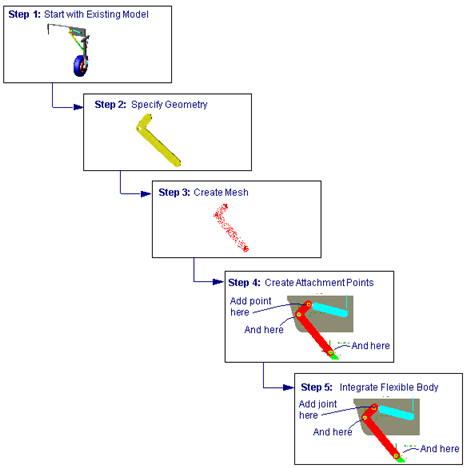
Step 1: Start with existing model
Start from an existing Adams model and load ViewFlex.
Step 2: Specify geometry
Create a flexible body using one of the following methods:
■Extrusion method: Create a new piece of geometry for the flexible body.
■Geometry method: Use an existing solid geometry for the flexible body.
■Import mesh method: Import an external mesh defined in either NASTRAN (BDF or DAT format) or (UNV format).
Step 3: Create the Mesh
You can define the mesh type (shell or solid), its dimensions, and material type.
Step 4: Create attachment points
To incorporate a ViewFlex flexible body into your model, you must create one or more interface nodes (attachment points) on the flexible body. The attachment points are the only points at which you can define either a constraint between the flexible body and another part, or force acting on the flexible body.
Step 5: Integrate the flexible body into the existing model
Now that you have a flexible body, follow the same modeling techniques as you do with flexible bodies in Adams Flex. For more information, see Building Flex Body Models in the Adams Flex online help.