Hub Compliance
Hub compliance allows you to model wheel bearing compliance.
The parameter variable pvs_hub_compliance is used to model compliance. Where, '0', '1' are mapped to Inactive and Active respectively. It is used to activate appropriate groups created for the hub compliance.
The parameter variable pv[lrs]_hub_compliance_offset is used as dependent variable which helps to offset hub compliance bushing/joint from the wheel center.
Description
For independent suspensions, the spindle part is disconnected from the upright part by deactivating the revolute joint. The spindle is then attached to the upright as shown in Figure 15 below via a spherical joint and a bushing.
For dependent suspensions, the hub part is disconnected from the axle part by deactivating the revolute joint. The hub is then attached through a spherical joint and a bushing.
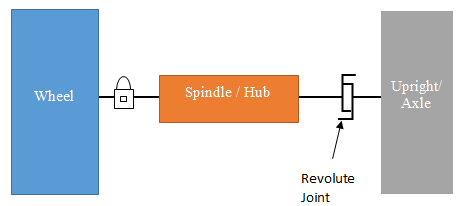
Figure 14 Hub Compliance Deactivated
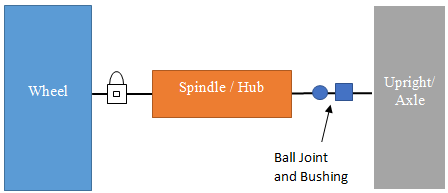
Figure 15 Hub Compliance Activated
To add hub compliance to existing suspension template:
To add hub compliance to your existing suspension template, you can use following steps:
1. Open your existing suspension template
2. Go to Tools > Command Navigator
3. Locate the macro under acar > template_builder > hub_compliance > create, enter information as shown below:
For the option: | Do the following: |
|---|---|
Template Name | Enter the template name in which you want to create hub compliance |
Hub Compliance Name | Enter the hub compliance name. By default it is set to ‘hub_compliance’ |
I Part | Enter the name of the part on which the compliance will act. For example, choose the Upright or Axle part. |
J Part | Enter the name of the part on which the compliance will react. For example, choose the Spindle or Hub part. |
Joint to replace | Enter the joint which will be replaced by a spherical joint and a bushing. |
Type | Enter one of the following: ■Left / right - Define one of the joints/bushings, and your template-based product creates the corresponding opposite bushing. |
Location Rcoordinate | Enter a construction frame from which the location offset will be applied. For example, cf[lr]_wheel_center. |
Orientation Rframe | Enter the name of the construction frame from which you want to apply the orientation offset. For example, cf[lr]_wheel_center. |
Property File | While creating a compliance, note that the text box by default contains the bushing property file mdids://acar_shared/bushings.tbl/mdi_hub_compliance.bus. You can use this file or select another one from your databases. Note: This bushing property file shouldn't have any resisting torque acting along the rotation of the hub. This can be achieved by setting scale factor tz_scale_factor to 0.0. The spherical joint takes care of translational degrees of freedom, so fz[fy/tz]_scale_factor can be set to 0.0 as well. The scale factor of this bushing shouldn't be promoted to factors in the DOE as it may change the tz_scale_factor to a non-zero value. |