Overview
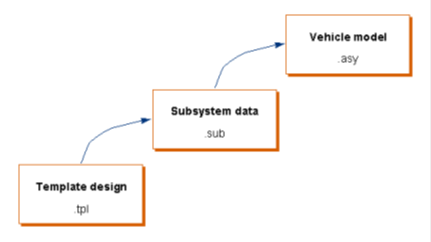
Three levels of models are used to form a vehicle model (full or half vehicle):
1. Template
Templates are parametric models, built by expert users within the Template Builder. Templates define the topology of models.
2. Subsystem
Subsystems are used in the Standard Interface. Subsystems are based on templates and allow standard users to change the parametric data of the template as well as the definition of some of the components.
Prior to version 2017.2, each subsystem had to represent a unique major and minor role. For example, you could only have one "suspension" (major role) of type "rear" (minor role). In 2017.2 and onwards, this is no longer a limitation. Duplicate subsystems can be specified, differentiated by an index and subsystem shift. This feature is useful for large vehicles with multiple axles. For example, to model a three axle trailer suspension, a single suspension subsystem could be referenced three times, with a longitudinal offset between each.
3. Assembly
An assembly represents a collection of subsystems, along with an optional test rig, which when assembled forms a system that you can analyze using Adams Solver.
Testrigs are special models that are used to actuate or drive your assembly. Each analysis requires a specific testrig. For example, most full-vehicle events require the __MDI_SDI_TESTRIG, while most suspension analyses require the __MDI_SUSPENSION_TESTRIG.
Prior to version 2017.2, a testrig was required to be specified in every full-vehicle and suspension assembly. In 2017.2 and onwards, testrigs are optional. If the assembly doesn't contain the testrig required for a particular analysis, then that testrig will be added to the assembly during analysis submission. This means that one assembly can now be used for any type of analysis.
Assembly Variants
An assembly file includes the assembly class (full-vehicle, suspension, generic and so on), list of Adams plugins needed, a list of one or more subsystems, and optionally a testrig and Adams Solver settings.
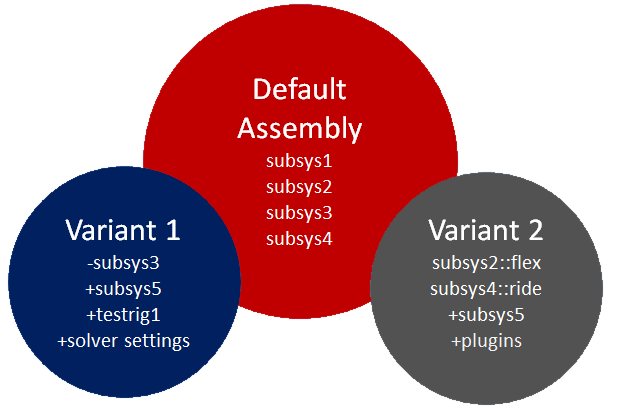
The simplest assembly file would define only the “default” variant (this is the case with Adams Car versions prior to 2017.2). Any deviations from the default definition can be saved as a new variant.
The following items can be defined in an assembly variant:
■Assembly class - the default variant may be a full-vehicle assembly, while a variant may define a suspension assembly.
■Plugin list - the default variant may not require any plugins, while a variant may require Adams Ride, Adams Durability, and Adams Vibration. These plugins will not be loaded until the user switches to this variant.
■Subsystems - the default variant includes a list of one or more subsystems, while a variant may include any or none of these, plus additional subsystems. If an assembly variant requires replacing a subsystem, be sure the underlying templates handle model activity correctly. See Toggling Subsystem Activity for more details
■Subsystem variants - each assembly variant also specifies which subsystem variants to use.
■Testrig - optionally, each assembly variant specifies which testrig it needs. If one or more testrigs are referenced, testrig hardpoints and parameter variable tables will be included. These hardpoints and parameter variables can include variant values.
■Solver settings - optionally, each assembly variant can specify its own Solver settings.
Subsystem Variants
While the testrig defines the model topology (for example, parts and connections), the subsystem file populates that model topology with the designer's intent. In previous versions of Adams Car, a single variation of that design intent could not be captured in the same subsystem file, necessitating a new subsystem file (and therefore a new assembly file) for every small variation.
The following items can now be defined in a subsystem variant:
■Hardpoints
■Parameter variables
■General parts
■Switch parts
■Flex bodies
■FE_parts
■FE_part Sections
■Nonlinear rods
■Anti-roll bars
■All UDE types (bushings, springs, dampers, bumpstops, reboundstops and so on)
■Gears
■General parameters
■General splines
■General variables
The Advantage of Using Variants
Variants define variations of the base model. Using variants, you can quickly apply different modeling methods, compare a different set of subsystems, specify a new testrig, etc. Each variant may be intended for specific analyses. For example,
■For a Ride analysis in the time domain, the user might want to include FTires, flexible bodies, and frequency dependent bushings.
■For a handling analysis, the user might prefer Pac2002 tires and nonlinear bushings.
■For a real-time analysis, the user might need rigid bodies and linear bushings.
All these variants could be stored in the subsystem files and specified by the assembly file, decreasing the time to setup models for each kind of analysis.
Other benefits:
■Users may switch between suspension and full-vehicle analyses by simply selecting the assembly variant in event dialog box, instead of opening different assemblies for each type of analysis.
Refer to the example assembly from Adams Car Concept database: <acar_concept>/assemblies.tbl/Demo_Vehicle_Variants.asy.
Refer to the example assembly from Adams Car Concept database: <acar_concept>/assemblies.tbl/Demo_Vehicle_Variants.asy.
■Variants inherit changes to the default model. The assembly/subsystem variants automatically inherit changes made to common items in their corresponding default model. There is no need to update a bunch of files to get the changes made in the default subsystem. For example, if the user wants subsystem variants that differ only in bushing stiffnesses, then any other changes (e.g. hardpoint locations) to the default subsystem will be inherited by the variants.
■To identify the content of an assembly or subsystem and its corresponding variant definitions, users can get a listing of the content in the Information Window. Users can also inspect the assembly files (.asy) and subsystem files (.sub).
Compared with versions of Adams Car prior to 2017.2, the use of assembly and subsystem variants can greatly reduce the number of files you need to maintain. To illustrate, imagine the set of files previously needed to define slight variations in vehicle design. For three variations of an imaginary vehicle design, Table 1 below shows 34 files, 12 of which are assemblies, necessary to perform standard full-vehicle analyses, front and rear suspension analyses, and four-post shaker analysis.
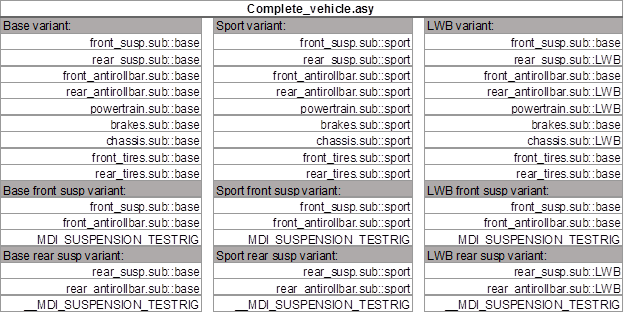
By using assembly and subsystem variants, Table 2 shows how a single assembly file, containing nine assembly variants, and referencing nine unique subsystem files, can represent the same vehicle configurations and analysis types. Note that because testrigs are now optional, there was no need to define separate variants for the four-post shaker.
Table 1 Files needed in previous versions of Adams Car
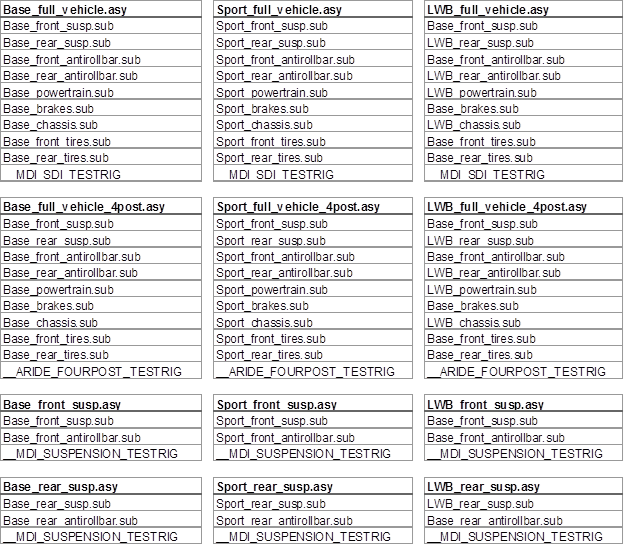
Table 2 Single assembly file possible in Adams Car 2024.1