About Database Management
The template-based products define assemblies using several different files. The files define the topology, dynamic element characteristics, analysis information, and more. Your template-based product stores these files in hierarchical databases.
The template-based products provide two types of default databases:
■Private database for each user - A private database is for your personal use. You can store and retrieve data from your private database. In addition, you can share your private database with others. If a private database does not exist, your template-based product creates the private database at the beginning of a session.
■Shared database for all users - A shared database provides all users with access to standard, accurate data. To prevent loss of data or the storing of inaccurate data in a shared database, standard users can only retrieve data from a shared database. Typically, only the site manager has the permissions necessary to create files in a shared database. An example of a shared database is distributed with your template-based product, and it is usually placed in the installation directory.
Learn more about databases:
Database Structure
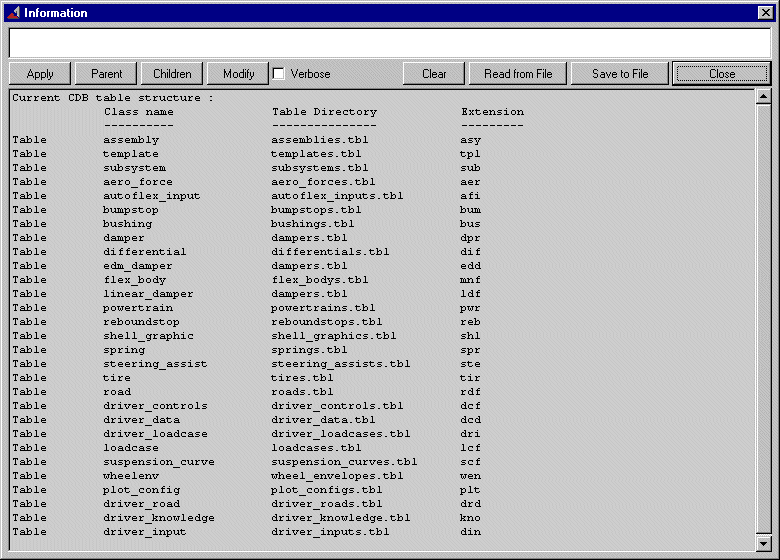
Each database consists of one directory (*.cdb) and several subdirectories (*.tbl), called tables. Each subdirectory contains files for specific types of components, such as springs and dampers, or files for performing tests, such as loadcases and wheel envelopes. The number of tables varies, but you can define the number in the shared and private configuration files.
By default, your template-based product divides a database into the following table elements:
■Models and topological information (templates, assemblies, subsystems, and flexible bodies)
■Analysis information (such as analysis scripts, loadcases, driver loadcases, and suspension curves)
■Postprocessing (plot configuration files)
■In Adams Car, driver files (such as driver inputs and roads)
■In Adams Car, tires and roads
■Property files (such as springs, dampers, and remaining tables)
Each type of file that a table stores has a unique three-letter extension that identifies its contents. For example, all files stored in the assembly table contain a .asy extension.
An example of the default structure of a database for Adams Car is shown in the Information window. The information window shows all the tables in the database, their names, the type of files they store, and the file extension of the files that they store.
You can also add your own tables since the database is an open-architecture file repository. For example, you might want to create a table that stores data files for an analysis that is specific to your company. Learn about managing tables.
About the Database Search List
During startup, your template-based product stores any databases that are defined in your private, site, and shared configuration files in its search list. The databases in the search list are the only databases that appear in dialog boxes when you select to display databases and files, such as subsystem or property. For example, when you want to change the database to which you can write files, your template-based product only displays those databases in its search list in the dialog box.
Your template-based product searches the databases in its search list using a search order that you can modify.
You can change the databases in the search list and their search order either by using the menus or by editing the configuration files directly. All configuration files can define the databases, including the private, site, and shared configuration files.
For your template-based product to be able to store a database in its search list, the file system to which the database points must be accessible on the current file system of the computer.