Model Fidelity Reduction on Tires
The Model Fidelity feature allows to reduce the tire model(s) used in your Adams Car assembly from a higher-fidelity modeling method to a lower-fidelity (and, thus, faster solving) method.
When selecting Tools → Model Reduction → Tires, a wizard will be launched that will guide you through the reduction process.
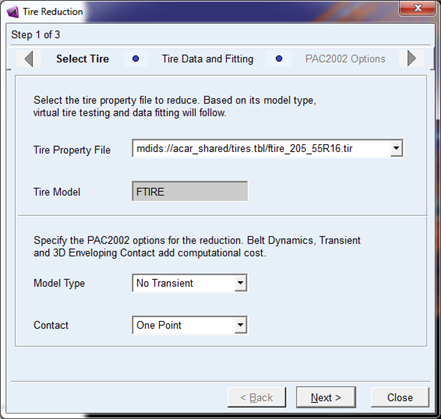
The basis of the approach is to convert the selected tire property file to a PAC2002 tire property file for which the reduced use mode options can be defined. If the tire property file is already a PAC2002 formatted file, just the reduced options can be defined.
Any (USER) tire model that is supported by Adams Car (linked via the Standard Tire Interface or Cosin Tire Interface and using a Teim Orbit formatted tire property file) can be converted to a PAC2002 tire property file and thus reduced in fidelity.
There are a few options for the reduction:
PAC2002 3D Enveloping Contact vs. Single Point Follower
The 3D Enveloping Contact will resemble the non-linear tire road contact for short wavelength obstacles but will put a high calculation load to the Solver. If simulations are performed at rather smooth road or the exact peak loads on the tire are less important, selecting the One Point contact is a good option.
PAC2002 3D Enveloping Contact Number of Cams
In case the 3D Enveloping Contact is used, the reduction of the number of Cams in the Enveloping will reduce calculation time considerably without a large fidelity reduction. The accuracy of lateral force response on short wave road inclination changes will mainly suffer from this reduction.
PAC2002 3D Enveloping Contact Number of Contact Threads
By increasing the number threads that can be used for the 3D Enveloping (apart from the threads for C++ Solver), the 3D Enveloping contact will be faster. However, when running C++ Solver in SMP (multi-threaded mode) the benefit of this option will be low.
PAC2002 with or without Belt Dynamics
For having the correct high frequency response of a tire on a road with short wavelength obstacles, the inertia and stiffness effects of the tire belt are important, but increase simulation times. At rather smooth roads switching off the belt dynamics can be interesting for increasing simulation efficiency.
PAC2002 Steady-state (no transient) versus Transient
In case the forward speed of the vehicle in the simulation is large ( > 30 m/s) the impact of the first order tire transient (relaxation lengths) is low, by switching them off the calculation load for solver will be reduced (small effect).
PAC2002 local tire solver
A tire model has some differential equations to solve, in particular when using belt dynamics. By default, those states are solved by the Adams Solver via the GSE interface. The local tire solver can take care of calculating these states instead without the use of the GSE. In particular, in cases with a large number of states (that is, belt dynamics) and small solver time step this option is beneficial.
The Select Tire of the wizard the options available (depend on the selected tire property file) are for the tire models dynamic response:
■No Transient
■Transient
■Belt dynamics
For the road contact, one can choose in between 'One Point' contact and '3D Enveloping Contact'.
The Tire Data and Fitting page, the tire property file needs to be converted by the Tire Data Fitting Tool.
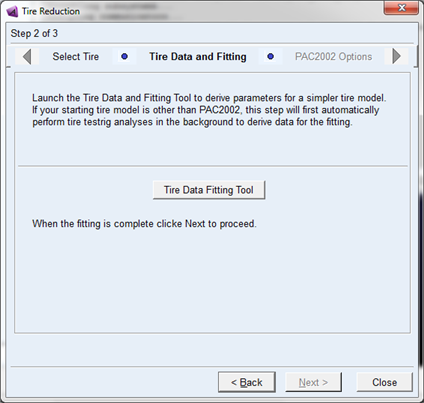
When launched, the Tire Data Fitting Tool will show the conversion dialog window with the settings specified in the previous page of the wizard:
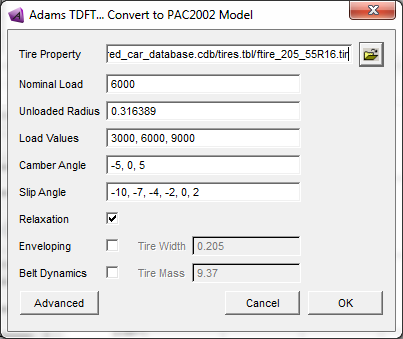
In addition to the selection of the use mode options (Relaxation, Enveloping, Belt Dynamics), the working range for the tire can be specified. A detailed explanation can be found in section Converting a non-PAC2002 or non-PAC-MC tire property file.
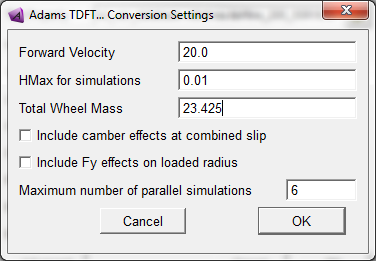
The 'Advanced' button offers you to set some more specific settings for the conversion process: the 'Maximum number of parallel simulations' can speed up the conversion process considerably.
Once started, the conversion process starts with generating 'virtual' tire test data by running tire test rig simulations with the original tire property file. If your computer platform has multiple cpu's, parallel simulations can therefore speed up the conversion.
After the simulations have finished the parameter identification process for the PAC2002 tire model with all the available data will start. At the end of this process, graphical comparisons can be made in between the 'virtual' test data and the PAC2002 representation, for details on the plotting see section Calculating the PAC2002 or PAC-MC tire model parameters out of tire measurement data.
If the conversion ran properly and you are finished with the TDFT work, then save the converted PAC2002 tire with File → Save Property.
After closing the TDFT the remaining settings can be defined in the last page of the wizard:
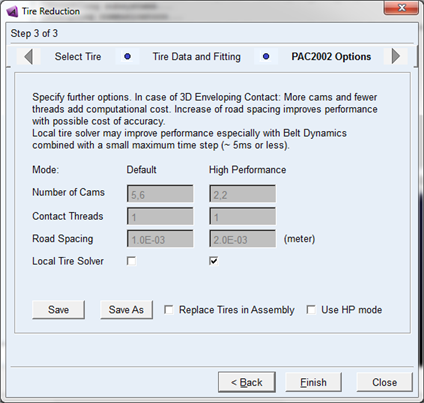
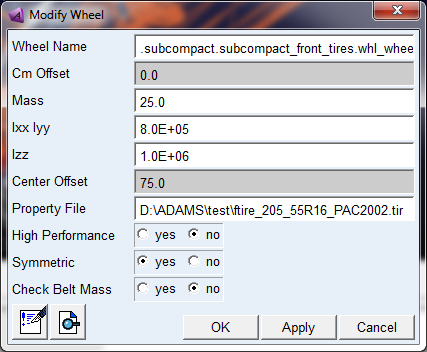
For some parameters the PAC2002 has two settings, the 'Default' setting and the 'High Performance' setting. This allows you to easily switch from a default (slow) parameter setting to a setting in which the tire model performs faster. The 'High Performance' switch is also shown in the Wheel Modify dialog for each tire in your model:
Both for the 'Default' and 'High Performance' model the speed critical parameters can be set in the last wizard page. In case the '3D Enveloping Contact' has been selected at the first page, three enveloping parameters can be defined:
■Number of Cams:
The 3D Enveloping Contact is using cams distributed over the tire - road contact patch for analyzing the road input. More cams will result in more accuracy but less speed. For 'Default' use with good accuracy 5 cams in longitudinal direction and 6 in lateral is a proven optimum. The minimum number of cams is 2 in each direction. Lateral force response due to road inclination (short wavelength) will mainly be impacted by reducing the number of cams.
■Contact Threads:
By increasing the number of threads speed can be increased. However when running C++ multi-threaded the benefit of this option is low.
■Road Spacing:
By taking a more course grid size of the contact patch/cams the contact routine will be faster.
The local tire solver will reduce the work for the Adams Solver for integrating the tire states locally, and thus increase overall simulation speed. In particular, when a large number of states are involved (Belt Dynamics) and small solver step sizes (< 0.005 s) this option is interesting.
With the 'Save' button the converted tire property file including the chosen settings will be saved with the predefined file name: <original_file_name>_PAC2002.tir in the working directory.
With 'Save As' a different filename can be defined. If 'Replace Tires in Assembly' is checked, the original tire property file will be replaced by the converted PAC2002 file in the current assembly. 'Use HP mode' will set the High Performance switch so that the High Performance settings will be use in the assembly model.