Setting up and running Adams models
The steps to setup and run Adams are the following:
a. You must place a GFORCE at each interaction point. The GFORCE must be reacting on GROUND (the JFLOAT MARKER must be located on GROUND). The RM MARKER must be located on GROUND, its location must be coincident with the GROUND origin and it must be parallel to GROUND. The location of the I MARKER must be coincident with the location of the interaction point (must be coincident with a corresponding node in the Marc model or a geometry's CoM in an EDEM model) and must be oriented parallel to GROUND.
Moreover, the GFORCE must use the USER() and ROUTINE options as shown below. For instance:
GFORCE/2
, I = 15
, JFLOAT = 17
, RM = 16
, FUNCTION = USER(0)\
, ROUTINE = ACSI_Adams::
Note: | In this release no checks are done for these conditions. We plan to check the model meets all the conditions above in the next releases. |
For example, Figure 7 shows and Adams and a Marc models interacting at point P.
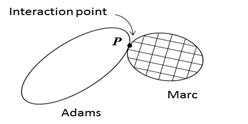
Figure 7 Setting up an interaction point in Adams and Marc.
The Adams setup for the GFORCE is depicted in Figure 8 below.
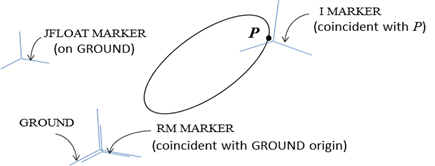
Figure 8 Setting up a GFORCE at an interaction point P in Adams.
(Coincident locations are drawn separately for clarity.)
(Coincident locations are drawn separately for clarity.)
The GFORCE will apply the reaction force and torque provided by the Marc process while Adams drives a NODE (this node may control a RIGID BODY or it may be connected by a spider web to a set of nodes) in the Marc model.
b. You may set two environment variables (cygwin shell):
export MSC_COSIM_CONFIG_FILE=the_name
export MSC_COSIM_PROCESS_ID=id_number
where the_name is the path to the configuration script and id_number must be the same process id set in the configuration script. See Running the Glue code for the case of Linux and DOS shells.
Optionally, you may set ENVIRONMENT statements in the *.adm file to avoid polluting your operating system.
c. You must add a process group in the configuration script. For example:
process {
code = adams
name = Rigid parts and springs
id = 99
interaction {
name = gforce1
connection = Box
gforce_id = 1
}
}
Notice the code option must be of type adams. For each interaction point, add an interaction group and provide a name for the point. The connection option must be the corresponding name of some other interaction found in another co-simulating code process group. The process id is arbitrary and it must match the value set in the environment variable MSC_COSIM_PROCESS_ID.
d. You must launch the Adams process only when the Glue code prompts you to do it. The Adams process can be launch from the command line using the mdi script or from Adams View. Alternatively, you may use options execution_command and working_directory to launch the Adams process automatically. See section Automatic local launch.
e. Given that most of the total co-simulation time is spent in Marc and the motion of the NODEs in Marc is controlled using positions, we recommend using the following settings in Adams:
♦Use GSTIFF, SI2 for the integrator.
♦Control HMAX to match closely the time steps Marc is using.
♦Tighten the integration error.