Gear Pairs
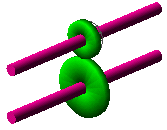
This component represents a connection between two gears on two different shafts, according to a gear ratio and a specified rotational backlash. To create a gear pair, input and output shafts, and input and output gears must exist. A coupler element constrains the rotation of the output gear to the input gear.
Learn about gear pairs:
Creating or Modifying Gear Pairs
To create or modify gear pairs:
1. From the Driveline Components menu, point to Gear Pair, and then select New/Modify.
3. Select OK.
About Gear Pairs
You can use gear pairs to model the connection between spur gears of a constant mesh gearbox model. In the constant mesh gearbox all gears are positively meshed to each other. They are mounted on bearings and, when selected, are coupled to proper shafts by means of various types of devices. The gear pair component consists of:
■Ideal bearing between input shaft and gear (modeled as revolute joint).
■Ideal bearing between output shaft and gear (modeled as revolute joint).
■Two perpendicular joints that constrain, on demand, the residual rotational degree of freedom of the input and output gears.
■Coupler between the two revolute joints representing the positive connection between gears.
■An additional dummy part (mesh carrier).
.
Note: | Adams Driveline automatically creates some kinematic joints in this component. |
The dummy part is required to allow proper behavior of the mechanism. Adams Driveline creates the part representing the mesh carrier within the UDE instance. It is used to effectively define the connection of the input gear to the output gear via coupler element. Without the mesh carrier part, a rigidly connected input gear would not produce any rotation of the output gear with respect to the output shaft.
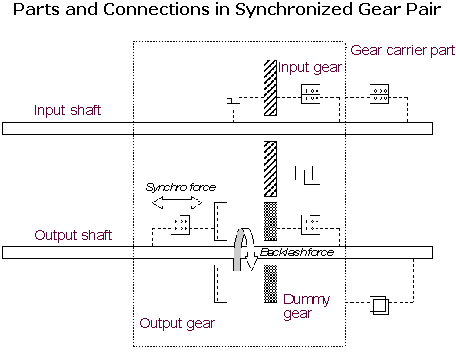
You can select the initial configuration of the synchronizing mechanism by choosing one of the following options:
■Input gear connected to input shaft (input gear perpendicular JPRIM is active)
■Output gear connected to output shaft (output gear perpendicular JPRIM is active)
In the Standard Interface (see Interface Modes), you can vary values for the following:
■Reduction ratio, in case it was not parameterized on the gear revolution geometries
■Gear pair configuration
■Output-to-input direction
■Backlash
■Stiffness
■Damping
■Sharpness factor
■Ratio
Request Definition
Result name: gear_states_1 (input gear/shaft) and gear_states_2 (output gear/shaft)
Gear Parameters
\
Component: | Component name: | Component units: | Definition: |
|---|---|---|---|
F2 | angle | angle | The angle between the two parts (gear and shaft). |
F3 | angular_velocity | angular velocity | The relative velocity between the two parts (gear and shaft). |
F4 | torque | torque | Rotational force exerted by the synchronizer element. |