Complex Springs
This component represents a complex rotational spring with hysteresis. You can use it to model rotational springs in clutch friction disks, as well as any other connection in which a rotational spring damper with hysteresis is needed.
Learn about complex springs:
Creating or Modifying Complex Springs
To create or modify complex springs:
1. From the Driveline Components menu, point to Complex (Torsional) Spring, and then select New/Modify.
3. Select OK.
About Complex Springs
This complex spring represents a torsional spring with hysteresis. You can use it to model rotational springs in clutch friction disks, as well as any other connection in which a rotational spring damper with hysteresis is needed.
The hysteresis effect is accomplished using two different splines (loading and unloading) stored in a specific property file (<db_name>/complex_springs.tbl/*.csp). Adams Solver switches from one spline to the other according to the value of angular velocity between the I and J marker. The value of velocity at which the transition has to occur is also stored in the property file. Using two splines allows you to take into account different values of hysteresis for different values of angular displacement. See the following figure.
Torque versus Angular Displacement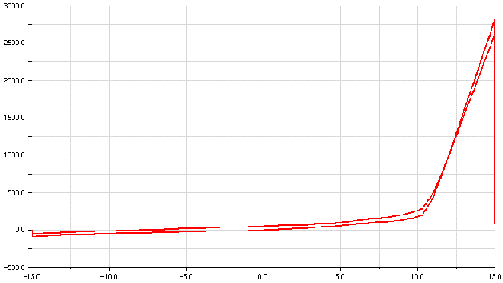
In addition, the dependency of hysteresis from engine RPM is taken into account, since loading and unloading splines are three-dimensional splines. The first independent variable is the angular displacement and the second independent variable is engine RPM.
Before submitting an Analysis, you can switch the hysteresis effect on or off from the modify dialog box. If you set Hysteresis Activity to no, Adams Driveline uses only the first spline (loading) to evaluate the force exerted by this component. In the Standard Interface (see Interface Modes), you can vary values for the following:
■Property file
■Hysteresis activity
Calculation of Complex Spring Force
The complex spring force is calculated as follows:
FORCE = - load_step * load_scale_factor * load_spline - hysteresis_activity * step2 * unload_scale_factor * unload_spline - damping * WZ
where:
■load_step = step5(WZ,- TRANSITION_VELOCITY/2, 1-activity, TRANSITION_VELOCITY, 1)
■unload_step = step5(WZ,- TRANSITION_VELOCITY, 1, TRANSITION_VELOCITY/2, 0)
■load_spline = akispl(AZ,load_spline, 0)
■unload_spline = akispl(AZ,unload_spline, 0)
When hysteresis_activity is set to off (0), the spring acts as a nonlinear torsion spring with viscous damping, and only the first spline is used.
Note that you can also model torsion spring with hysteresis (and it's easier to define its parameters) using the torsion spring.
Example Complex-Spring Property File
$--------------------------------------------------MDI_HEADER
[MDI_HEADER]
FILE_TYPE = 'csp'
FILE_VERSION = 4.0
FILE_FORMAT = 'ASCII'
$--------------------------------------------------UNITS
[UNITS]
LENGTH = 'mm'
ANGLE = 'degrees'
FORCE = 'newton'
MASS = 'kg'
TIME = 'second'
$-----------------------------------------------SPRING_PARAMETERS
[SPRING_PARAMETERS]
TRANSITION_VELOCITY = 1e-1
DAMPING = 50
$--------------------------------------------------LOADING_SPLINE
[LOADING_SPLINE]
(Z_DATA)
{rpm}
0.0
1000.0
4000.0
(XY_DATA)
{ x y}
-60 -400000 -400000 -400000
-50 -300000 -300000 -300000
-40 -220000 -220000 -220000
-30 -175000 -175000 -175000
-20 -115000 -115000 -115000
-10 -50000 -50000 -50000
0 0 0 0
10 30000 30000 30000
20 50000 50000 50000
30 100000 100000 100000
40 160000 160000 160000
50 200000 200000 200000
60 400000 400000 400000
$--------------------------------------------------UNLOADING_SPLINE
[UNLOADING_SPLINE]
(Z_DATA)
{rpm}
0.0
1000.0
4000.0
(XY_DATA)
{ x y}
-60 -400000 -400000 -400000
-50 -200000 -200000 -200000
-40 -150000 -150000 -150000
-30 -110000 -110000 -110000
-20 -70000 -70000 -70000
-10 -25000 -25000 -25000
0 0 0 0
10 50000 50000 50000
20 110000 110000 110000
30 180000 180000 180000
40 220000 220000 220000
50 300000 300000 300000
60 400000 400000 400000