Ride Wheels
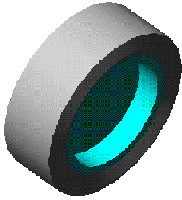
The tire component consists of a rim and a ring.
Learn about ride wheels:
Creating or Modifying Ride Wheels
To create or modify ride wheels:
1. From the Driveline Components menu, point to Ride Wheel, and then select New/Modify.
3. Select OK.
About Ride Wheels
The tire model consists of two parts:
■Rim - Is connected to the suspension hub during the assembly.
■Ring - Is connected to the rim with a vertical spring damper, a longitudinal spring damper, and a torsion spring damper to describe the elasticity of the tire itself.
The rim and ring parts are also connected to each other with a planar joint, which constrains the two parts to moving in the global XZ plane.
The ring is then connected to another part, named road, with a vertical force. This force is used to evaluate traction forces exerted between the ring and the road in case a driving/braking torque is applied to the driveline model. The traction force is applied at the wheel center. Therefore, a torque is needed equal to the traction torque times the loaded tire radius.
If we call the vertical force between the ring and the road Fz, then we can say that the traction force, Fx, is equal to:
Fx = m * Fz
where:
■m = road friction coefficient
■Fz = vertical load
The friction coefficient is calculated using the tire slip and the spline defining the dependency of the friction on the tire slip (see figure Friction-Slip Function). The calculation follows: m = AKISPL(slip,0, friction_spline) * friction_var
where:
■slip = tire slip
■friction_var = friction scaling function. This value is used to scale to the original friction spline, defined for a maximum friction coefficient of 1.
Friction_var is defined using an adams_variable and can be defined to change either as a function of time or traveled distance.
For example, if you want to have the friction on the front left tire go down to 0.5 at time = 1 sec and then back to 1 at time = 2.5 with a transition time of 0.5 seconds, the expression for front left friction_var is as follows:
STEP(TIME,1,1,1,5,0.5) + STEP(TIME, 2, 2.5, 0, 0.5)
You can set this dependency using a specific dialog box from the Adams Driveline Standard Interface, prior to submitting the Analysis. This dialog box allows you to set any kind of expression for the friction coefficient, for an expression similar to the one explained above. You also have the graphical support that gives you feedback on the shape of function you are using.
To access the dialog box, from the Simulate menu, point to Full-Vehicle Analysis, point to Environmental Conditions, and then select Road Friction.
An Adams variable named traveled_distance automatically evaluates the distance traveled by the full-vehicle model. If friction has to be defined as a function of the traveled distance, the expression could be something like:
STEP(VARVAL(traveled_distance),1,1,1,5,0.5) + STEP(VARVAL(traveled_distance), 2, 2.5, 0, 0.5)
Friction-Slip Function
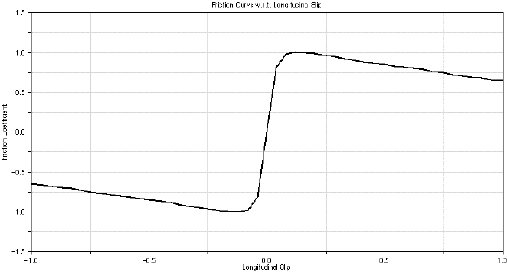
Adams Driveline evaluates the tire slip according to the following formula (note that slip will be always between -1 and 1):
slip = MAX(MIN((V - wr)/ABS(v), 1), -1)
where:
■V = longitudinal speed of the car
■w = rotational velocity of the wheel
■r = loaded radius of the wheel (DZ(rim_cm, road))
Note that the reason why the ring part is connected to the road instead of the ground is because this modeling technique allows you to put vertical and longitudinal actuators between the road and the ground. This makes it possible to apply imposed motions to the full-vehicle model, such as known road profiles or frequency sweep profiles.
The interposition of a rotational spring damper between the rim and the ring part is very important for those analyses in which it is important to capture natural frequencies of the tire, such obstacle-passing maneuver or tip in - tip out analyses.
Request Definition
Component: | Component name: | Component units: | Definition: |
|---|---|---|---|
F2 | Longitudinal slip | none | The longitudinal slip of the tire. |
F3 | Omega | RPM | The angular velocity of the tire. |
F4 | Traction | force | Traction force exerted by the tire. |
F6 | Vertical force | force | Vertical load on the tire. |
Subsystem Parameters
Property file
Static tire forces
To model the static tire forces in longitudinal and lateral directions, VFORCEs are activated in ride wheels only when performing the Adams Driveline Static Loadcase Analysis. These additional forces allow finding static solutions with, for example complete vehicles and are de-activated after each Static Loadcase Analysis. To prevent static tire forces at wheel lift-off, the longitudinal and lateral components of the VFORCEs are set to zero when the vertical tire force becomes less than 1 Newton using a step function. The default static stiffness is set to 500 N/mm, but can be modified by the user from the tire property file using the parameters STATIC_LONG_STIFFNESS and STATIC_LAT_STIFFNESS in section [TIRE_PARAMETERS].
Example Ride-Wheel Property File
$--------------------------------------------------MDI_HEADER
[MDI_HEADER] FILE_TYPE = 'rti'
FILE_VERSION = 2.0
FILE_FORMAT = 'ASCII'
(COMMENTS)
{comment_string}
'Tire - Ride Tire'
$--------------------------------------------------UNITS
[UNITS] LENGTH = 'mm'
ANGLE = 'degrees'
FORCE = 'newton'
MASS = 'kg' TIME = 'second'
$--------------------------------------------------MODEL
[MODEL]
PROPERTY_FILE_FORMAT = 'RIDE'
$--------------------------------------------------DIMENSION
[DIMENSION]
RADIUS = 300
WIDTH = 300
ASPECT_RATIO = 0.55
RIM_RADIUS = 190
RIM_WIDTH = 139
$--------------------------------------------------TIRE_PARAMETERS
[TIRE_PARAMETERS]
STIFFNESS = 9e5 DAMPING = 1e4
TORSION_STIFFNESS = 6e4
TORSION_DAMPING = 1e1
$---------------------------------------------------RING_PARAMETERS
[RING_PARAMETERS]
MASS = 4.5
Ixx = 1
IYY = 1
IZZ = 1
$------------------------------------------------FRICTION_vs_SLIP
[FRICTION_vs_SLIP]
{ slip_speed friction }
-1.0 -0.6508
-0.95 -0.6624
-0.91 -0.6799
-0.87 -0.6945
-0.83 -0.7061
-0.79 -0.7265
-0.75 -0.7497
-0.7 -0.7673
-0.666 -0.7847
-0.62 -0.8021
-0.58 -0.8168
-0.54 -0.8312
-0.5 -0.8487
-0.45 -0.8662
-0.41 -0.8837
-0.375 -0.9012
-0.33 -0.9274
-0.29 -0.9477
-0.25 -0.9639
-0.2 -0.9869
-0.166 -0.9927
-0.125 -1.0007
-8.0E-02 -0.9777 -4.0E-02 -0.8092 0.0 0.0 4.0E-02 0.8092 8.0E-02 0.9777
0.125 1.0007
0.166 0.9927
0.2 0.9869
0.25 0.9639
0.29 0.9477
0.33 0.9274
0.375 0.9012
0.41 0.8837
0.45 0.8662
0.5 0.8487
0.54 0.8312
0.58 0.8168
0.62 0.8021
0.666 0.7847
0.7 0.7673
0.75 0.7497
0.79 0.7265
0.83 0.7061
0.87 0.6945
0.91 0.6799
0.95 0.6624
1.0 0.6508