Conceptual Wet Clutches
A wet clutch is a torque that connects an I part and a J part.
Learn about wet clutches:
Creating or Modifying Wet Clutches
To create or modify wet clutches:
1. From the Driveline Components menu, point to Conceptual Wet Clutch, and then select New/Modify.
3. Select OK.
About Wet Clutches
The clutch pressure is pre-defined as a function of time (defined in the property file). It cannot be connected to the driving machine’s clutch demand state.
The wet clutch torque is the summation of three single-component torques. The first torque is based on the inputs stored in the property file, such as number of friction surfaces, effective radius, pressure area, turning point pressure, and friction coefficient. Second is a drag torque, defined in the property file by a coefficient. The wet clutch also includes a part with a rotational degree of freedom and compliant connection to the J part.
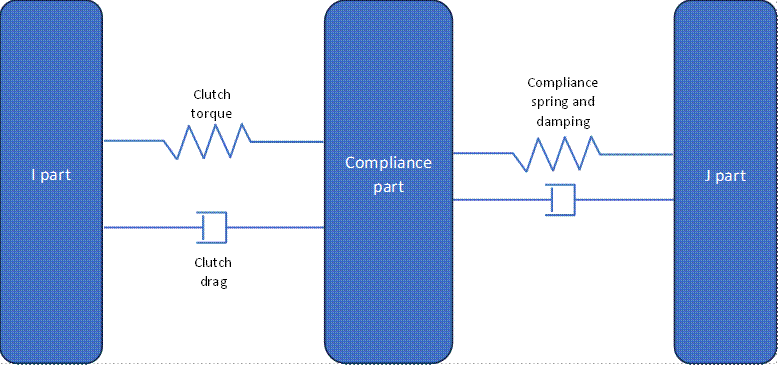
Adams Driveline uses the following formulas to evaluate the resulting torque:
Parameters in property file:
Parameter | Description | Unit |
|---|---|---|
N_OF_SURFACE | Number of friction surfaces in the clutch pack | None |
EFFECTIVE_RADIUS | Effective radius of the friction surface(s) | Length |
PRESSURE_AREA | Area of one friction surface | Area |
TURNING_POINT_PRESSURE | Minimum pressure that must be overcome | Pressure |
CLUTCH_MU | Friction coefficient | None |
OPEN_CLUTCH_DRAG_GAIN_FACTOR | Drag torque gain | Torque |
TIME_OFFSET | Time at which pressure spline begins | Time |
CLUTCH_COMPLIANT_STIFFNESS | Stiffness of the compliant connection | Torque/angle |
CLUTCH_COMPLIANT_DAMPING | Damping of the compliant connection | Torque/angular velocity |
Curve in the property file:
Parameter | Description | Unit |
|---|---|---|
CLUTCH_PRESSURE | Pressure vs. time | Time and pressure |
States:
■clutch_pressure = AKISPL(time + time offset, 0,clutch_pressure_spline) - turning point pressure
■clutch_capacity = STEP(varval(clutch_pressure),0,0,0.1,1) * number of surfaces * effective radius * clutch mu * pressure area * clutch_pressure
■clutch_switch = STEP(WZ(I_part, compliance_part, compliance_part), -0.2, -1, 0.2, 1)
■clutch_torque = -clutch_capacity * clutch_switch
■clutch_drag = -number of surface * drag gain * WZ(I_part, compliance_part, compliance_part)
■clutch_compliance = -clutch compliance stiffness * AZ(compliance_part, J_part) -clutch compliance damping * WZ(compliance_part, J_part, J_part)
In the Standard Interface (see Interface Modes), you can vary the property file.
Request Definition
Result name: request
Component: | Component name: | Component units: | Definition: |
|---|---|---|---|
F2 | angle | angle | The angle between the I and J part. |
F3 | angular_velocity | angular velocity | The angular velocity of the I part with respect to the J part. |
F6 | clutch_pressure | pressure | The input pressure of the clutch. |
F7 | capacity | torque | The capacity that the clutch is able to develop. |
F8 | torque | torque | The torque developed in the compliant connection to the J part |
Subsystem Parameters
Property file (<db_name>/clutch_forces.tbl)