Importing a Workbook File in Adams Car
1. Navigate to Tools → Explore → Import from Workbook.
2. Browse the file that is to be imported.
3. Select if the assembly specified in the workbook should be used or if an already opened assembly is to be used.
Note: | If using an already opened assembly, it must be fully compatible with the content of the workbook and, therefore, with the assembly upon which the workbook was based when exported originally. |
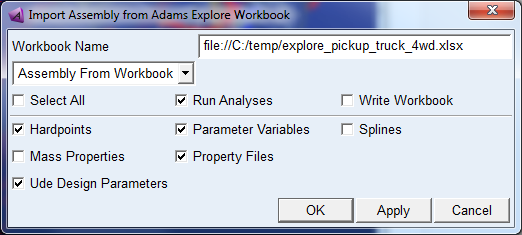
4. Select the entity types to be imported using the check boxes.
5. Select whether to run the analyses listed in the workbook analyses sheet or not and whether to write the output workbook or not.
6. Press OK or Apply.
Notes: | All values stored in a Adams Explore workbook cannot be stored in an Adams Car assembly. For example spline values will only live in the session. If the model is saved or any of the standard analysis macros are run the spline values will be overwritten by those from the property files. Some of the UDE design variables are not saved if the assembly is saved in ascii format. To ensure that also these values are preserved the assembly shall be saved in binary format. If a model is updated using a workbook with the same values of it's eg. parameter values as it already has Adams Car will anyway say that the subsystem has changed even though it has not. |