Introduction
Adams Explore provides a two-way interface between Adams and Microsoft Excel across a computer network. This enables a workflow whereby an Adams analyst exports a spreadsheet workbook defining key model parameters and analysis outputs which could then be consumed by a non-Adams user who could, wholly from within Excel or via a web page, modify the parameters, launch analyses, view the updated outputs and further post-process them.
The model itself is not contained in the exported workbook file. The file only contains references to where to find the model on the file system, information about the specific entities exported and analyses to be performed. Therefore all paths in the workbook file must be valid on the computer that is importing the file.
See the section Adams File Types for more information on Adams Explore file types.
Webpage Workflow
Adams Explore will enable solving and reviewing results of complex multibody dynamics problems using Adams without having it installed on the local machine. The only strict requirement is to be on a device on the same computer network as the machine configured to run Adams. If the device has a web browser the example workflow like in the picture below is made possible.
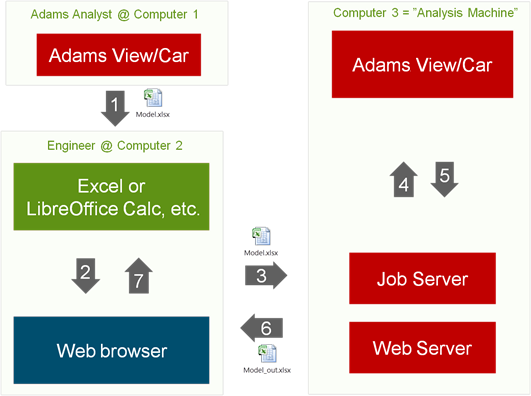
An Adams analyst exports a workbook file with information about a model to be run from inside Adams. The information contained comprise where the model is located, where it is to be computed, which parameters are subject to change and which analyses to be run. Also added are responses of interest such as plot curves and design objectives.
The Adams analyst then sends the file (1) via email to a colleague, who is an engineer possibly without knowledge about Adams and, who is using a computer or a device without Adams installed. This colleague, the "Engineer" opens the file in an editor that supports the document type (for example, Microsoft Excel or Google Docs - for more details about the xlsx format and supported editors see About the File Format) and edits some of the parameters. The Engineer then clicks on a hyperlink in the workbook file which opens a webpage (2). On this webpage the workbook file is uploaded (3) and received by and the servers which has been started previously on the "Analysis Machine". This analysis machine is a normal computer which has Adams installed and can be the same as the Computer 1.
The web server tells the job server to start an Adams Explore job based on the workbook file. Adams is started (4). After completion an output workbook files is written to the working directory of Adams. This file is picked up by the web server (5) and made available on the web page. The Engineer sees this file downloads it to his device (6) and opens it in the editor to review the response of the changed parameters.
Excel-Only Workflow (Windows Only)
A second workflow is available on windows with the help of a special Excel add-in. This add-in contains interface buttons coupled to VBA code used to communicate with the servers and to send output status to a special worksheet.
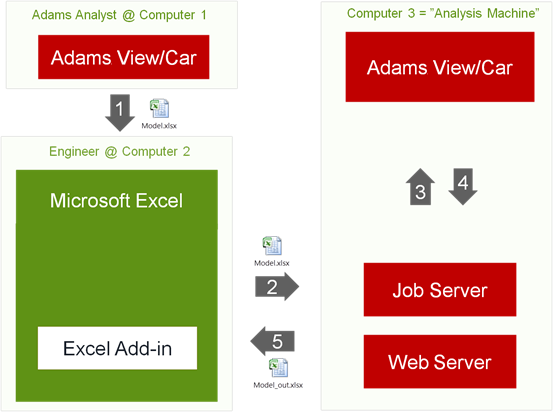
An Adams analyst exports a workbook file with information about a model to be run from inside Adams. The information contained comprise where the model is located, where it is to be computed, which parameters are subject to change and which analyses to be run. Also added are responses of interest such as plot curves and design objectives.
The Adams analyst then sends the file (1) via email to a colleague, who is an engineer possibly without knowledge about Adams and, who is using a computer or a device without Adams installed. This colleague, the "Engineer" opens the file in Microsoft Excel to which he has added a provided add-in and edits some of the parameters. The Engineer then clicks on a button in the add-in which saves and submits the file (2). The file is received by the servers which have been started previously on the "Analysis Machine". This analysis machine is a normal computer which has Adams installed and can be the same as the Computer 1.
The web server tells the Job server to start an Adams Explore job based on the workbook file. Adams is started (3). After completion an output workbook file is written to the working directory of Adams. This file is picked up by the web server (5) and made available. The Excel add-in asks the web server continuously, or at the request of the Engineer, for the status. When the job is completed and the file is available the file can be opened directly in Excel to review the response of the changed parameters.