Importing a Workbook File in Adams View
1. Navigate to the Design Exploration Tab.
2. Click on the  button in the Explore container.
button in the Explore container. 3. Browse the file that is to be imported.
4. Select if the model specified in the workbook should be used or if an already opened model is to be used.
Note: | If using an already opened model, it must be fully compatible with the content of the workbook and, therefore, with the model upon which the workbook was based when exported originally. |
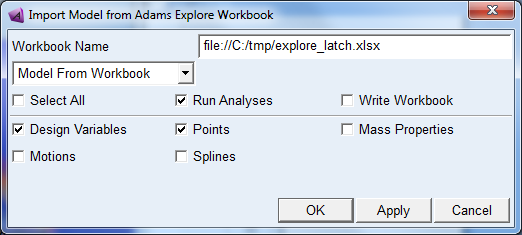
5. Select the entity types to be imported using the check boxes.
6. Select whether to run the analyses listed in the workbook analyses sheet or not and whether to write the output workbook or not.
7. Press OK or Apply.