Simulation Deployment
Three configurations of simulation deployment are supported and some may be of interest when running models containing nonlinear flexible bodies due to the amount of computational demand these add to Adams models:
■Single Machine: The complete Adams analysis (including any/all nonlinear flexible bodies) is run entirely on one machine. To improve solve time performance in this mode one may consider taking advantage of multi-threading especially if the single machine has multiple CPU's available. See "Adams Solver Thread Count" and "Guidelines on Thread Count Usage" in the "Important Simulation Settings" section above for more details.
■Multiple Machine: The nonlinear flexible bodies are assigned different machines on which they will be solved. This is done via the "Compute Resource" field in the modify dialog box:
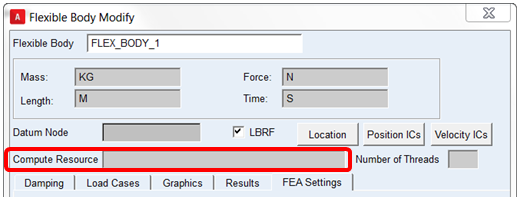
The machine, as specified in this field, must be accessible on the network from whatever machine is launching the Adams analysis. That machine must also have access to the necessary Adams licenses. It must also have at a minimum the nonlinear flexible body solver component, the NLFE Service, installed or a full Adams installation. See the Adams 2024.1 Installation and Operation Guide for details on how to install only the NLFE Service component on a machine. This configuration is intended for users who have access on their local network to other individual machines beside their own workstation.
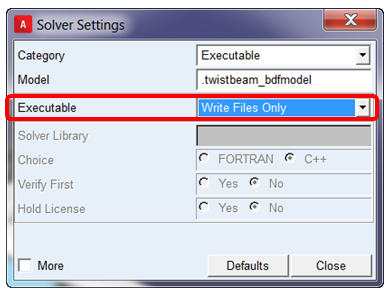
■Cluster: The complete Adams analysis (including any/all nonlinear flexible bodies) is provided to a high-performance computing (HPC) environment. In this scenario users select "Files Only" from Settings - Solver - Executable. Then, when the analysis is "launched" from within Adams View, all the files required are exported to the Adams working directory on the local machine. The user then supplies those files to a compute cluster, which has a full Adams installation on it, through their organization's HPC management tools (for example, some webpage front-end, job submittal client and so on.)