Adams Insight Main Window
This is the window that appears when you first launch Adams Insight. Learn more about toolbars and Treeview.
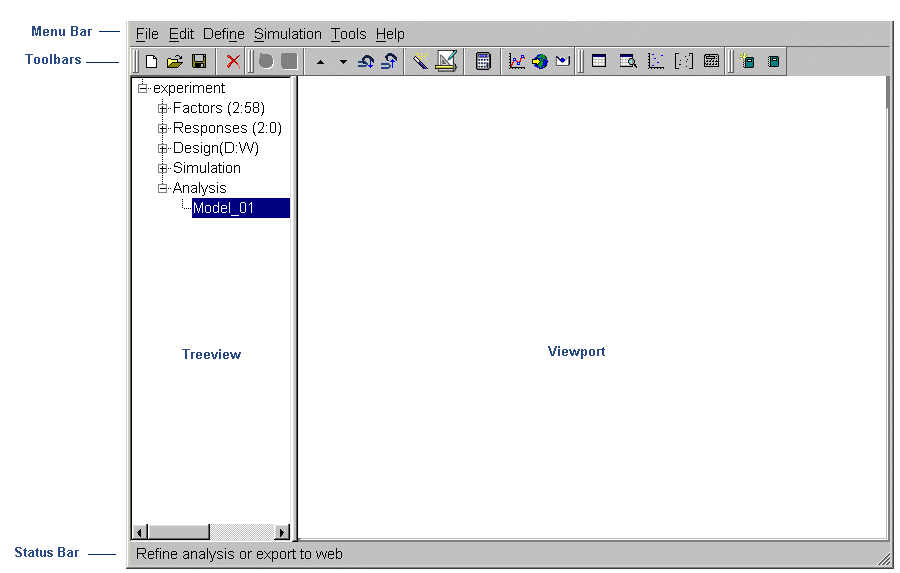
■Menu Bar: The Menu bar contains pull-down menus for File, Edit, Define, Simulation, Tools, and Help.
■Toolbars: The toolbars contain commonly-used tools for accessing files, creating experiments, and generating reports. The tools in the toolbars are arranged in the order that you use them in the process of creating and executing your designed experiment. Depending on where you are in the process of creating an experiment, Adams Insight enables or disables the tools. This feature alerts you to the correct order of procedures to follow.
■Treeview: The treeview displays a hierarchical list of objects that you can include in an experiment. The tree is especially useful in selecting and identifying objects when you are creating a design matrix.
■Viewport: The Viewport is the area of the window that displays fields for modifying the objects you select from the treeview.
■Status bar: The Status bar displays messages and issues prompts during your Adams Insight session.