Preprocess Axial Cylindrical Roller Bearing Contact
The write contact file dialog box allows you to create axial roller bearing contact file by running Bearing AT contact pre-processor.
For more detailed information about the process, please read Bearing AT manual.
Main
For the options | Do the following |
|---|---|
Axial Roller Property File | Select existing roller property file(*.rpf) |
Microgeometry Modif. Name | Enter suffix for contact file name. The contact file name of the bearing is appended by the character string Microgeometry Modif Name. The length of the character string is limited to 20 characters. |
Import *.rcf | Click to import the bearing contact property file |
Contact
The compliances of the rolling element against the ring are computed by a high-performance contact algorithm. The user needs to define workspace of rolling element against ring, which is stored in the axial roller bearing contact file (*.rcf). A *.log file provides information about contact processing.
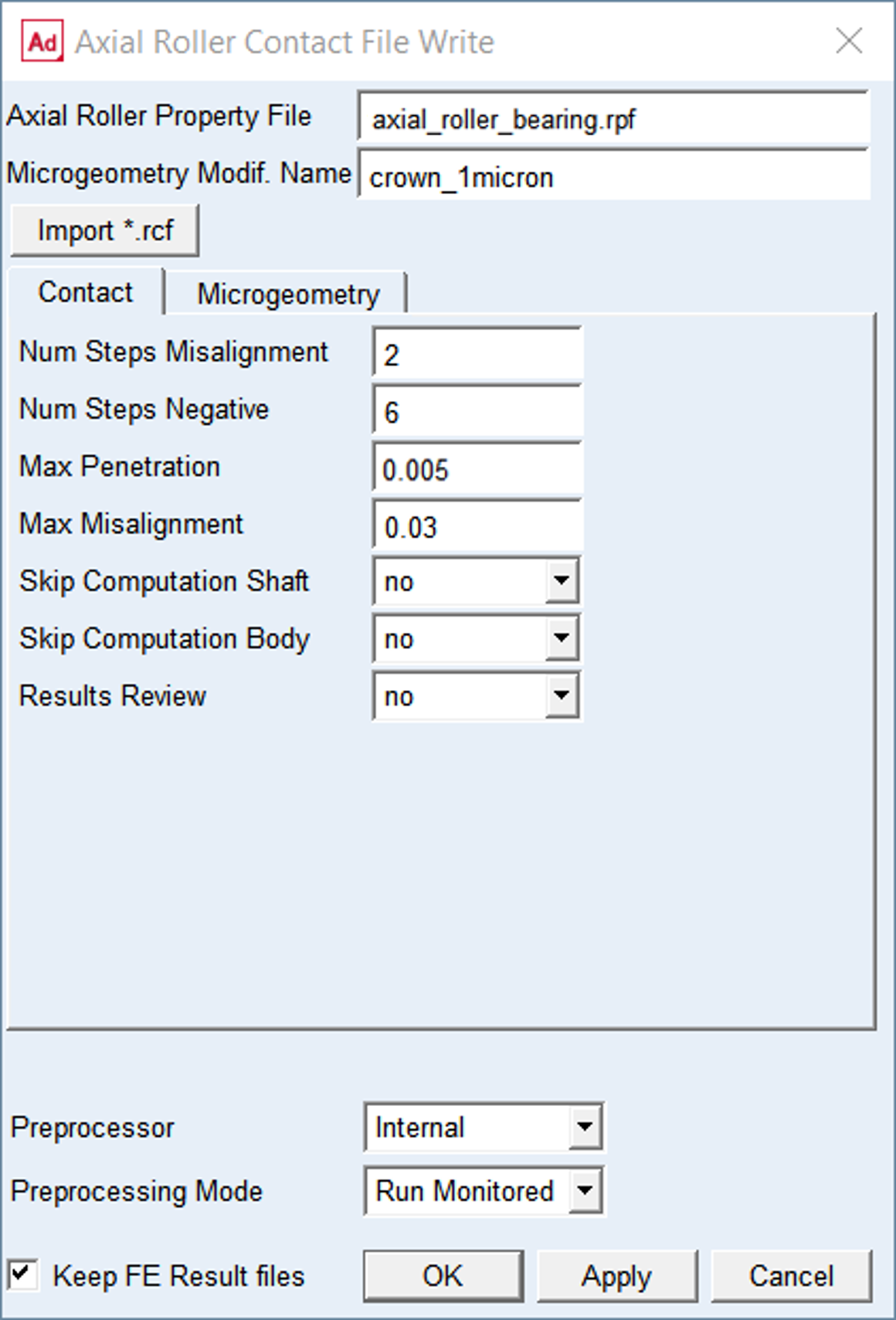
Figure 111 Contact tab
For the options | Do the following |
|---|---|
Num Steps Misalignment | Enter number of steps for misalignment. The term Misalignment refers to the relative rotation of the roller against the race – see Figure 112. The roller is oriented from negative (-) Max_misalignment to positive (+) Max_misalignment with increment of Δβ = Max_misalignment / Num Steps Misalignment Effectively there are total number of steps applied from negative Max_misalignment to positive Max_misalignment defined by the formula: Steps total = 2 * Num Steps Misalignment +1 Default = 2 |
Num Steps Negative | Enter the number of penetration steps in negative direction. The value should be multiple of 2. The roller load is zero in design position in case of absence of clearance and misalignment. Any misalignment will generate a load which should be relieved by moving roller away from the race, thus ensure the point of first load transfer is robustly identified – see Figure 112. Default = 6 |
Max Penetration | Enter the maximum penetration of roller vs. shaft ring and roller vs. body ring – see Figure 113. The Max Penetration is applied in 20 penetration steps. Default = 0.003 |
Max Misalignment | Enter value of roller maximum angular misalignment. The term Misalignment refers to the relative rotation of the roller against the race – see Figure 112. The input value (in degrees) is usually a small number and is identical for the inner and outer race for the determination of the compliance. Default = 0.03 |
Skip Computation Shaft | Set to Yes to skip execution of contact simulation for the roller vs. shaft ring. It might save some time in case you need to redo contact simulation of the body ring only. Default = no |
Skip Computation Body | Set to Yes to skip execution of contact simulation for the roller vs. body ring. It might save some time in case you need to redo contact simulation of the shaft ring only. Default = no |
Results Review | Set to one of following options: ■yes: to output some additional *.rre result files with contact pressure table and Nastran cards for further postprocessing ■no: to not output additional result files Default = no |
Mode to run Preprocessing | Select one of following options for running contact preprocessor. • Run Quiet: executes contact preprocessing without any output to the screen but to the *.log file in the working directory ■Run Monitored: executes contact preprocessing with output to the screen and to the *.log file in the working directory ■Files Only: the batch file is created but not submitted to execution, one has to launch it manually Default = Run Monitored |
Keep FE Results files | If you want to keep the results files from Nastran (*.pch) to run another contact simulation, select Keep FE Results files in the toggle button otherwise those will be removed after contact simulation is completed successfully. Default = ON |
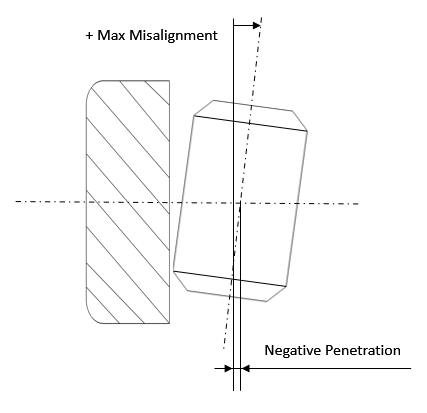
Figure 112 Max. misalignment
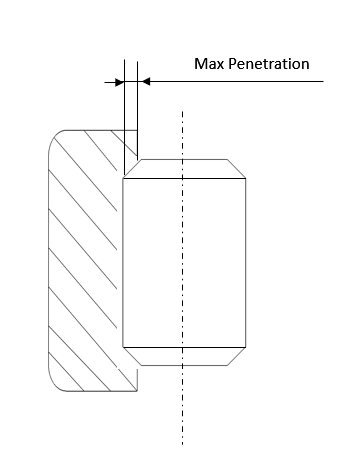
Figure 113 Max. penetration
Microgeometry
It is assumed in Bearing AT, that micro-geometry has only effects of second order on the flexibility of the roller. This assumption allows investigating the effect of any micro-geometry without re-computation of the finite element models, what helps to save CPU-time and gives you more flexibility in modeling.
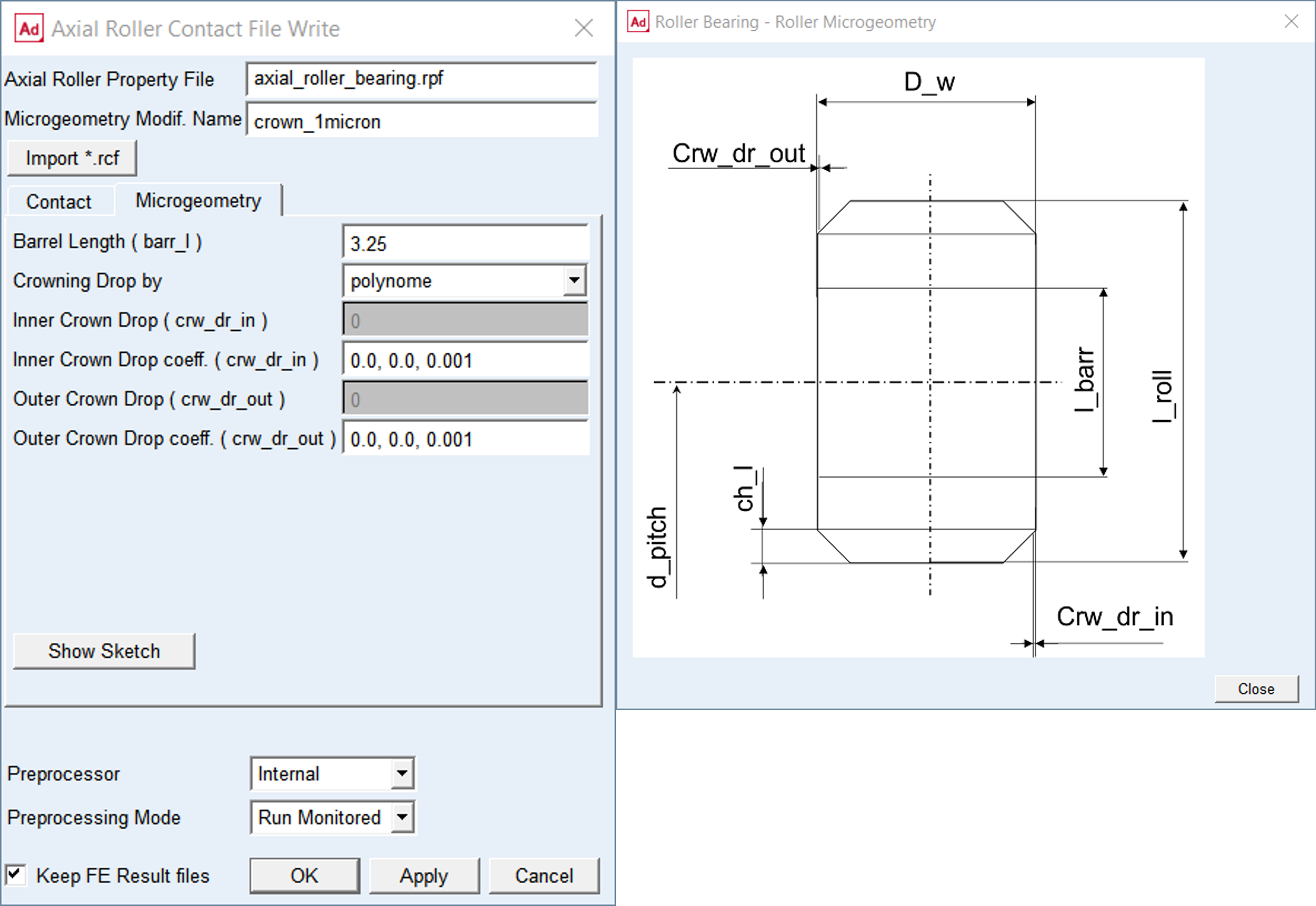
Figure 114 Microgeometry tab
For the options | Do the following |
|---|---|
Barrel Length (barr_l) | Enter value of barrel length The barrel length is the length of the roller, where it has the unmodified surface. The barrel length is measured along the Z - axis of the bearing and it is symmetrically distributed on both sides of the roller. Default = 0.5 * Length_of_Roller |
Crowning Drop by | Select one of following options to define crowing drop: ■arc - is tangent to the roller surface at barrel length; requires input of the drop only ■polynome - is of 3-rd order defined by an independent variable u, which has the value of zero at barrel length and a value of 1 at the fillet (Figure 115) Default: polynome |
For the option Crowning Drop by the Arc: | |
Inner Crown Drop (crw_dr_in) | Enter value of inner crowning drop in model units |
Outer Crown Drop (crw_dr_out) | Enter value of outer crowning drop in model units |
For the option Crowning Drop by the Polynome: | |
Inner Crown Drop coeff. (crw_dr_in) | Enter values of inner crowning drop coefficients in model units The polynomial coefficients a1 , a2 , a3 define Inner Crowning Drop curve by following polynomial equation: crw_dr_in = a1 * u + a2 * u**2 + a3 * u**3 For instance, enter ‘0.0, 0.0, 0.01’ to get crowning drop of 0.01 of cubic shape. Default: 0.0, 0.0, 0.001 |
Outer Crown Drop coeff. (crw_dr_out) | Enter values of outer crowning drop coefficients Enter polynomial coefficients a1 , a2 , a3 which define Outer Crowning Drop curve by following polynomial equation: crw_dr_out = a1 * u + a2 * u**2 + a3 * u**3 For instance, enter ‘0.0, 0.0, 0.01’ to get crowning drop of 0.01 of cubic shape. Default: 0.0, 0.0, 0.001 |
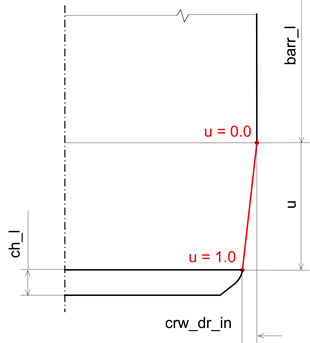
Figure 115 Roller crowning drop