Preprocess Ball Bearing Contact
Machinery → Bearing AT → Ball Bearing → Preprocessing → Contact
The compliances of the rolling element against the ring are computed by a high-performance contact algorithm. The user needs to define workspace of rolling element against ring, which is stored in the ball bearing contact file (*.bcf); a *.log file provides information about contact processing. The resulting compliance forces are stored on the *.bif file for the inner race and the *.bof file for the outer race.
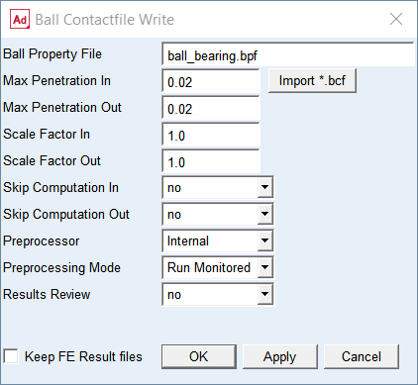
Figure 10 Input data for ball bearing contact analysis
For the options | Do the following |
|---|---|
Ball Property File | Enter the ball property file (*.bpf) |
Import *.bcf | Click to import the bearing contact property file |
Max Penetration In | In the compliance analysis (refer Figure 11) for the inner race, the ball is pushed into the ring to a maximum value of 'penetration'. A value of 0.0 for the penetration means that contact will start with increasing penetration. The ball is pushed in 20 steps into the ring to the maximum value of 'penetration', where penetration represents the overlap between rigid ball and rigid ring. The first compliance analysis starts in pure radial direction; subsequent analyses are rotated by 5 degrees till the direction of motion does not fall inside the race. Select the penetration in such a way, that the contact patch is not exceeded; refer the user manual for more information. |
Max Penetration Out | Similar to compliance for inner race. |
Scale Factor In | Enter the scale factor to adjust results of contact analysis for the ball vs. inner ring. Default value is 1.0 |
Scale Factor Out | Enter the scale factor to adjust results of contact analysis for the ball vs. outer ring. Default value is 1.0 |
Skip Computation In | Set to Yes to skip execution of contact simulation for the ball vs. inner ring. It might save some time in case you need to redo contact simulation of the outer ring only. |
Skip Computation Out | Set to Yes to skip execution of contact simulation for the ball vs. outer ring. It might save some time in case you need to redo contact simulation of the inner ring only. |
Preprocessor | |
Mode to Run Preprocessing | Select one of following options for running contact pre-processor. ■quiet: executes contact preprocessing without any output to the screen but to the *.log file in the working directory ■monitored: executes contact preprocessing with output to the screen and to the *.log file in the working directory ■batch only: the batch file is created but not submitted to execution, one has to launch it manually |
Results Review | Set to one of following options: ■yes: to output some additional *.bre result files with contact pressure table and Nastran cards for further postprocessing ■no: to not output additional result files |
Keep FE Results files | If you want to keep the results files from Nastran (*.pch) to run another contact simulation, select Keep FE Results files in the toggle button |
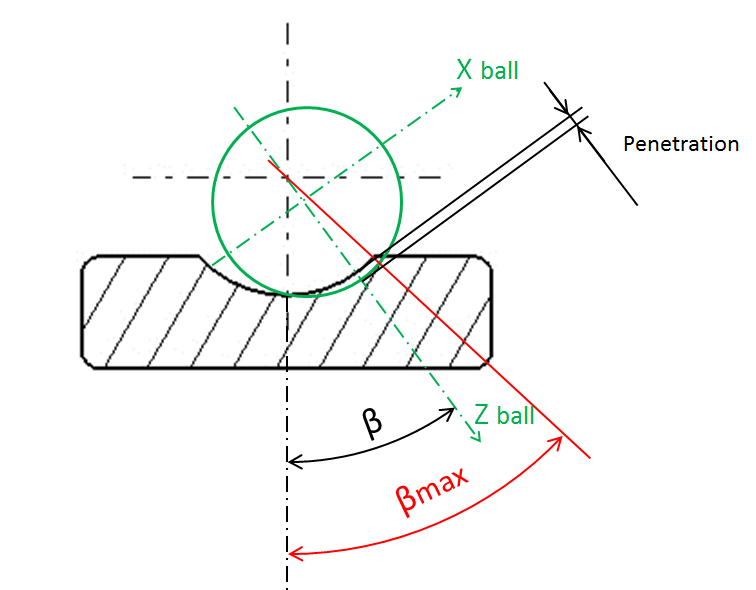
Figure 11 Ball contact angle and penetration