Create Pulley - Trapezoidal Toothed
Machinery → Create Pulley
For the option | Do the following |
|---|---|
Number of Pulley | Enter the number of pulleys to be created. Note: The maximum number of pulleys allowed per model is 50. The maximum number of pulleys allowed per pulley set is 20. |
Axis of Rotation | Axis of Rotation can be one of the following: ■Orientation ■Pick (Marker) ■Global Z ■Global X ■Global Y |
Pulley1/2/... | |
Name | Enter the Pulley name. In modify mode, click in this field and press the Enter/Return key to highlight the pulley within the graphics window. |
Center Location | Enter the coordinates or Pick (Markers, View location and so on.). |
Geometry | |
Pulley Width | Enter value for pulley width. |
Number of Teeth | Enter the number of teeth on the pulley. Note: The maximum number of teeth allowed is 100. |
Type | Select one of the following: ■ISO 5294 - The pitch diameter and the tooth angle will be defined by number of teeth and the parameters of the belt. ■User entered - You must supply the parameters to define the geometry. |
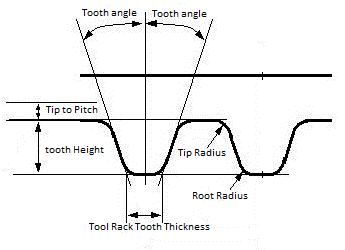
As you fill in some of the following text boxes, you might find it useful to refer to tool rack profile according to ISO 5294. | |
Profile | Select one of the following: ■Circle ■Elliptic |
If you selected Circle profile, the following options available. | |
Pitch diameter | Enter the pitch diameter. Required if Type = User entered. |
Tooth angle | Enter the tooth (pressure) angle. Required if Type = User entered. |
Tooth height | Enter the tooth height. |
Tooth tip radius | Enter the tip radius. |
Tooth root radius | Enter the root radius. |
Tip to pitch | Enter the theoretical distance between the pulley tooth tip and the pitch circle. |
Tool rack tooth thickness | Enter the tooth thickness of the tool rack tooth at the tip of the tool rack tooth. |
Elliptic pulley You can perform tolerance studies by making the pulley elliptic instead of circular. To make the pulley elliptic, you specify the deviation from the pitch circle to the major and minor semi axes of the ellipse. Adams Machinery calculates the deviation on the minor semi axis to get the same perimeter for the ellipse as for the non deviated pitch circle. You can then rotate the ellipse by specifying an angular offset from the x-axis of the part to the major semi axis of the ellipse. Learn more about how the Elliptic Trapezoidal Pulley is handled. | |
If you selected Elliptic profile, the following options available. | |
Profile deviation X | Enter the deviation from the pitch radius to the elliptic radius at the major semi axis. |
Profile deviation Y | Displays the deviation from the pitch radius to the elliptic radius at the minor semi axis. |
Angle offset | Enter the angular offset from the x-axis of the part to the major semi axis of the ellipse. Note: The angle offset will only be visible when the belt is wrapped. |