Basic Concepts in Adams Mechatronics
Here the basic components and terms used in Adams Mechatronics are briefly described.
While the figure below illustrates how the (transducer and actuator) signals from the mechanical systems are connected to the control systems via the control system inputs/outputs, we will try to describe each term.
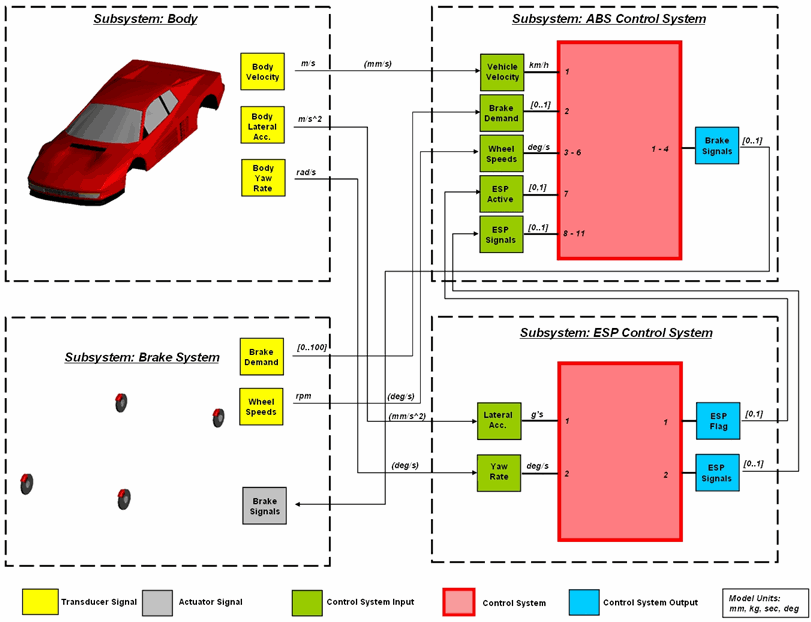
Transducer Signal
Transducer signals are used to measure a certain signal from an arbitrary location of the mechanical system. For example, it can measure the rotational velocity of a wheel or the instantaneous brake pressure. The measured signal is sent to the control system via the control system input.
Actuator Signal
Actuator signals are used to transfer the output from the control system to the mechanical system. For example, the actuator signal could be a brake pressure of an ABS control system, which would be used in the force expressions of the brake model in the mechanical system. Typically in Adams Car, you would create a point torque actuator in the template builder and in the function expression refer to the actuator signal.
Note: | it is important to pay attention to difference between following terms: the Actuator Signal which is an Adams Mechatronics component and Actuators which is an Adams Car component. |
Control System
A Control System in the context of Adams Mechatronics is an object which contains information about the type of controller, the number of input channels and output channels, and so on.
Control System Input
Control system inputs are created when you create a control system. The number of inputs specified for the control system will determine the number of control system input objects that are auto-created. Using the Signal Manager, you can hook up the appropriate transducer signal (or other control system output) to the corresponding control system input. Since the control system inputs are always automatically created, you can only perform Modify operations on them.
Control System Output
Control system outputs are created when you create a control system. The number of outputs specified for the control system will determine the number of control system output objects that are auto-created. Using the Signal Manager, you can hook up the appropriate control system output to the corresponding actuator signal. Since the control system outputs are always automatically created, you can only perform Modify operations on them.
Mechanical System
In Adams Mechatronics the mechanical system refers to the mechanical model excluding the control systems. Note that you can exploit Adams Mechatronics components such as transducer/actuator signals without the need for a new version of the model (template in Adams Car) since you can activate/deactivate the control system. See Activity in Adams Mechatronics for more information.
Signal Manager
The Signal Manager is a graphic interface in Adams Mechatronics where you connect the mechanical system(s) to the control system(s), that is, connect the transducer signals to the control system inputs and control system outputs to the corresponding actuator signals. Note that you can also connect a control system output of one control system to input of another control system. Typically, you need to use the Signal Manager only once for a complete model and then connections will be saved within the model. The next time you open the model, the signal connections will be setup automatically.
External System Library (ESL)
External system library (ESL) is a general term used for code generated by control packages like Matlab/Code Generation, Easy5, or Functional Mockup Interface (FMI). This code is saved in a file with dll (dynamic link library) extension on Windows or so (shared objects) extension on Linux operating system or fmu (functional mockup unit) extension in case of FMI. Note that fmu is a zip file type which typically includes the library, model description and some other related files.
To provide an effective access to the ESL file, Adams Mechatronics uses ESL property file, which in turn points to a ESL file and contains other information such as control system parameters name and value. This provides the possibilities to perform a design study in Adams Insight.
In Adams Car, ESL property files are stored in external_system_libraries.tbl directory in the Adams Car database. In Adams View, they are stored in a user-specified folder.