Property Editor - Spring Damper
In treeview -> page -> model -> spring_damper
Lets you edit the display of a spring damper. The tab Disp Attrs is explained below. For information on the Object Props tab, see Property Editor - Modeling Object.
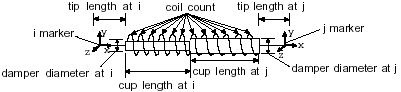
A spring damper is a graphic representation of a spring and damper drawn between two Markers. The spring damper stretches along the axis created by its I and J markers. The figure below illustrates the display options you can set.
For the option: | Do the following: |
|---|---|
Coil Count | Enter the number of coils drawn in the spring. |
Spring Diameter | Enter the diameter of the spring.  |
Damper Diameter: I and J | Enter the diameters of the dampers at the I and J markers. |
Tip Length: I and J | Enter the distances between the ends of the dampers and the I and J markers. |
Cup Length: I and J | Specify the length of the damper cups in a spring-damper graphic. The first value defines the length of the cup at I marker. Adams PostProcessor measures the length from the bottom of the cup to its top along the line that I and J define. The second value defines the length of the cup at J. Adams View measures the length from the bottom of the cup to the top along the line that I and J define. |