Modifying 4D Plots
Modification can be done in two ways:
1. Dashboard: Once a 4D plot has been created, when it is selected again, the plotting dashboard will be in modify mode. Note that X/Y axis combinations can't be changed in modify state, but one is allowed to change the plot type, toggle the color data option and edit the contents of the Data page
2. Property Editor: Similar to modification of 2D XY plots, the property editor (situated beneath the tree view in Adams Post Processor) can be used to edit aspects of the plot display but not its data
Property Editor - 4D Plot
In tree view → page → 4D plot
For the option: | Do the following: |
|---|---|
Bounding Box | Clear to turn off the display of the three-dimensional box surrounding the plot. |
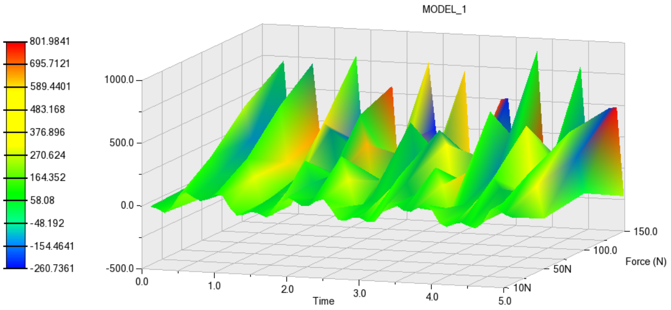
Grid | Select [Off/Clear/Shaded] ■Off- No grid ■Clear- Normal grid with lines ■Shaded - Grid with shaded background |
Graph Volume | Enter the x, y, and z aspect ratio of the plot. For example, a volume of 1,1,1 makes the plot look like a cube, while a volume of 2,1,1 makes the plot twice as long in the x dimension as it is in the y and z. |
Property Editor - 4D Surface
In tree view → page → 4D plot → surface_3d
For the option: | Do the following: |
|---|---|
Skip X/Skip Y | Set the x and y increment values you want Adams PostProcessor to skip. Setting it to 1 for each creates the smoothest surface. |
Interpolated Colors | Select to display the surface of the plot as a range of colors. A legend explaining the colors and the values they represent appears. |
Color | Set the single color with which to display the surface. |
Number of Colors | Enter the number of interpolated colors to be displayed in the plot. There can be no more than 255. |
Style | Select either of options. [Surface, Stacked] ■Stacked option will convert surface into stacked curves with polylines. Default is surface. |
Example of Shaded Grid 4D Plot