CBKSUB
The CBKSUB subroutine is an optional user-written subroutine that Adams Solver C++ calls at a predefined set of events during the code execution. The CBKSUB only passes input values announcing the type of event, the current simulation time, and a data array.
An event can be seen as a milestone reached during the code execution. An event is triggered when certain conditions occur, for example, a SENSOR triggers or an error condition is detected. Most of the time a milestone is reached naturally by the code, for example, a simulation command is about to be executed, a corrector iteration is about to start and so on.
The CBKSUB is a true callback function designed for advanced users only.
Note: | Use mixed case names for the Adams subroutine names when using the C style interface. For the default subroutine name capitalize the first letter and have the remaining letters lower case; Cbksub for example. Doing this ensures that Adams Solver correctly distinguishes a C style subroutine from Fortran and calls with the appropriate interface. |
Use
FORTRAN Calling Sequence
include 'slv_cbksub_util.inc'
SUBROUTINE CBKSUB ( time, event, data )
include 'slv_cbksub.inc'
DOUBLE PRECISION time
INTEGER event, data(3)
C Calling Sequence
include "slv_cbksub.h"
include "slv_cbksub_util.h"
void Cbksub( const struct sAdamsCbksub *cbk, double time, int event, int *data )
C++ Calling Sequence
include "slv_cbksub.h"
include "slv_cbksub_util.h"
extern "C" void Cbksub( const struct sAdamsCbksub *cbk, double time, int event, int *data )
Input Arguments
data | An integer array with context dependent values. The values depend on the type of event. |
event | An integer value identifying the type of event for which the call is being made. As of now 39 events have been implemented. |
time | The current simulation time. |
cbk | Structure containing callback data (see below) |
struct sAdamsCbksub { int ID; int NPAR; const double* PAR; void *reserved; }; |
Output Argument
The CBKSUB does not have output arguments. |
Extended Definition
Currently, only the Adams Solver C++ supports the CBKSUB.
The overhead (CPU time) is negligible.
Providing this subroutine is optional.
All utility subroutines are allowed to be called from within the CBKSUB except ADAMS_DECLARE_THREADSAFE, ANALYS, DATOUT, GTCMAT, MODIFY, PUT_SPLINE and UCOVAR. Calling any of these subroutines makes the behavior of the Adams Solver C++ undefined. No guards have been implemented.
None of the user-written subroutines are allowed to be called. The forbidden set includes CFFSUB, CNFSUB, CONSUB, COUSUB, COUXX, COUXX2, CURSUB, DIFSUB, DMPSUB, FIESUB, GFOSUB, GSE_DERIV, GSE_UPDATE, GSE_OUTPUT, GSE_SAMP, MFSUB, MOTSUB, RELSUB, REQSUB, SAVSUB, SENSUB, SEVSUB, SFOSUB, SPLINE_READ, SURSUB, TIRSUB, VARSUB, VFOSUB and VTOSUB. Calling forbidden subroutines makes the behavior of the Adams Solver C++ undefined. No guards have been implemented.
Both SYSFNC and SYSARY are allowed to be called from within the CBKSUB. Notice however, that no dependencies are registered. This feature makes possible to compute some desired quantities without creating dependencies. Usually, users will compute and cache values at specific events.
Events
Forty four (44) events have been implemented. Below is the list of current supported events.
1=ev_INITIALIZE | Triggered right after the library containing user-written subroutines has been loaded. The data set defining the model has not been processed. Input array data is undefined. |
2=ev_TERMINATE | Triggered before the model is going to be deleted. All user-written subroutines will be called for the last time. First entry of input array data contains the solver status. Other entries are undefined. |
3=ev_SENSOR | Triggered after a SENSOR has triggered. First entry of input array data is the ID of the SENSOR. Second entry is an integer defining the type of SENSOR: 1=sn_CODGEN 2=sn_DT 3=sn_HALT 4=sn_PRINT 5=sn_RESTART 6=sn_RETURN 7=sn_STEPSIZE 8=sn_YYDUMP 9=sn_EVALUATE The third entry of input array data is ignored. Notice the SENSOR must have an action associated with it (for example, HALT). If the SENSOR has no action, no event will be triggered. |
4=ev_ITERATION_BEG | Triggered before the Jacobian and/or right-hand side evaluation is about to start. First entry of input array data is the current simulation mode. Second entry is the current analysis mode. The third entry is 1 if a Jacobian evaluation is requested, 0 otherwise. |
5=ev_ITERATION_END | Triggered after the Jacobian and/or right-hand side evaluation is finished. First entry of input array data is the current simulation mode. Second entry is the current analysis mode. The third entry is ignored. |
6=ev_BODY_ROTATION | Triggered before a body rotation is to take place. First entry of input array data is the current simulation mode. Second entry is the current analysis mode. The third entry is ignored. |
7=ev_OUTPUT_STEP_REQ | Triggered to request output generation. First entry of input array data is the current simulation mode. Second entry is the current analysis mode. The third entry is ignored. |
8=ev_OUTPUT_STEP_BEG | Triggered when output generation is about to start. First entry of input array data is the current simulation mode. Second entry is the current analysis mode. The third entry is ignored. |
9=ev_OUTPUT_STEP_END | Triggered after output generation is finished. First entry of input array data is the current simulation mode. Second entry is the current analysis mode. The third entry is ignored. |
10=ev_TIME_STEP_BEG | Triggered at the beginning of a time step. First entry of input array data is the current simulation mode. Second entry is the current analysis mode. The third entry is ignored. |
11=ev_TIME_STEP_FAILE | Triggered when the integration error can not be achieved and a reduction of the time step is to be performed. First entry of input array data is the current simulation mode. Second entry is the current analysis mode. The third entry is ignored. |
12=ev_TIME_STEP_END | Triggered at the end of a successful time step. First entry of input array data is the current simulation mode. Second entry is the current analysis mode. The third entry is ignored. |
13=ev_MODEL_INPUT_BEG | Triggered right before the model will be read. Input array data is undefined. |
14=ev_MODEL_INPUT_END | Triggered right after the model has been read. Input array data is undefined. |
15=ev_DIS_IC_BEG | Triggered when a displacement initial conditions is about to start. First entry of input array data is the current simulation mode. Second entry is the current analysis mode. The third entry is ignored. |
16=ev_DIS_IC_END | Triggered after a displacement initial conditions has ended. First entry of input array data is the current simulation mode. Second entry is the current analysis mode. The third entry is ignored. |
17=ev_VEL_IC_BEG | Triggered when a velocity initial conditions is about to start. First entry of input array data is the current simulation mode. Second entry is the current analysis mode. The third entry is ignored. |
18=ev_VEL_IC_END | Triggered after a velocity initial conditions has ended. First entry of input array data is the current simulation mode. Second entry is the current analysis mode. The third entry is ignored. |
19=ev_ACC_IC_BEG | Triggered when an acceleration initial conditions is about to start. First entry of input array data is the current simulation mode. Second entry is the current analysis mode. The third entry is ignored. |
20=ev_ACC_IC_END | Triggered after an acceleration initial conditions has ended. First entry of input array data is the current simulation mode. Second entry is the current analysis mode. The third entry is ignored. |
21=ev_STATICS_BEG | Triggered when a static simulation is about to start. First entry of input array data is the current simulation mode. Second entry is the current analysis mode. The third entry is ignored. |
22=ev_STATICS_END | Triggered when a static simulation has ended. First entry of input array data is the current simulation mode. Second entry is the current analysis mode. The third entry is zero (0) if the statics simulation was successful or one (1) if the static simulation failed. |
23=ev_STEADY_STATE_BEG | Triggered when a steady-state simulation is about to start. First entry of input array data is the current simulation mode. Second entry is the current analysis mode. The third entry is ignored. |
24=ev_STEAD_STATE_END | Triggered when a steady-state simulation has ended. First entry of input array data is the current simulation mode. Second entry is the current analysis mode. The third entry is ignored. |
25=ev_KINEMATICS_BEG | Triggered when a kinematics simulation is about to start. First entry of input array data is the current simulation mode. Second entry is the current analysis mode. The third entry is ignored. |
26=ev_KINEMATICS_END | Triggered when a kinematics simulation has ended. First entry of input array data is the current simulation mode. Second entry is the current analysis mode. The third entry is ignored. |
27=ev_DYNAMICS_BEG | Triggered when a dynamics simulation is about to start. First entry of input array data is the current simulation mode. Second entry is the current analysis mode. The third entry is ignored. |
28=ev_DYNAMICS_END | Triggered when a dynamics simulation has ended. First entry of input array data is the current simulation mode. Second entry is the current analysis mode. The third entry is ignored. |
29=ev_LINEAR_BEG | Triggered when a linear simulation is about to start. First entry of input array data is the current simulation mode. Second entry is the current analysis mode. The third entry is ignored. |
30=ev_LINEAR_END | Triggered when a linear simulation has ended. First entry of input array data is the current simulation mode. Second entry is the current analysis mode. The third entry is ignored. |
31=ev_QSTATICS_BEG | Triggered when a quasi-statics simulation is about to start. First entry of input array data is the current simulation mode. Second entry is the current analysis mode. The third entry is ignored. |
32=ev_QSTATICS_END | Triggered when a quasi-statics simulation has ended. First entry of input array data is the current simulation mode. Second entry is the current analysis mode. The third entry is ignored. |
33=ev_SAVE_BEG | Triggered when a SAVE job is about to start. Input array data is undefined. |
34=ev_SAVE_END | Triggered when a SAVE job has ended. Input array data is undefined. |
35=ev_RELOAD_BEG | Triggered when a RELOAD job is about to start. Input array data is undefined. |
36=ev_RELOAD_END | Triggered when a RELOAD job has ended. Input array data is undefined. |
37=ev_TRAN_SIM_BEG | Triggered when a transient simulation is about to start. Input array data is undefined. |
38=ev_TRAN_SIM_END | Triggered when a transient simulation has ended. Input array data is undefined. |
39=ev_COMMAND | Triggered when Adams Solver C++ is about to start processing a command. First entry of input array data is an integer identifying the command (see Table 2 below). The second entry is a 1 if the command is requested by a CONSUB, 0 otherwise. |
40=ev_MODEL_CHANGE | Triggered when processing a command that changes the model. Input array data is undefined. |
41=ev_FORCE_RECONC_BEG | Triggered when the solver is about to evaluate forces before a simulation job. Input array data is undefined. After this event is triggered, a set of ev_ITERATION_BEG and ev_ITERATION_END may be called. Input array data is undefined. |
42=ev_FORCE_RECONC_END | Triggered when the solver finished evaluating forces. Input array data is undefined. |
43=ev_PRIVATE_EVENT1 | Triggered by internal work being done by the solver. Your CBKSUB must ignore this event. Input array data is undefined. |
44=ev_PRIVATE_EVENT2 | Triggered by internal work being done by the solver. Your CBKSUB must ignore this event. Input array data is undefined. |
Simulation mode, analysis mode
Most of the events shown above provide the current simulation mode and analysis mode stored in the input array data. The current simulation mode is the main simulation being executed as a response to a simulation command. The value of the simulation mode is the same value obtained making calls to the GETMOD utility subroutine or the value computed with the MODE function.
The analysis mode is a temporary numerical solution required to honor the simulation requested by the user. For example, when Adams Solver C++ starts a dynamic simulation it first checks whether an initial conditions is required. If the initial-conditions job is required, an ev_ITERATION_BEG event will provide “Dynamics” and “Initial conditions” as the simulation mode and analysis mode respectively if the iteration is performed from within the temporary initial-conditions job.
Table 1 below shows the simulation/analysis modes provided in the input array data.
0=am_UNDEFINED | Undefined. |
1=am_KINEMATICS | Kinematics simulation. |
2=am_RESERVED | Not used. |
3=am_INITIAL_CONDITIONS | Initial conditions. |
4=am_DYNAMICS | Dynamics simulation. |
5=am_STATICS | Statics simulation. |
6=am_QUASI_STATICS | Quasi-statics simulation. |
7=am_LINEAR | Linearization, eigensolution, state-matrices. |
8=am_STEADY_STATE | Steady-state simulation. |
9=am_COMPLIANCE | Compliance computation. |
1=cm_ACCGRAV |
2=cm_ACTIVATE |
3=cm_ARRAY |
4=cm_BEAM |
5=cm_BUSHING |
6=cm_CONTROL |
7=cm_COUPLER |
8=cm_CPAPAR |
9=cm_DEACTIVATE |
10=cm_DEBUG |
11=cm_DIFF |
12=cm_ENVIRONMENT |
13=cm_EQUILIBRIUM |
14=cm_FIELD |
15=cm_FILE |
16=cm_FLEX_BODY |
17=cm_FRICTION |
18=cm_GCON |
19=cm_GEAR |
20=cm_GFORCE |
21=cm_GSTIFF |
22=cm_HELP |
23=cm_HOTLINE |
24=cm_IC |
25=cm_INFO |
26=cm_INTEGRATOR |
27=cm_JOINT |
28=cm_JPRIM |
29=cm_KINEMATICS |
30=cm_LINEAR |
31=cm_LPARAM |
32=cm_LSOLVER |
33=cm_LTABLEPARAM |
34=cm_MARKER |
35=cm_MENU |
36=cm_MOTION |
37=cm_OUTPUT |
38=cm_PART |
39=cm_PREFERENCES |
40=cm_RELOAD |
41=cm_REQUEST |
42=cm_RETURN |
43=cm_SAVE |
44=cm_SENSOR |
45=cm_SFORCE |
46=cm_SHOW |
47=cm_SIMULATE |
48=cm_SPLINE |
49=cm_SPRINGDAMPER |
50=cm_STOP |
51=cm_STRING |
52=cm_TIME |
53=cm_VARIABLE |
54=cm_VFORCE |
55=cm_VTORQUE |
56=cm_WSTIFF |
Tip: | All integers defining events, SENSOR types, simulation/analysis modes, and command types are defined in file slv_cbksub.inc which is included in the software distribution. File slv_cbksub_utils.inc has usefuld routines. File slv_cbksub.h and slv_cbksub_utils.h are also provided for C/C++ coding. Using either C/C++ or FORTRAN, we strongly suggest using the enumerations defined in the above include files (*.h, *.inc) because the integer values defining an event may change from release to release. |
Calling sequence in dynamic simulations
This section describes a simplified CBKSUB call sequence during a dynamic simulation. The call sequence for other simulations is similar.
When executing a dynamic simulation, Adams Solver C++ divides the time span between the current simulation time and the final simulation time into a number of so called "output steps". The state of the system is advanced up to the end of each output step at which a request for output generation is triggered from within the innermost code layer. However, to reach the end of each output step, the solver may require to perform a set of smaller "time steps" in order to reach the end of the current output step. Figure 1 and Figure 2 depict a simplified version of the overall program flow showing the calls to the CBKSUB subroutine.
Highlights related to Figure 1 are the following. First, the block labeled "Process SIM/DYN command" stands for the code where the input parameters of the simulation command are read. The command information is used to determine the number of output steps required to be made by the solver. Also notice that in case an initial conditions job is required, no details of the calling sequence to the CBKSUB are presented.
Finally, the block corresponding to the function output_step() is presented in Figure 2.
The flowchart presented in Figure 2 consists of two loops. The outer loop controls the number of "time steps" made by the dynamic integration until an "output step" is reached. The inner loop controls the number of corrector iterations required to advance the state of the simulation.
Figure 1 and Figure 2 are simplified versions of the calling sequence of the CBKSUB subroutine. For the sake of clarity, several calls have been omitted.
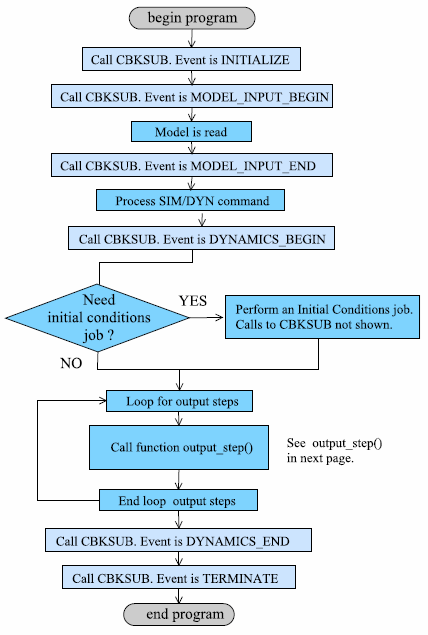
Figure 1 Calling sequence of CBKSUB during a dynamic simulation (1).
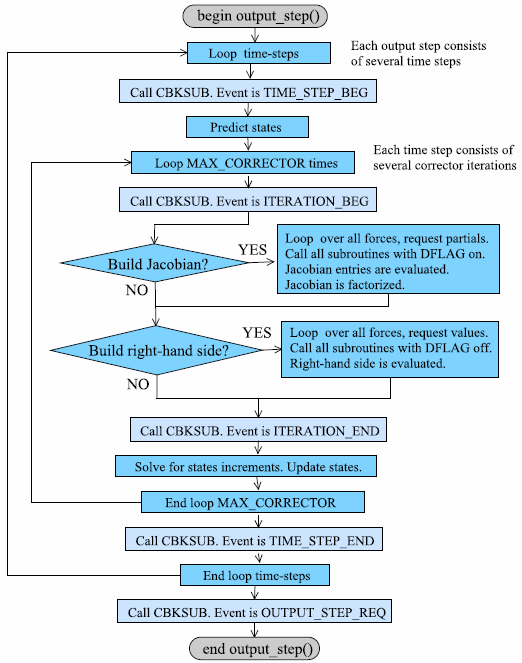
Figure 2 Calling sequence of CBKSUB during a dynamic simulation (2).
Example
Basic strategy
Let’s assume an Adams model has a set of VFORCEs defined by VFOSUB subroutines. Let’s assume the function expression for these VFORCEs is very complex and requires several SYSFNC or SYSARY calls in order to properly compute the magnitude of each component. For example, the x component of the forces couold have this expression:
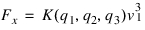
where  is a non linear function and
  and
and  are measurable states of the model that can be computed with the help of SYSFNC and SYSARY calls. If the computation of
  is common to all VFORCEs then it is possible to cache the value of
  at the beginning of each corrector iteration and then return the value:
is a non linear function and and are measurable states of the model that can be computed with the help of SYSFNC and SYSARY calls. If the computation of is common to all VFORCEs then it is possible to cache the value of at the beginning of each corrector iteration and then return the value:
At every subsequent VFOSUB call. This can be done safely by creating a CBKSUB where the ITERATION_BEG event is monitored to compute the cache value and set an internal flag ON. Both the cache and the flag will be defined in a COMMON block which the VFOSUBs share. For all other events, the flag is turned OFF.
Running without a CBKSUB
Listings nocallback.acf, nocallback.adm and nocallback.f (see Appendix) correspond to a simple model with a VFOSUB. The model is a spring-mass system shown in Figure 3. A VFOSUB computes the value of DX(16,1,1) and applies it to one of the masses. A dynamic simulation is run for 5.0 seconds.
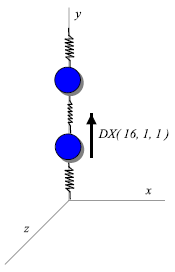
Figure 3 Simple model used for comparisons.
A partial listing of the message file is shown below.
command: FILE/MODEL=ttcs/nocallback, OUTPUT_PREFIX=results/nocallback
--------------------------------------------------------------------------------------
| Model Title |
|====================================================================================|
| |
| Test model without a CBKSUB |
| |
-------------------------------------------------------------------------------------
command:
command: integrator/error=1.e-04
command: sim/dyn, end=5, step=200
Begin Simulation
****** Performing Dynamic Simulation using Gstiff I3 Integrator ******
The system is modelled with INDEX-3 DAEs.
The integrator is GSTIFF, CORRECTOR = original
Integration error = 1.000000E-04
Simulation Step Function Cumulative Integration CPU
Time Size Evaluations Steps Taken Order time
___________ ___________ ___________ ___________ _________ ________
0.00000E+00 1.25000E-03 0 0 1 0.02
5.00000E-01 1.87099E-02 96 45 5 0.05
1.00000E+00 2.34734E-02 176 85 5 0.06
1.50000E+00 1.25000E-02 242 115 5 0.06
2.00000E+00 2.50000E-02 310 149 6 0.06
…
Running with a CBKSUB
Listings yescallback.acf, yescallback.adm and yescallback.f correspond to the same model shown above. However, this time a CBKSUB is included. The CBKSUB prints a message at every event announcing the event, the simulation mode, the analysis mode, and the current time when available.
The CBKSUB is interested only in the ev_ITERATION_BEG event at which a FLAG is raisde and a cache VALUE is computed to be used in the subsequent VFOSUB calls. The same dynamic simulation is run and Figure 4 shows the plots of the results comparing the runs with and without a CBKSUB. A partial listing of the message file when using a CBKSUB is shown below. Notice the CBKSUB prints a a message every time an iteration begins.
command: FILE/MODEL=ttcs/yescallback, OUTPUT_PREFIX=results/yescallback
---------------------------------------------------------------------------
| Model Title |
|==========================================================================|
| |
| Test model with a CBKSUB user-written subroutine | | | |
----------------------------------------------------------------------------
command:
command: integrator/error=1.e-04
command: sim/dyn, end=5, step=200
Begin Simulation
****** Performing Dynamic Simulation using Gstiff I3 Integrator ******
The system is modelled with INDEX-3 DAEs.
The integrator is GSTIFF, CORRECTOR = original
Integration error = 1.000000E-04
Event ev_ITERATION_BEG am_DYNAMICS am_INITIAL_CONDITI 0.000E+00
Event ev_ITERATION_BEG am_DYNAMICS am_INITIAL_CONDITI 0.000E+00
Event ev_ITERATION_BEG am_DYNAMICS am_INITIAL_CONDITI 0.000E+00
Event ev_ITERATION_BEG am_DYNAMICS am_INITIAL_CONDITI 0.000E+00
Event ev_ITERATION_BEG am_DYNAMICS am_DYNAMICS 0.125E-02
...
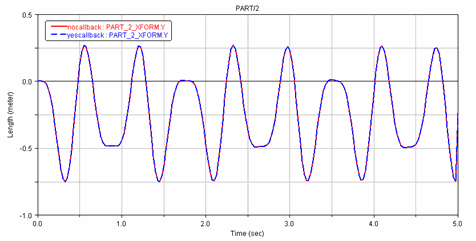
Figure 4 Comparison of results with and without CBKSUB.
Discussion
The fundamental question concerns the quality of the results. For the particular example presented above, the results with and without a CBKSUB will differ depending on the error tolerance set by the INTEGRATOR statement/command. In this case, using an error tolerance of 1.0E-04 shows indistinguisable results. If usinng a default INTEGRATION settings (error tolerance 1.0E-03) some differences appear but below the prescribed integration error nonetheless.
In general, using the strategy presented above ought to provide correct results (errors are under the prescribed integration error tolerance). However, the speed of convergence may be affected.
Appendix
nocallback.adm
Test model without a CBKSUB
!
!-------------------------------- SYSTEM UNITS ------------------------------
!
UNITS/
, FORCE = NEWTON
, MASS = KILOGRAM
, LENGTH = METER
, TIME = SECOND
!
!----------------------------------- PARTS ----------------------------------
!
!----------------------------------- Ground ---------------------------------
!
! adams_view_name='ground'
PART/1
, GROUND
!
! adams_view_name='MARKER_1'
MARKER/1
, PART = 1
, QP = 0, 0.5, 0
!
! adams_view_name='MARKER_2'
MARKER/2
, PART = 1
, QP = 0, 3.5, 0
!
! adams_view_name='MARKER_6'
MARKER/6
, PART = 1
, QP = 0, 3.2, 0
, REULER = 0D, 90D, 0D
!
! adams_view_name='MARKER_8'
MARKER/8
, PART = 1
, QP = 0, 1, 0
, REULER = 180D, 90D, 180D
!
! adams_view_name='MARKER_10'
MARKER/10
, PART = 1
, QP = 0, 0.5, 0
!
! adams_view_name='MARKER_13'
MARKER/13
, PART = 1
, QP = 0, 3.5, 0
!
! adams_view_name='MARKER_17'
MARKER/17
, PART = 1
, FLOATING
!
!------------------------------------ Part ----------------------------------
!
! adams_view_name='PART_2'
PART/2
, MASS = 1.0
, CM = 15
, IP = 1.0, 1.0, 1.0
!
! adams_view_name='MARKER_3'
MARKER/3
, PART = 2
, QP = 0, 1.6, 0
!
! adams_view_name='MARKER_7'
MARKER/7
, PART = 2
, QP = 0, 1, 0
, REULER = 180D, 90D, 180D
!
! adams_view_name='MARKER_9'
MARKER/9
, PART = 2
, QP = 0, 1.6, 0
!
! adams_view_name='MARKER_12'
MARKER/12
, PART = 2
, QP = 0, 1.6, 0
!
! adams_view_name='cm'
MARKER/15
, PART = 2
, QP = 0, 1.6, 0
, REULER = 0D, 90D, 0D
!
! adams_view_name='ELLIPSOID_1'
GRAPHICS/7
, ELLIPSOID
, CM = 3
, XSCALE = 0.2828427124
, YSCALE = 0.2828427124
, ZSCALE = 0.2828427124
!
!------------------------------------ Part ----------------------------------
!
! adams_view_name='PART_3'
PART/3
, MASS = 1.0
, CM = 16
, IP = 1.0, 1.0, 1.0
!
! adams_view_name='MARKER_4'
MARKER/4
, PART = 3
, QP = 0, 2.7, 0
!
! adams_view_name='MARKER_5'
MARKER/5
, PART = 3
, QP = 0, 3.2, 0
, REULER = 0D, 90D, 0D
!
! adams_view_name='MARKER_11'
MARKER/11
, PART = 3
, QP = 0, 2.7, 0
!
! adams_view_name='MARKER_14'
MARKER/14
, PART = 3
, QP = 0, 2.7, 0
!
! adams_view_name='cm'
MARKER/16
, PART = 3
, QP = 0, 2.7, 0
, REULER = 90D, 90D, 0D
!
! adams_view_name='ELLIPSOID_2'
GRAPHICS/8
, ELLIPSOID
, CM = 4
, XSCALE = 0.2828427124
, YSCALE = 0.2828427124
, ZSCALE = 0.2828427124
!
!------------------------------ DYNAMIC GRAPHICS ----------------------------
!
! adams_view_name='SPRING_1.I_graphic'
GRAPHICS/1
, FORCE
, ETYPE = SFORCE
, EID = 1
, EMARKER = 9
!
! adams_view_name='SPRING_1.J_graphic'
GRAPHICS/2
, FORCE
, ETYPE = SFORCE
, EID = 1
, EMARKER = 10
!
! adams_view_name='SPRING_2.I_graphic'
GRAPHICS/3
, FORCE
, ETYPE = SFORCE
, EID = 2
, EMARKER = 11
!
! adams_view_name='SPRING_2.J_graphic'
GRAPHICS/4
, FORCE
, ETYPE = SFORCE
, EID = 2
, EMARKER = 12
!
! adams_view_name='SPRING_3.I_graphic'
GRAPHICS/5
, FORCE
, ETYPE = SFORCE
, EID = 3
, EMARKER = 13
!
! adams_view_name='SPRING_3.J_graphic'
GRAPHICS/6
, FORCE
, ETYPE = SFORCE
, EID = 3
, EMARKER = 14
!
! adams_view_name='SPRING_1.spring_graphic'
GRAPHICS/9
, SPDP
, I = 9
, J = 10
, COILS = 10
, DA = 0.22
!
! adams_view_name='SPRING_2.spring_graphic'
GRAPHICS/11
, SPDP
, I = 11
, J = 12
, COILS = 10
, DA = 0.22
!
! adams_view_name='SPRING_3.spring_graphic'
GRAPHICS/13
, SPDP
, I = 13
, J = 14
, COILS = 10
, DA = 0.16
!
!-------------------------------- CONSTRAINTS -------------------------------
!
! adams_view_name='JOINT_1'
JOINT/1
, TRANSLATIONAL
, I = 5
, J = 6
!
! adams_view_name='JOINT_2'
JOINT/2
, TRANSLATIONAL
, I = 7
, J = 8
!
!----------------------------------- FORCES ---------------------------------
!
! adams_view_name='SPRING_1.sforce'
SFORCE/1
, TRANSLATIONAL
, I = 9
, J = 10
, FUNCTION = - 100.0*(dm(9,10)-1.0)
, - 0.0*vr(9,10)
, + 0.0
!
! adams_view_name='SPRING_2.sforce'
SFORCE/2
, TRANSLATIONAL
, I = 11
, J = 12
, FUNCTION = - 100.0*(dm(11,12)-1.0)
, - 0.0*vr(11,12)
, + 0.0
!
! adams_view_name='SPRING_3.sforce'
SFORCE/3
, TRANSLATIONAL
, I = 13
, J = 14
, FUNCTION = - 100.0*(dm(13,14)-1.0)
, - 0.0*vr(13,14)
, + 0.0
!
! adams_view_name='SFORCE_4'
SFORCE/4
, TRANSLATIONAL
, I = 15
, J = 1
, FUNCTION = 4.0
!
! adams_view_name='VFORCE_1'
VFORCE/1
, I = 16
, J = 17
, RM = 16
, FUNCTION = USER(1)
!
!----------------------------- ANALYSIS SETTINGS ----------------------------
!
RESULTS/
, XRF
!
END
nocallback.acf
nocallback
nocallback
integrator/error=1.e-04
sim/dyn, end=5, step=200
stop
nocallback.f
C----------------------------------------------------------------------
C Test model without a CBKSUB
C----------------------------------------------------------------------
C
C----------------------------------------------------------------------
C VFOSUB
C----------------------------------------------------------------------
SUBROUTINE VFOSUB(id, time, par, npar, dflag, iflag, result)
C
C Vforce function expression
IMPLICIT NONE
INTEGER id
DOUBLE PRECISION time
DOUBLE PRECISION par(*)
INTEGER npar
LOGICAL dflag
INTEGER iflag
DOUBLE PRECISION result(3)
C
C Local variable and parameter definitions
LOGICAL errflg
CHARACTER*80 mesage
INTEGER IPAR(3)
INTEGER NV
DOUBLE PRECISION DATINF(6)
INTEGER FLAG
DOUBLE PRECISION VALUE
C
C Program starts
ERRFLG = .FALSE.
IPAR(1) = 16
IPAR(2) = 1
IPAR(3) = 1
mesage='Error while reading from SYSARY in VFOSUB'
CALL SYSARY('DISP', IPAR, 3, DATINF, NV, errflg)
IF (errflg) CALL STOPERR(101, mesage)
result(1) = -DATINF(2)*30
result(2) = 0.0D0
result(3) = 0.0D0
C
RETURN
END
C
C----------------------------------------------------------------------
C STOPERR
C----------------------------------------------------------------------
SUBROUTINE STOPERR(id, mesage)
C
C Routine to call ADAMS Error Message routine and end program simulation
LOGICAL errflg
CHARACTER*(*) mesage
CHARACTER*4 endflg
INTEGER id
errflg=.TRUE.
endflg='STOP'
CALL ERRMES(errflg, mesage, id, endflg)
RETURN
END
yescallback.adm
Test model with a CBKSUB user-written subroutine
!
!-------------------------------- SYSTEM UNITS ---------------------------------
!
UNITS/
, FORCE = NEWTON
, MASS = KILOGRAM
, LENGTH = METER
, TIME = SECOND
!
!----------------------------------- PARTS -------------------------------------
!
!----------------------------------- Ground ------------------------------------
!
! adams_view_name='ground'
PART/1
, GROUND
!
! adams_view_name='MARKER_1'
MARKER/1
, PART = 1
, QP = 0, 0.5, 0
!
! adams_view_name='MARKER_2'
MARKER/2
, PART = 1
, QP = 0, 3.5, 0
!
! adams_view_name='MARKER_6'
MARKER/6
, PART = 1
, QP = 0, 3.2, 0
, REULER = 0D, 90D, 0D
!
! adams_view_name='MARKER_8'
MARKER/8
, PART = 1
, QP = 0, 1, 0
, REULER = 180D, 90D, 180D
!
! adams_view_name='MARKER_10'
MARKER/10
, PART = 1
, QP = 0, 0.5, 0
!
! adams_view_name='MARKER_13'
MARKER/13
, PART = 1
, QP = 0, 3.5, 0
!
! adams_view_name='MARKER_17'
MARKER/17
, PART = 1
, FLOATING
!
!------------------------------------ Part -------------------------------------
!
! adams_view_name='PART_2'
PART/2
, MASS = 1.0
, CM = 15
, IP = 1.0, 1.0, 1.0
!
! adams_view_name='MARKER_3'
MARKER/3
, PART = 2
, QP = 0, 1.6, 0
!
! adams_view_name='MARKER_7'
MARKER/7
, PART = 2
, QP = 0, 1, 0
, REULER = 180D, 90D, 180D
!
! adams_view_name='MARKER_9'
MARKER/9
, PART = 2
, QP = 0, 1.6, 0
!
! adams_view_name='MARKER_12'
MARKER/12
, PART = 2
, QP = 0, 1.6, 0
!
! adams_view_name='cm'
MARKER/15
, PART = 2
, QP = 0, 1.6, 0
, REULER = 0D, 90D, 0D
!
! adams_view_name='ELLIPSOID_1'
GRAPHICS/7
, ELLIPSOID
, CM = 3
, XSCALE = 0.2828427124
, YSCALE = 0.2828427124
, ZSCALE = 0.2828427124
!
!------------------------------------ Part -------------------------------------
!
! adams_view_name='PART_3'
PART/3
, MASS = 1.0
, CM = 16
, IP = 1.0, 1.0, 1.0
!
! adams_view_name='MARKER_4'
MARKER/4
, PART = 3
, QP = 0, 2.7, 0
!
! adams_view_name='MARKER_5'
MARKER/5
, PART = 3
, QP = 0, 3.2, 0
, REULER = 0D, 90D, 0D
!
! adams_view_name='MARKER_11'
MARKER/11
, PART = 3
, QP = 0, 2.7, 0
!
! adams_view_name='MARKER_14'
MARKER/14
, PART = 3
, QP = 0, 2.7, 0
!
! adams_view_name='cm'
MARKER/16
, PART = 3
, QP = 0, 2.7, 0
, REULER = 90D, 90D, 0D
!
! adams_view_name='ELLIPSOID_2'
GRAPHICS/8
, ELLIPSOID
, CM = 4
, XSCALE = 0.2828427124
, YSCALE = 0.2828427124
, ZSCALE = 0.2828427124
!
!------------------------------ DYNAMIC GRAPHICS -------------------------------
!
! adams_view_name='SPRING_1.I_graphic'
GRAPHICS/1
, FORCE
, ETYPE = SFORCE
, EID = 1
, EMARKER = 9
!
! adams_view_name='SPRING_1.J_graphic'
GRAPHICS/2
, FORCE
, ETYPE = SFORCE
, EID = 1
, EMARKER = 10
!
! adams_view_name='SPRING_2.I_graphic'
GRAPHICS/3
, FORCE
, ETYPE = SFORCE
, EID = 2
, EMARKER = 11
!
! adams_view_name='SPRING_2.J_graphic'
GRAPHICS/4
, FORCE
, ETYPE = SFORCE
, EID = 2
, EMARKER = 12
!
! adams_view_name='SPRING_3.I_graphic'
GRAPHICS/5
, FORCE
, ETYPE = SFORCE
, EID = 3
, EMARKER = 13
!
! adams_view_name='SPRING_3.J_graphic'
GRAPHICS/6
, FORCE
, ETYPE = SFORCE
, EID = 3
, EMARKER = 14
!
! adams_view_name='SPRING_1.spring_graphic'
GRAPHICS/9
, SPDP
, I = 9
, J = 10
, COILS = 10
, DA = 0.22
!
! adams_view_name='SPRING_2.spring_graphic'
GRAPHICS/11
, SPDP
, I = 11
, J = 12
, COILS = 10
, DA = 0.22
!
! adams_view_name='SPRING_3.spring_graphic'
GRAPHICS/13
, SPDP
, I = 13
, J = 14
, COILS = 10
, DA = 0.16
!
!-------------------------------- CONSTRAINTS -------------------------------
!
! adams_view_name='JOINT_1'
JOINT/1
, TRANSLATIONAL
, I = 5
, J = 6
!
! adams_view_name='JOINT_2'
JOINT/2
, TRANSLATIONAL
, I = 7
, J = 8
!
!----------------------------------- FORCES ---------------------------------
!
! adams_view_name='SPRING_1.sforce'
SFORCE/1
, TRANSLATIONAL
, I = 9
, J = 10
, FUNCTION = - 100.0*(dm(9,10)-1.0)
, - 0.0*vr(9,10)
, + 0.0
!
! adams_view_name='SPRING_2.sforce'
SFORCE/2
, TRANSLATIONAL
, I = 11
, J = 12
, FUNCTION = - 100.0*(dm(11,12)-1.0)
, - 0.0*vr(11,12)
, + 0.0
!
! adams_view_name='SPRING_3.sforce'
SFORCE/3
, TRANSLATIONAL
, I = 13
, J = 14
, FUNCTION = - 100.0*(dm(13,14)-1.0)
, - 0.0*vr(13,14)
, + 0.0
!
! adams_view_name='SFORCE_4'
SFORCE/4
, TRANSLATIONAL
, I = 15
, J = 1
, FUNCTION = 4.0
!
! adams_view_name='VFORCE_1'
VFORCE/1
, I = 16
, J = 17
, RM = 16
, FUNCTION = USER(1)
!
!------------------------------ DATA STRUCTURES -----------------------------
!
CBKSUB/1
, PRIORITY = 1
, FUNCTION = USER(0)\
, ROUTINE = yescallback::
!
!----------------------------- ANALYSIS SETTINGS ----------------------------
!
RESULTS/
, XRF
!
END
yescallback.acf
yescallback
yescallback
integrator/error=1.e-04
sim/dyn, end=5, step=200
stop
yescallback.f
C----------------------------------------------------------------------
C Test model with a CBKSUB user-written subroutine
C----------------------------------------------------------------------
include 'slv_cbksub_util.inc'
C
C----------------------------------------------------------------------
C VFOSUB
C----------------------------------------------------------------------
SUBROUTINE VFOSUB(id, time, par, npar, dflag, iflag, result)
C
C Vforce function expression
IMPLICIT NONE
INTEGER id
DOUBLE PRECISION time
DOUBLE PRECISION par(*)
INTEGER npar
LOGICAL dflag
INTEGER iflag
DOUBLE PRECISION result(3)
C
C Local variable and parameter definitions
LOGICAL errflg
CHARACTER*80 mesage
INTEGER IPAR(3)
INTEGER NV
DOUBLE PRECISION DATINF(6)
INTEGER FLAG
DOUBLE PRECISION VALUE
C
C Common data
C VALUE is the cache computed by the CBKSUB soubroutine
C FLAG=0 means no cache.
C FLAG=1 means cache is available.
COMMON/ FORCES/ VALUE, FLAG
C
C If the solver is numerically differencing or no cache is available,
C return the value computed using SYSARY.
C Do not change the value of FLAG because this may be a call made by
C the evaluator of output results.
IF(dflag.eq..TRUE..OR.FLAG.EQ.0) THEN
errflg = .FALSE.
IPAR(1) = 16
IPAR(2) = 1
IPAR(3) = 1
mesage='Error while reading from SYSARY in VFOSUB'
CALL SYSARY('DISP', IPAR, 3, DATINF, NV, errflg)
IF (errflg) CALL STOPERR(101, mesage)
result(1) = -DATINF(2)*30
result(2) = 0.0D0
result(3) = 0.0D0
return
END IF
C
C Cached VALUE is available
result(1) = VALUE
result(2) = 0.0D0
result(3) = 0.0D0
C
RETURN
END
C
C----------------------------------------------------------------------
C STOPERR
C----------------------------------------------------------------------
SUBROUTINE STOPERR(id, mesage)
C
C Routine to call ADAMS Error Message routine and end program simulation
LOGICAL errflg
CHARACTER*(*) mesage
CHARACTER*4 endflg
INTEGER id
errflg=.TRUE.
endflg='STOP'
CALL ERRMES(errflg, mesage, id, endflg)
RETURN
END
C
C----------------------------------------------------------------------
C CBKSUB
C----------------------------------------------------------------------
SUBROUTINE CBKSUB(time, event, data)
C
include 'slv_cbksub.inc'
C
C Input parameters
DOUBLE PRECISION time
INTEGER event, data(3)
C
C Event and mode names
CHARACTER*16 EVTNAME
CHARACTER*18 ANLYMOD
C
C Used in the SYSARY call
INTEGER IPAR(3)
INTEGER NV
LOGICAL ERRFLG
DOUBLE PRECISION DATINF(6)
CHARACTER*200 MESSAGE
INTEGER FLAG
DOUBLE PRECISION VALUE
C
C Common data
C VALUE is the cache computed by the CBKSUB soubroutine
C FLAG = 0 means no cache.
C FLAG = 1 means cache is available.
COMMON/ FORCES/ VALUE, FLAG
C
C Set the flag to 'no cache available'
FLAG = 0
C
C Compute cache if this is an ev_ITERATION_BEG event
IF( event.eq.ev_ITERATION_BEG ) THEN
C
C This is a ev_ITERATION_BEG event.
WRITE(MESSAGE,'(A,A,A,A,A,A,e10.3)') 'Event ', EVTNAME(event),
* ' ', ANLYMOD(data(1)), ' ', ANLYMOD(data(2)), time
CALL USRMES(.TRUE.,MESSAGE, 0, 'INFO')
C
C Call SYSARY and update the cache
FLAG = 1
IPAR(1) = 16
IPAR(2) = 1
IPAR(3) = 1
CALL SYSARY('DISP', IPAR, 3, DATINF, NV, ERRFLG)
VALUE = -DATINF(2)*30
ENDIF
C
RETURN
END