EQUILIBRIUM
An EQUILIBRIUM command redefines and/or lists the data for an EQUILIBRIUM statement. If an EQUILIBRIUM statement is not included in the Adams Solver model and an EQUILIBRIUM command is not issued prior to a static or quasi-static simulation, Adams Solver (FORTRAN) uses the default values for ALIMIT, ERROR, IMBALANCE, MAXIT, PATTERN, STABILITY, and TLIMIT for the analysis.
Format
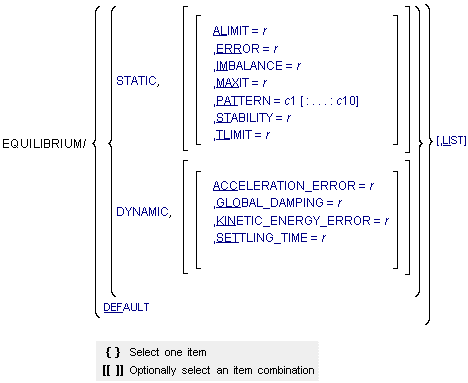
Arguments
ACCELERATION_ERROR=r | Specifies the maximum acceleration error allowed during static simulations performed using dynamic analyses. Range: ACCELERATION_ERROR > 0 |
ALIMIT=r | Specifies the maximum angular increment allowed per iteration during static simulations performed using static analyses. The default units for ALIMIT are radians. To specify ALIMIT in degrees, add a D after the value. Range: ALIMIT > 0 |
DEFAULT | Resets all options to the default values specified in the EQUILIBRIUM statement, namely: STATIC ALIMIT = 10D ERROR = 1.0 IMBALANCE = 1.0E-4 MAXIT = 25 PATTERN = T:T:T:T:T:T:T:T:T:T STABILITY = 1.0E-5 TLIMIT = 20 |
DYNAMIC | Specifies that Adams Solver (FORTRAN) perform static simulations using dynamic analyses. |
ERROR=r | Specifies the maximum relative displacement error during static simulations performed using static analyses. Range: ERROR > 0 |
GLOBAL_DAMPING=r | Applies the coefficient for global damping to all bodies during static simulations performed using dynamic analyses. Range: GLOBAL_DAMPING > 0 |
IMBALANCE=r | Specifies the maximum force imbalance during static simulations performed using static analyses. Range: IMBALANCE > 0 |
KINETIC_ENERGY_ERROR=r | Specifies the maximum kinetic energy error allowed in static simulations performed using dynamic analyses. Range: KINETIC_ENERGY_ERROR > 0 |
LIST | Lists the current values of the data in the EQUILIBRIUM statement. |
MAXIT=r | Specifies the maximum number of iterations allowed for finding static equilibrium during static simulations performed using static analyses. Range: MAXIT > 0 |
PATTERN=c1[:...:c10] | Specifes as many as ten character strings that together establish the pattern for evaluating the Jacobian matrix during the modified Newton-Raphson iteration. For each iteration, T or TRUE indicates that Adams Solver (FORTRAN) evaluates the Jacobian and F or FALSE indicates that Adams Solver (FORTRAN) does not evaluate the Jacobian for static simulations performed using static analyses. Thus, cj determines whether or not Adams Solver (FORTRAN) evaluates the Jacobian at the jth iteration. If necessary, Adams Solver (FORTRAN) repeats the pattern of evaluations until it reaches the maximum number of iterations (MAXIT). The number of Ts or TRUEs and Fs or FALSEs together must be at least one and no more than ten. |
SETTLING_TIME=r | Specifies the maximum time allowed to reach equilibrium during static simulations performed using dynamic analyses. Range: SETTLING_TIME > 0 |
STABILITY=r | Specifies the fraction of the mass and damping matrices (subsets of the equilibrium Jacobian matrix) Adams Solver adds to the stiffness matrix (a subset of the equilibrium Jacobian matrix) during static simulations performed using static analyses. Adding a fraction of the mass and damping matrices to the stiffness matrix can stabilize the iteration process and prevent the iteration from diverging. Often the stiffness matrix is singular for a system because the system is neutrally stable (for example, the system moves in certain directions without affecting the potential energy). Adding a fraction of the mass and damping matrices to the stiffness matrix removes this singularity and makes it possible to solve for equilibrium positions. The value of STABILITY does not affect the accuracy of the solution, but it does affect the rate of convergence of the iteration process. Range: STABILITY > 0 |
STATIC | Specifies that Adams Solver (FORTRAN) perform static simulations using static analyses. |
TLIMIT=r | Specifies the maximum translational increment allowed per iteration during static simulations performed using static analyses. Range: TLIMIT > 0 |
Extended Definition
For an extended definition on the EQUILIBRIUM command and corresponding tips, cautions, and examples, refer to the EQUILIBRIUM statement.
See other Analysis parameters available.