EQUILIBRIUM
The EQUILIBRIUM statement specifies error tolerances and other parameters for static equilibrium and quasi-static equilibrium analyses.
Format
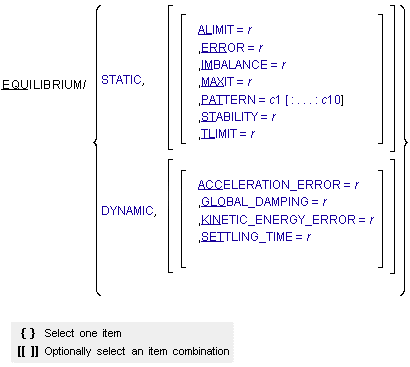
Arguments
ACCELERATION_ERROR=r | Specifies the maximum acceleration error allowed during static simulations performed using dynamic analyses. Default: 1.0E-02 Range: ACCELERATION_ERROR > 0 |
ALIMIT=r | Specifies the maximum angular increment allowed per iteration during static or quasi-static equilibrium analysis. The default units for ALIMIT are radians. To specify ALIMIT in degrees, add a D after the value. Default: 0.17453 (10 D) Range: ALIMIT > 0 |
DYNAMIC | Specifies that Adams Solver perform static simulations using dynamic analyses. Default: STATIC |
ERROR=r | Specifies the relative correction convergence-threshold. The iterative process carried out during the equilibrium analysis can not converge prior to all relevant relative corrections being smaller than this value. Default: 1.0E-04 Range: ERROR > 0 |
GLOBAL_DAMPING=r | Specifies the coefficient for global damping applied to all bodies during static simulations performed using dynamic analyses. Default: 0 Range: GLOBAL_DAMPING > 0 |
IMBALANCE=r | Specifies the equation imbalance convergence threshold. The iterative process carried out during the equilibrium analysis can not converge prior to each equation imbalance being smaller than this value. Default: 1.0E-04 Range: IMBALANCE > 0 |
KINETIC_ENERGY_ERROR=r | Specifies the maximum kinetic energy error allowed in static simulations performed using dynamic analyses. Default: 1.0E-02 Range: KINETIC_ENERGY_ERROR > 0 |
MAXIT=i | Specifies the maximum number of iterations allowed for finding static equilibrium. Default: 25 Range: MAXIT > 0 |
PATTERN=c1[:...:c10] | This statement specifies as many as ten character strings that together establish the pattern for evaluating the Jacobian matrix during the modified Newton-Raphson iteration. For each iteration, T or TRUE indicates that Adams Solver (FORTRAN) evaluates the Jacobian and F or FALSE indicates that Adams Solver (FORTRAN) does not evaluate the Jacobian. Thus, cj determines whether or not Adams Solver (FORTRAN) evaluates the Jacobian at the jth iteration. If necessary, Adams Solver (FORTRAN) repeats the pattern of evaluations until it reaches the maximum number of iterations (MAXIT). The number of Ts or TRUEs and Fs or FALSEs together must be at least one and no more than ten. Default: T:T:T:T:T:T:T:T:T:T, which evaluates the Jacobian at every iteration (for example, the unmodified Newton-Raphson algorithm). |
SETTLING_TIME=r | Specifies the maximum time allowed to reach equilibrium during static simulations performed using dynamic analyses. Default: 100 Range: SETTLING_TIME > 0 |
STABILITY=r | Specifies the fraction of the mass and damping matrices (subsets of the equilibrium Jacobian matrix) Adams Solver adds to the stiffness matrix (a subset of the equilibrium Jacobian matrix) during static simulations performed using static analyses. Adding a fraction of the mass and damping matrices to the stiffness matrix can stabilize the iteration process and prevent the iteration from diverging. Often the stiffness matrix is singular for a system because the system is neutrally stable (for example, the system moves in certain directions without affecting the potential energy). Adding a fraction of the mass and damping matrices to the stiffness matrix removes this singularity and makes it possible to solve for equilibrium positions. The value of STABILITY does not affect the accuracy of the solution, but it does affect the rate of convergence of the iteration process. Default: 1.0E-05 Range: STABILITY > 0 |
STATIC | Specifies that Adams Solver (FORTRAN) perform static simulations using static analyses. Default: STATIC |
TLIMIT=r | Specifies the maximum translational increment allowed per iteration. Default: 20 Range: TLIMIT > 0 |
Extended Definition
The EQUILIBRIUM statement specifies the use of static or dynamic analyses to find static and quasi-static equilibria. The statement also specifies error tolerances and other parameters for static and quasi-static equilibrium analyses, and dynamic analyses that are used to find static equilibria. You use this statement when you want to change one or more of the tolerances or other parameters from the default values.
Use the SIMULATE command to request one of the following:
■Single static equilibrium analysis.
■Dynamic analysis for finding static equilibrium.
■Series of static equilibrium analyses over time, for example, a quasi-static equilibrium analysis.
A static or quasi-static equilibrium analysis is appropriate only when the system has one or more degrees of freedom (degrees of freedom after Adams Solver (FORTRAN) has removed any redundant constraints). Static and quasi-static equilibrium analyses solve for displacement and static forces, but not for velocity, acceleration, or inertia forces which are all assumed to be zero. To perform a static equilibrium analysis, Adams Solver (FORTRAN) finds the configuration and static forces for which all the static forces in the system balance after being evaluated at the current simulation time. This process requires the solution of a set of nonlinear algebraic equations. Adams Solver (FORTRAN) uses the modified Newton-Raphson iteration to solve these equations.
When you specify the DYNAMIC argument for an EQUILIBRIUM statement or command, and you issue a SIMULATE/STATIC command, Adams Solver (FORTRAN) performs a dynamic analysis that is similar to one it would perform if you issued the SIMULATE/DYNAMIC command, except for the following:
■The function-expression variable, TIME, whether accessed using function expressions or the TIME variable passed to most user subroutines, is set to the starting time for the duration of the analysis. This setting has the effect of freezing all time-dependent excitations.
■Body forces are applied to all rigid bodies (damping forces) that oppose motion relative to ground. The magnitude of the forces depends on the velocity of the rigid bodies relative to ground and on the GLOBAL_DAMPING argument used with the EQUILIBRIUM statement or command.
■The simulation time is reset to the starting time once the analysis is complete.
■The analysis terminates when one of the following occurs:
■A norm of the system acceleration falls below ACCELERATION_ERROR and the system kinetic energy simultaneously falls below KINETIC_ENERGY_ERROR.
■The simulation time has advanced by SETTLING_TIME.
Because a dynamic analysis occurs here, the INTEGRATOR statement/command specifies the error tolerances and other parameters normally associated with dynamic analyses.
If neither an EQUILIBRIUM command nor an EQUILIBRIUM statement is issued in an Adams Solver session, to set the default values for ALIMIT, ERROR, IMBALANCE, MAXIT, PATTERN, STABILITY, and TLIMIT,the Adams Solver (FORTRAN) uses their default values when performing a static equilibrium or quasi-static equilibrium analysis.
If neither an EQUILIBRIUM command nor an EQUILIBRIUM statement is issued in an Adams Solver session, to set the default values for ALIMIT, ERROR, IMBALANCE, MAXIT, PATTERN, STABILITY, and TLIMIT,the Adams Solver (FORTRAN) uses their default values when performing a static equilibrium or quasi-static equilibrium analysis.
Note: | If the dynamic analysis will be followed by a static analysis, the goal of the dynamic analysis is not to find equilibrium, but to allow the system to settle enough to permit the subsequent analysis to be successful. |
Tip: | ■Using the PATTERN argument to request less frequent evaluations of the Jacobian matrix may decrease the computation time. However, infrequent evaluations could also be more expensive since the modified Newton-Raphson algorithm might require more iterations due to the slower convergence rates. ■Use the ALIMIT and TLIMIT arguments to limit incrementing displacement variables during an iteration for static equilibrium. Excessive incrementing could prevent Adams Solver (FORTRAN) from finding a static equilibrium position. ■Use the IMBALANCE argument if the physical units of the problem are such that the default imbalance of 1.0E0-4 is excessively large or excessively small. Changing from an inappropriate to an appropriate value for IMBALANCE saves CPU time. ■If your model runs well dynamically, and will not find static equilibrium using a static analysis, try using the EQUILIBRIUM/DYNAMIC option to find static equilibrium. ■Understanding how your model behaves in a standard SIMULATE/DYNAMIC simulation is helpful before using dynamic analyses to find static equilibrium. ■When using a dynamic analysis to find static equilibrium, you may find it useful to relax the INTEGRATOR/ERROR argument more than if you were performing a standard dynamic analysis. ■A damped dynamic analysis can only approach a static equilibrium asymptotically. Therefore, to find the equilibrium solution, consider following a dynamic analysis, or a series of analyses, with a final static analysis. ■For dynamic analyses that are used to find static equilibrium, you should choose the convergence criteria: ACCELERATION_ERROR, KINETIC_ENERGY_ERROR, and SETTLING_TIME based on the units of the model, as well as the characteristics of the simulation. |
Caution: | ■Setting STABILITY=0 results in a singularity if the system is neutrally stable. If the system is neutrally stable, STABILITY must be greater than zero in order for Adams Solver (FORTRAN) to compute static equilibrium. ■Static equilibrium, or quasi-static equilibrium analyses often have multiple equilibrium solutions. Adams Solver (FORTRAN) makes no attempt to converge to a stable position. For example, Adams Solver (FORTRAN) may converge to an inverted pendulum position rather than the more common hanging pendulum. Items such as the initial position of parts and the settings for ALIMIT, TLIMIT, and STABILITY can all influence the solution to which Adams Solver (FORTRAN) converges. ■Currently, ADAMSC++ /Solver can use only GSTIFF and GSTIFF variants to perform dynamic analyses using static equilibrium. ■Only rigid bodies (PARTS) are considered when using dynamic analyses to find static equilibrium (flexible bodies and point masses are ignored both when applying global damping forces and when calculating system acceleration and kinetic energy). It is possible to use the EQUILIBIUM/DYNAMIC option with flexible bodies and/or point masses in the model. The results may or may not be useful. |
Examples
EQUILIBRIUM/ STABILITY=0.01, TLIMIT=10
, IMBALANCE=1.0E-05
, IMBALANCE=1.0E-05
This EQUILIBRIUM statement instructs Adams Solver (FORTRAN) to use these values instead of the defaults when performing a static or quasi-static equilibrium analysis. It adds 0.01 times the sum of the mass and damping matrices to the stiffness matrix during an equilibrium iteration. It limits the translation in any one iteration to 10 length units. The force imbalance in the system must be less than 1.0E-05 force units for Adams Solver (FORTRAN) to consider the system to be in equilibrium.
EQUILIBRIUM/ DYNAMIC, SETTLING_TIME = 0.5, LIST
This EQUILIBRIUM statement instructs Adams Solver (FORTRAN) to perform dynamic analyses to find static equilibria, and resets the value of the SETTLING_TIME parameter from the default to 0.5. It also causes Adams Solver (FORTRAN) to list on your screen and in a message file (.msg) the current EQUILIBRIUM settings.
See other Analysis parameters available.