INTEGRATOR
The INTEGRATOR command lets you redefine data in the INTEGRATOR statement.
Format
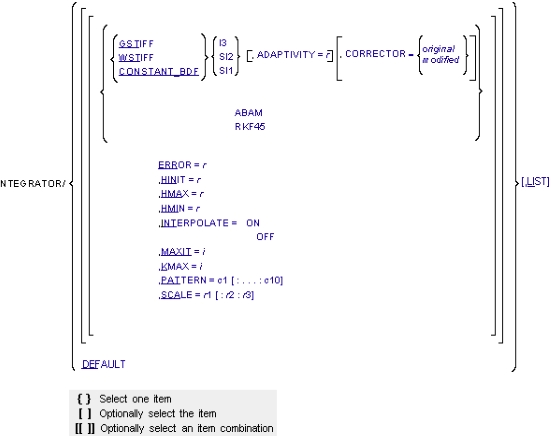
Arguments
ABAM | Specifies that the ABAM (Adams-Bashforth-Adams-Moulton) integrator is to be used for integrating the differential equations of motion. This integrator is suitable for systems that are not stiff; that is, systems that are characterized by undamped transients. |
ADAPTIVITY=r | All of the BDF integrators (GSTIFF, WSTIFF, and CONSTANT_BDF) use Newton-Raphson iterations to solve the nonlinear Differential-Algebraic equations of motion. This iteration process is referred to as correcting the solution. ADAPTIVITY modifies the corrector error tolerance to include a term that is inversely proportional to the integration step size. This is intended to loosen the corrector tolerance when the step size gets small (many corrector failures occur because of small step size). If the integration step size is equal to h, ADAPTIVITY/h is added to the corrector tolerance. When using ADAPTIVITY, begin with a small number, such as ADAPTIVITY=1E-8. Note that this relaxes the tolerance of the corrector, which can introduce additional error into the dynamic solution. The corrector tolerance must be at least a factor of 10 stricter than the integration tolerance. The ratio advocated in the theoretical literature ranges from .1 to .001 and is a function of the integrator order and step size. The ratio that Adams Solver (FORTRAN) uses varies with the integrator chosen, but is within the range specified above. If you use ADAPTIVITY to relax the corrector tolerances, be sure to validate your results by running another simulation using a different integration error tolerance. ADAPTIVITY affects only the GSTIFF, WSTIFF, and CONSTANT_BDF integrators. ADAPTIVITY is typically required to overcome corrector convergence difficulties. You should not use it in normal situations. Range: ADAPTIVITY > 0 |
CONSTANT_BDF | Specifies that the CONSTANT_BDF integrator is to be used for integrating the differential equations of motion. |
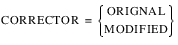 | Specifies the corrector algorithm that is to be used with the stiff integrators GSTIFF, WSTIFF, or CONSTANT_BDF. The corrector in a stiff integrator ensures that all candidate solutions satisfy the equations of the system. The two algorithms, original and modified, differ primarily in how they assess when the corrector iterations have converged. ■CORRECTOR=original - Specifies that the corrector available in the previous releases of Adams Solver. This is the default. This implementation of the corrector requires that at convergence, the error in all solution variables be less than the corrector error tolerance. ■CORRECTOR=modified - Specifies that a modified corrector. This implementation of the corrector requires that at convergence, the error in only those variables for which integration error is being monitored, be less than the corrector error tolerance. Because this is a slightly looser definition of convergence, use proper care when using this option. The CORRECTOR=modified setting is helpful for models containing discontinuities in the forcing functions. Problems with contacts belong in this category. For additional information, see the Extended Definition in the INTEGRATOR statement. |
DEFAULT | Resets the integrator parameters. See the default values in the INTEGRATOR statement. |
ERROR=r | Specifies the relative and absolute local integration error tolerances that the integrator must satisfy at each step. For BDF integrators, Adams Solver (FORTRAN) monitors the integration errors in the displacement and state variables that the other differential equations (DIFFs, LSEs, GSEs, and TFSISOs) define. ABAM, SI1, and SI2 formulations also monitor errors in velocity variables. The larger the ERROR, the greater the error/step in your solution. Note that the value for ERROR is units-sensitive. For example, if a system is modeled in mm-kg-s units, the units of length must be in mm. Assuming that all the translational states are larger than 1mm, setting ERROR=1E-3 implies that the integrator monitors all changes of the order of 1 micron. The error tolerance is compared against a local error measure that depends on the difference between the current predicted and corrected states, the past history of the states, and the current integration order. Default: 1E-3 Range: ERROR > 0 |
GSTIFF | Specifies that the GSTIFF (Gear) integrator is to be used for integrating the differential equations of motion. |
HINIT=r | Defines the initial time step that the integrator attempts. Range: 0 < HMIN < HINIT < HMAX |
HMAX=r | Defines the maximum time step that the integrator is allowed to take. Default: When setting the argument INTERPOLATE = ON, the integration step size is limited to the value specified for HMAX, but if HMAX is not defined, no limit is placed on the integration step size. If INTERPOLATE = OFF, the maximum step size is limited to the output step. Range: 0 < HMIN < HINIT < HMAX |
HMIN=r | Defines the minimum time step that the integrator is allowed to take. Range: 0 < HMIN < HINIT < HMAX |
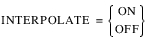 | INTERPOLATE=ON specifies that the integrator is not required to control its step size to hit an output point. Therefore, when the integrator crosses an output point, it computes a preliminary solution by interpolating to the output point. It then refines or reconciles the solution to satisfy the equations of motion and constraint. INTERPOLATE=OFF turns off interpolation for the chosen integrator. Interpolation is not supported for CONSTANT_BDF or RKF45. |
I3 | Specifies the Index-3 (I3) formulation be used. For additional information, see the Extended Definition in the INTEGRATOR statement. |
KMAX=i | Indicates the maximum order that the integrator can use. The order of integration refers to the order of the polynomials used in the solution. The integrator controls the order of the integration and the step size, and therefore, controls the local integration error at each step so that it is less than the error tolerance specified. Note: For problems involving discontinuities, such as contacts, setting KMAX=2 can improve the speed of the solution. However, we do not recommend that you set the KMAX parameter unless you are a very experienced user. Any modification can adversely affect the integrator’s accuracy and robustness. Range: 1 < KMAX < 12 (ABAM); 1 < KMAX < 6 (GSTIFF, WSTIFF, and CONSTANT_BDF) Note: KMAX is not applicable to RKF45. |
LIST | Lists current values of the integrator arguments. |
MAXIT=i | Specifies the maximum number of iterations allowed for the Newton-Raphson iterations to converge to the solution of the nonlinear equations. The correctors in GSTIFF and WSTIFF use the Newton-Raphson iterations. ABAM also uses Newton-Raphson iterations to solve for the dependent coordinates. MAXIT should not be set larger than 10. This is because round-off errors increase when a large number of iterations are taken. This can cause an error in the solution. Range: MAXIT > 0 |
PATTERN=c1[:...:c10] | Indicates the pattern of trues and falses for re-evaluating the Jacobian matrix for Newton-Raphson. A value of true (T) indicates that Adams Solver (FORTRAN) is evaluating a new Jacobian matrix for that iteration. A value of false (F) indicates that Adams Solver (FORTRAN) is using the previously calculated Jacobian matrix as an approximation of the current one. PATTERN accepts a sequence of at least 1 character string and not more than 10 character strings. Each string must be either TRUE or FALSE, which you can abbreviate with T or F. You must separate the strings with colons. Note: A pattern setting of all false, implies that Adams Solver (FORTRAN) is not to evaluate the Jacobian until it encounters a corrector failure. For problems that are linear or almost linear, this setting can improve simulation speed substantially. |
RKF45 | Specifies that a Runge-Kutta-Fehlberg (4,5) method be used to integrate the differential equations governing the system being modeled. RKF45 is a single-step method unlike the BDF methods (GSTIFF, WSTIFF, or CONSTANT_BDF) or ABAM. It is primarily designed to solve non-stiff and mildly stiff differential equations when derivative evaluations are not expensive. In general, you should not use it to get highly accurate results or answers at many specific points. Internally, RKF45 uses the DDERKF integrator written by L.F. Shampine and H.A. Watts. DDERKF attempts to discover when it is not suitable for the task posed. For additional information, see the Extended Definition in the INTEGRATOR statement. |
SCALE=r1[,r2][,r3] | The SCALE parameter applies to only WSTIFF and ABAM. It is not applicable to GSTIFF and CONSTANT_BDF. SCALE scales the sum of the relative and absolute error tolerances. If T is the sum of the relative and absolute error tolerances applied to the state vector, then the following tolerance is applied: ■r1 * T to the translational displacements ■r2 * T to the angular displacements ■r3 * T to the modal coordinates Note: By default, error tolerance is uniformly applied to all of the displacement and angular coordinates. Range: SCALE [i] > 0 where i = 1, 2, or 3 |
SI1 | Specifies that the Stabilized Index-1 (SI1) formulation, in conjunction with the GSTIFF, WSTIFF, or CONSTANT_BDF integrator, be used for formulating and integrating differential equations of motion. The SI1 formulation takes into account constraint derivatives when solving for equations of motion. In addition, it monitors the integration error on the impulse of the Lagrange Multipliers in the system. These additional safeguards enable the integrators to monitor the integrator error in velocity variables and the impulse of the Lagrange Multipliers. Simulation results are, therefore, very accurate. A positive side effect of the SI1 formulation is that the Jacobian matrix remains stable at small step sizes, which increases the stability and robustness of the corrector at small step sizes. For additional information, see the Extended Definition in the INTEGRATOR statement. |
SI2 | Specifies that the Stabilized Index-2 (SI2) formulation, in conjunction with the GSTIFF or CONSTANT_BDF integrator, be used for formulating and integrating differential equations of motion. The SI2 formulation takes into account constraint derivatives when solving for equations of motion. This process enables the GSTIFF integrator to monitor the integration error of velocity variables, and therefore renders highly accurate simulations. A positive side effect of the SI2 formulation is that the Jacobian matrix remains stable at small step sizes, which increases the stability and robustness of the corrector at small step sizes. The SI2 formulation is available only with GSTIFF and CONSTANT_BDF. For additional information, see the Extended Definition in the INTEGRATOR statement. |
WSTIFF | Specifies that the WSTIFF (Wielenga stiff) integrator be used for integrating the differential equations of motion. WSTIFF uses the BDF method that takes step sizes into account when calculating the coefficients for any particular integration order. |
Extended Definition
For an extended definition, cautions, and tips, see the INTEGRATOR statement.
Note: | Setting the environment variable MSC_ADAMS_SOLVER_INTERPOLATE_ADAPTIVE enforces Adams Solver to use a different output block generation. The scheme works as follows: ■Instead of generating an output block at each requested interval provided in the SIMULATE/DYNAMICS command, Adams Solver ignores the request of generating equally spaced output blocks and generates an output block at any integration step past the request interval. The end result is that Adams Solver generates output blocks at unequally spaced times. ■Using this setting, the solver does not need to reduce the current time step in order to hit a requested output block. Instead, it leaps over and prints an output block as soon as a request output block was suggested. In some cases, the solver may leap over more than one requested output blocks. The main benefit is speed performance. The main drawback is that output blocks are not equally spaced. |
Examples
INTEGRATOR/SI2, GSTIFF, ERROR=1.0E-4, HINIT=1.0E-6, LIST
This command specifies a dynamic simulation using the SI2 equation formulation combined with the GSTIFF integrator.
■The integrator has an error limit of 1.0E-4 and overrides the default value of 1.0E-3.
■HINIT= 1.0E-6 specifies an initial timestep of 1.0E-6, which overrides the default of 1/20th of the output step.
■LIST prints all current settings of the INTEGRATOR to the screen and message file.
See other Analysis parameters available.