SIMULATE
The SIMULATE command specifies the type of simulation you want Adams Solver (FORTRAN) to run. It also defines the run time and the number or size of the output steps.
Format
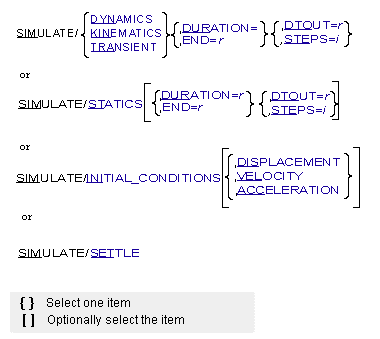
Arguments
ACCELERATION | Specifies that initial displacement, velocity, and acceleration analyses of the mechanism are to be performed if such analyses have not already been performed at the current time step and with the current model. |
DISPLACEMENT | Specifies that an initial displacement analysis of the mechanism is to be performed if such an analysis has not already been performed at the current time step and with the current model. |
DTOUT=r | Specifies the size of the output step for the analysis in model time units. Range: DTOUT > 0 |
DURATION | Specifies the duration of the analysis in model time units. Range: DURATION > 0 |
DYNAMICS | Specifies that Adams Solver (FORTRAN) is to integrate the dynamics equations. If a dynamic analysis is requested for a system with zero degrees of freedom, Adams Solver (FORTRAN) issues a warning message and integrates the equations instead of using kinematic analysis. Kinematic analysis is faster. |
END | Specifies the end time for a dynamic, a kinematic, or a quasi-static equilibrium analysis. Range: END > Begin Time > 0 |
INITIAL_CONDITIONS | Specifies that an initial-conditions analysis of the mechanism is to be performed. All three initial-conditions analyses are performed if 1) no DISPLACEMENT, VELOCITY, or ACCELERATION argument or if 2) the ACCELERATION argument is specified and no initial condition analyses have been performed at the current time step with the current model. Displacement and velocity initial conditions are performed if the VELOCITY argument is specified and no initial condition analyses have been performed at the current time step with the current model. Displacement initial conditions are performed if the DISPLACEMENT argument is specified and no initial-conditions analyses have been performed at the current time step with the current model. |
KINEMATICS | Specifies that Adams Solver (FORTRAN) is to run a kinematic analysis. If a kinematic analysis is requested for a system with one or more degrees of freedom, Adams Solver (FORTRAN) issues an error message and ignores the entire command. |
STATICS | Specifies that Adams Solver (FORTRAN) perform either a static equilibruim simulation or a quasi-static equilibrium simulation. Adams Solver (FORTRAN): ■Performs a static equilibrium simulation at the current time if you use the STATICS argument and you do not specify an end time or steps. ■Performs a quasi-static equilibrium simulation if you use the STATICS argument and specify an end time and steps. ■Uses kinematic analyses to perform static simulations for models that have zero degrees of freedom. If you request a quasi-static simulation on a model that has zero degrees of freedom, Adams Solver (FORTRAN) computes the same motion as in a kinematic analysis, but ignores (set to zero) velocities and accelerations. ■Uses dynamic analyses to perform static simulations when you issue the EQUILIBRIUM/DYNAMIC statement/command. See the EQUILIBRIUM statement. |
STEPS=i | Specifies the number of output steps wanted for the analysis. Range: STEPS > 1 |
TRANSIENT | Specifies that Adams Solver (FORTRAN) is to run a kinematic analysis if the system has zero degrees of freedom or a dynamic analysis if the system has one or more degrees of freedom. |
VELOCITY | Specifies that initial displacement and velocity analyses of the mechanism are to be performed if such analyses have not already been performed at the current time step and with the current model. |
Extended Definition
Adams Solver (FORTRAN) allows you to do one or more analyses on the same dataset until the STOP command is issued. These analyses can be different types as long as they meet the degree-of-freedom requirements for that type of analysis. For example, it is often useful or necessary to do a static equilibrium analysis on a model to establish equilibrium conditions before doing a dynamic analysis.
Tip: | Note the distinction between END and DURATION. At time zero, a SIMULATE command with END=1 or DURATION=1 indicates an end time of one second. At time one second, a SIMULATE command with END=1.5 indicates an end time of 1.5 seconds; a SIMULATE command with DURATION=1.5 indicates an end time of 2.5 seconds. |
Caution: | ■Before a dynamic simulation that follows a static simulation, Adams Solver (FORTRAN) computes the velocity and acceleration initial conditions even if they were computed prior to the static simulation. This ensures that the velocity and acceleration initial conditions are consistent with the displacements from the static simulation. ■When you use END and STEPS parameters with the SIM/STAT command, time increments past time = 0. As such, initial velocities are no longer valid and are not considered in subsequent dynamic analyses. ■If a static simulation directly follows a dynamic simulation, Adams Solver (FORTRAN) sets the velocities and accelerations (except gravity) to zero and repeats the displacement initial conditions. ■For a zero-degree-of-freedom model, Adams Solver (FORTRAN) solves the kinematic equations during a static simulation. This means that, even though it is a static simulation, Adams Solver (FORTRAN) uses the parameters from the KINEMATICS statement or command (not the EQUILIBRIUM statement or command) and sets the MODE analysis constant to 1 (not 5 or 6). ■Adams Solver (FORTRAN) automatically performs a dynamic analysis for kinematic systems that include DIFFs and sets the MODE analysis constant to 4 (not 1). ■The STEPS and DTOUT arguments can indirectly affect the accuracy of the results computed by the integrator. Under these circumstances, Adams Solver (FORTRAN) controls solution error by adjusting the integration time step to meet the error tolerance specified by the integrator or default values. These integrators do not use a time step greater than the interval to the next output time, however. The output times are determined by STEPS or DTOUT in combination with END or DURATION. Specifying a smaller output step than the integrators would ordinarily take results in more integrator steps than actually required to meet the error tolerance. In this case, varying the output step may vary the accuracy of the computed results, although all results are within the specified error tolerance. If the computed solution changes greatly when you change STEPS or DTOUT, the error tolerance is too large. You should reduce the error tolerance. If you set the error tolerance properly, the number of output steps should have very little effect on the computed results. ■Adams Solver (FORTRAN) may internally construct one or more differential elements in order to handle velocity and acceleration constraints. In those cases, the model will never be kinematical. Hence, attempts to run SIMULATE/KINEMATICS will trigger the dynamic solver to run the simulation. |
Examples
SIMULATE / KINEMATICS, END=5, STEPS=200
This SIMULATE command instructs Adams Solver (FORTRAN) to perform a kinematic analysis from the begin time to 5 time units with 200 output steps. If this is the first analysis on this dataset in this session, the begin time is 0 time units. Adams Solver (FORTRAN) can execute this command only if the system has zero degrees of freedom.
SIMULATE / KINEMATICS, DURATION=2, DTOUT=.025
This SIMULATE command instructs Adams Solver (FORTRAN) to perform a kinematic analysis for 2 time units with one output step every .025 time units.
See other Simulation available.