MATRIX
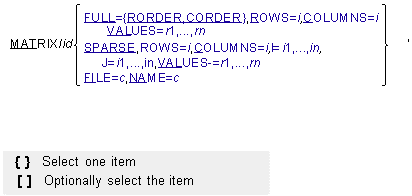
The MATRIX statement provides the means for inputting a two-dimensional array of numerical values. It is used primarily to support other statements such as CURVE, LSE, and NFORCE. The entries in the matrix can be assigned values with the arguments on the MATRIX statement itself or the MATRIX statement can specify the name of another data file from which the code reads the values. The data file can be in one of two formats: the Adams Solver (FORTRAN) format or the standard FSAVE format supported by the MATRIXx software package.
Format
Arguments
COLUMNS=i | Specifies the number of columns (N) in the matrix. |
FILE=c | Specifies the name of a file containing the values of the matrix. The file name can include the directory on operating systems that support path names, such as Linux. You can use the FILE argument to read large matrices into Adams Solver (FORTRAN). There is no limit on the size of an array read from a file. The first record in the file contains an 80-character header of which the first seven or eight characters are meaningful. ■If the first record begins with the characters ADAMSMAT or ADAMSMAT2, then the file is assumed to be in a format used by the Adams Solver (FORTRAN) code. ■If the first record begins with the characters MATRIXx, then the file is assumed to be in the FSAVE format of the MATRIXx software package. ■If the first record begins with the characters MATSAVE, then the file is assumed to be in the MATSAVE format of the MATRIXx software package. Note that the three specifications for the format of the data file are case sensitive. Capital letters and a lower case x must be used to make the MATRIXx selection. No other kinds of files are currently supported. However, the ADAMSMAT and ADAMSMAT2 options are fairly general since the format for reading in the data is specified within the file. See the example, Multiple Matrix Input Using the FILE Option, for details on the structure of an ADAMSMAT file. Because the FILE argument and value can be at most eighty characters long, the file path and name are limited from seventy-five characters (if you do not abbreviate FILE=) to seventy-seven characters (if you abbreviate FILE= to FI=). Range: All printable characters except '!', ';', ',', and '&' |
FULL={RORDER,CORDER} | Specifies a full-input format where all of the M x N entries are specified with the VALUES argument. RORDER indicates the values are listed by row in the VALUES argument. CORDER indicates the values are listed by column. |
I=i1,...,in | Specifies the row position of each of the n entries in the VALUES argument for a sparse matrix. Range: 1 < ik < M, k = 1,...,n |
J=i1,...,in | Specifies the column position of each of the n entries in the VALUES argument for a sparse matrix. Range: 1 < ik < N, k = 1,...,n |
NAME=c | Specifies the name of a matrix in the file identified by the FILE argument. All types of files, ADAMSMAT, ADAMSMAT2, MATRIXx , and MATSAVE, can contain data for more than one matrix. You use the NAME argument to select a particular matrix from a file even if it contains just one. Additional MATRIX statements are needed if multiple matrices are to be read from the same file. Range: All printable characters except '!', ';', ',', and '&' Maximum Number of Characters: 8 (all on the same line) |
ROWS=i | Specifies the number of rows (M) in the matrix. |
SPARSE | Specifies that a SPARSE input format is used where the row position, column position, and value are given, usually only for nonzero entry values. |
VALUES=r1,...,rn | If you select the FULL option, the VALUES argument specifies all of the m times n entries in the matrix. The sequence depends on the value of the FULL argument. If RORDER is specified, the values are listed row-by-row. If CORDER is specified, the values are listed column-by-column. If you select the SPARSE option, the VALUES argument specifies only the entries that may be nonzero. That is, Adams Solver (FORTRAN) assumes all entries in the M x N array not assigned values by the I, J, and VALUES arguments are equal to zero. The kth entry in VALUES is assigned to the row identified by the kth entry in I and to the column identified by the kth entry in J for k=1,...,n. Each pair of I and J entries must specify a unique entry in the array; there can be no duplicate entries for the same position in the matrix. |
Extended Definition
The MATRIX statement defines a general M x N array that can be a rectangular or square two-dimensional matrix or even a row or column matrix. You can enter the data in a FULL or SPARSE format. When the matrix has approximately one-third or more of its entries nonzero, the FULL format is more efficient. When the matrix is mostly empty and the labor associated with entering each nonzero entry’s row position, column position, and value is less than entering all of the values, you should use the SPARSE format. In cases where the matrix to be input is very large, you should use the FILE and NAME arguments to specify an external file containing the matrix.
You can enter data for an M x N matrix into Adams Solver (FORTRAN) from a file specified by the FILE argument on the MATRIX statement. The contents of the file can be in one of four formats: ADAMSMAT, ADAMSMAT2, or either the standard FSAVE format or the optional MATSAVE format.
The first 7,8, or 9 characters in the header of the file must be MATRIXx, MATSAVE, ADAMSMAT, or ADAMSMAT2 to identify the format of the data. Although the remaining content of an ADAMSMAT or ADAMSMAT2 file (as well as all of an Adams Solver (FORTRAN) dataset) is case insensitive, the identifying labels at the beginning of the first record in a matrix file must appear exactly as shown.
A file in the in the ADAMSMAT or ADAMSMAT2 format consists of variable-length records that must be laid out as described in the following paragraphs. The example at the end, Table 1, and Table 2 illustrate the details. The FSAVE and MATSAVE formats are described in MATRIXx literature.
To select the option, the header or first record must begin with the characters ADAMSMAT or ADAMSMAT2. The remainder of the first record can be used as a title to identify the kind of data in the file.
The second record contains only an integer n right-justified within the first five spaces (the I5 FORTRAN format). It tells how many matrices are contained in the file. The next several records (one or more) contain the alphanumeric names (eight characters or less) of all of the matrices in the file. The names are listed sequentially, four to a line, in eight-character fields separated by ten blanks. That is, the FORTRAN format for the records containing the matrix names is A8, 10X, A8, 10X, A8, 10X, A8.
Sets of contiguous records define each matrix. Without any intervening blank lines, the blocks of records begin immediately after the last line of matrix names. The first record in each block contains the name of the matrix in the first eight characters of the line. The code searches through the file until it finds the block of records corresponding to the NAME argument on the MATRIX statement.
The first record of the block contains the type of matrix (either FULL or SPARSE) within the second eight spaces on the record. If the type is FULL, the next eight spaces (from 17 through 24) contain the string CORDER or RORDER to indicate that the values are listed by column or by row, respectively. Otherwise, if the type is SPARSE, the space is left blank.
The numerical values specified on the first record of the block include the:
■Number of rows M in the matrix
■Number of columns N
■Total number of entries to be assigned values from the file
If the matrix type is SPARSE, then the total number of entries must be less than or equal to (generally much less than) M x N. If the matrix is FULL, the total number must be equal to M x N.
■For a matrix in the ADAMSMAT format, the values for M, N, and the total number of entries must be right justified in the fields 25 to 29, 30 to 34, and 35 to 39, respectively.
■For a matrix in the ADAMSMAT2 format, the values for M, N, and the total number of entries must be separated by spaces.
The final entry on the first line of the block of records defining each matrix is the format specification for the records containing the values of the matrix. Beginning in column 40, 41 spaces are allowed for the character string containing the FORTRAN format specification which must include delimiting parentheses. The lines of data begin on the next record and continue with successive records until the code has read into storage either M x N values in case the matrix is FULL or the total number specified in case the matrix is SPARSE.
Table 1. Specifications for the ADAMSMAT Matrix File
Item: | Number of records: | Contents: | Argument or symbol: | FORTRAN format: |
|---|---|---|---|---|
1 | 1 | Header for the file | ADAMSMAT | A |
2 | 1 | Number of matrices in the file | n | I5 |
3 | (n+3)/4 | Number of the n matrices | NAME | 4 (8A,10X) |
4 | 1 | Name of the matrix {FULL or SPARSE} {CORDER or RORDER if FULL or blank if SPARSE} Number of rows, columns, and total number of entries FORTRAN format specification | NAME M,N, number format | A8, A8, A8, 3I5 A41 |
5 | variable | All entries in the matrix if FULL or The indices and nonzero entries in the matrix if SPARSE | A(I,J) or I,J, A(I,J) | FORMAT FORMAT |
Note: Items 4 and 5 have to be repeated n times, once for each matrix named in Item 3. | ||||
Table 2. Specifications for the ADAMSMAT12 Matrix File
Item: | Number of records: | Contents: | Argument or symbol: | FORTRAN format: |
|---|---|---|---|---|
1 | 1 | Header for the file | ADAMSMAT2 | A |
2 | 1 | Number of matrices in the file | n | I5 |
3 | (n+3)/4 | Number of the n matrices | NAME | 4 (8A,10X) |
4 | 1 | Name of the matrix {FULL or SPARSE} {CORDER or RORDER if FULL or blank if SPARSE} Number of rows, columns, and total number of entries FORTRAN format specification | NAME M,N, number format | A8, A8, A8, Values separated by spaces A41 |
5 | variable | All entries in the matrix if FULL or The indices and nonzero entries in the matrix if SPARSE | A(I,J) or I,J, A(I,J) | FORMAT FORMAT |
Note: Items 4 and 5 have to be repeated n times, once for each matrix named in Item 3. | ||||
For a FULL matrix, the code simply reads matrix entries sequentially from the file. If the matrix is SPARSE, the data have to be organized in triplets: Adams Solver (FORTRAN) reads the row and column indices followed by the corresponding entry in the matrix. One triplet follows another until the specified total number of values have been read into the storage arrays.
If another matrix is contained in the file, the block of records defining its structure and containing its values must follow immediately after the last line of data for the previous matrix.
If another matrix is contained in the file, the block of records defining its structure and containing its values must follow immediately after the last line of data for the previous matrix.
Tip: | The largest square matrix that may be entered directly in the dataset is 48 48. In order to enter a larger matrix, you must supply the matrix entries in a file using the FILE and NAME arguments. |
Caution: | The file name must be on one line following the argument FILE =, which if abbreviated, limits the identifier to about 75 characters. |
Examples
Small Matrix Input
Assume that the following matrix is needed in an Adams Solver analysis:
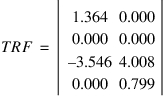
Because it is small in size, you will have little difficulty in entering the matrix directly into the Adams Solver (FORTRAN) dataset.
■Version 1, FULL Format (row order):
MATRIX/1, FULL = RORDER, ROWS=4, COLUMNS=2,
, VALUES=1.364,0.000,0.000,0.000,-3.546,4.008,0.000,0.799
MATRIX/1, FULL = RORDER, ROWS=4, COLUMNS=2,
, VALUES=1.364,0.000,0.000,0.000,-3.546,4.008,0.000,0.799
■Version 2, FULL Format (column order):
MATRIX/1, FULL = CORDER, ROWS=4, COLUMNS=2,
, VALUES= 1.364,0.000,-3.546,0.000,0.000,0.000,4.008,0.799
MATRIX/1, FULL = CORDER, ROWS=4, COLUMNS=2,
, VALUES= 1.364,0.000,-3.546,0.000,0.000,0.000,4.008,0.799
■Version 3, SPARSE Format:
MATRIX/1, SPARSE, ROWS=4, COLUMNS=2,
, I=1,3,3,4,J=1,1,2,2,
, VALUES=1.364,-3.546,4.008,0.799
MATRIX/1, SPARSE, ROWS=4, COLUMNS=2,
, I=1,3,3,4,J=1,1,2,2,
, VALUES=1.364,-3.546,4.008,0.799
Multiple Matrix Input Using the FILE Option
Assume that in addition to the matrix above, there are two additional matrices you want to enter into Adams Solver (FORTRAN).
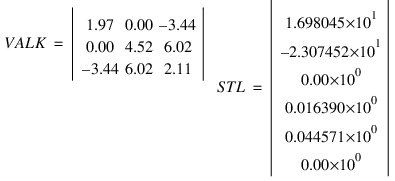
Assume that you want to use an external file to input the matrices and that all of the matrices are resident in a file called prob.dat which is in the system subdirectory, /home/staff/demo. The Adams Solver (FORTRAN) dataset entries would appear as the following:
MATRIX/1, File=/home/staff/demo/prob8.dat, Name= trf
MATRIX/2, File=/home/staff/demo/prob8.dat, Name= valk
MATRIX/3, File=/home/staff/demo/prob8.dat, Name= stl
MATRIX/2, File=/home/staff/demo/prob8.dat, Name= valk
MATRIX/3, File=/home/staff/demo/prob8.dat, Name= stl
The leading record of a matrix file is read as character data. The first seven or eight columns must contain one of the three character strings: MATRIXx, MATSAVE, or ADAMSMAT.
In the current example, the prob.dat is in the directory, /home/staff/demo, and contains the following data:
1 2 3 4 5 6 7 8
12345678901234567890123456789012345678901234567890123456789012345678901234567890
ADAMSMAT Floating platform example
3
TRF VALK STL
TRF FULL RORDER 4 2 8 ( 8F8.5 )
1.36400 0.00000 0.00000 0.00000 -3.54600 4.00800 0.00000 0.79900
VALK FULL CORDER 3 3 9 ( 3F6.3 )
1.970 0.000-3.440
0.000 4.510 6.020
-3.440 6.020 2.110
STL SPARSE 6 1 4 ( 2( 2I5, E14.6 ) )
1 1 0.169805E+02 2 1 -0.230745E+02
4 1 0.016390E+00 5 1 0.011271E+00
The second and third records are read with format I5 and 4(A8,10X), respectively. Then, the first record of each of the blocks corresponding to the three matrices TRF, VALK, and STL is read with the format 3A8, 3I5, A41. Finally, as can be seen in the copy of the file shown above between the two strings of 80 characters that mark the columns (which, of course, are not part of the file), the single record of data for the matrix TRF is read with the format 8F8.5; the three records for VALK are read with 3F6.3; and the two records for STL with 2(2I5,E14.6).
Applications
The CURVE, LSE, and NFORCE statements refer to the MATRIX statement. The CURVE statement specifies a MATRIX statement containing the coordinates of the points defining a general curve in space. For the LSE statement (Linear State Equation), the MATRIX statement is used to store the system state matrices (A, B, C, and D). For the NFORCE statement, the MATRIX statement is used to input the system stiffness and damping matrices (K and C), as well as the free length (Lo) and the preload (Fo).
See other Reference data available.