IMPACT
IThe IMPACT function models collisions.
Format
IMPACT (x, , x1, k, e, cmax, d)
, x1, k, e, cmax, d)Arguments
x | An expression that specifies a distance variable used to compute the IMPACT function. For example, if you use the x displacement of Marker 0201 with respect to Marker 0301, then x is DX(0201,0301,0301). See DX. |
 | An expression that specifies the time derivative of x to IMPACT. For example, if x is DX(0201,0301), then  is VX(0201,0301,0,0301). is VX(0201,0301,0,0301). |
x1 | A positive real variable that specifies the free length of x. If x is less than x1, then Adams Solver (FORTRAN) calculates a positive value for the force. Otherwise, the force value is zero. You can define x1 as a real number, function, or variable. |
k | A non-negative real variable that specifies the stiffness of the boundary surface interaction. |
e | A positive real variable that specifies the exponent of the force deformation characteristic. For a stiffening spring characteristic, e > 1.0. For a softening spring characteristic, 0 < e < 1.0. |
cmax | A non-negative real variable that specifies the maximum damping coefficient. |
d | A positive real variable that specifies the boundary penetration at which Adams Solver (FORTRAN) applies full damping. |
Extended Definition
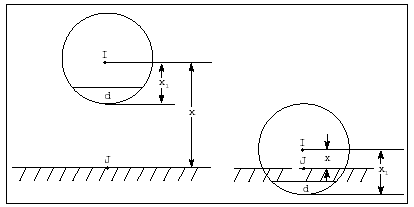
The IMPACT function activates when the distance between the I and the J markers falls below a nominal free length (x1), that is, when two parts collide. As long as the distance between the I and J markers is greater than x1, the force is zero. An example of a system you can model with the IMPACT function is a ball falling towards the ground. Figure 3 below shows the free length value x1 at which the IMPACT force turns on.
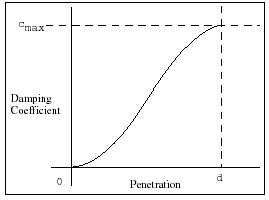
The force has two components, a spring or stiffness component and a damping or viscous component. The stiffness component is proportional to k, and is a function of the penetration of the I marker within the free length distance from the J marker. The stiffness component opposes the penetration. The damping component of the force is a function of the speed of penetration. The damping opposes the direction of relative motion. To prevent a discontinuity in the damping force at contact, the damping coefficient is, by definition, a cubic step function of the penetration. Thus, at zero penetration, the damping coefficient is always zero. The damping coefficient achieves a maximum, cmax, at a user-defined penetration, d.
Figure 3 Example Illustrating the IMPACT Function
The equation defining IMPACT is:

Note that when:
■x > x1, no penetration occurs and the force is zero (penetration p = 0)
■x < x1, penetration occurs at the end closer to the J marker, and the force is > 0 (penetration p = x1 - x).
Also note that when p < d, the instantaneous damping coefficient is a cubic step function of the penetration p.
When p > d, the instantaneous damping coefficient is cmax.
Adams Solver (FORTRAN) never returns a negative force for IMPACT. If the above expression is negative, Adams Solver (FORTRAN) returns a value of zero.
Figure 4 below is a plot of damping coefficient versus penetration.
Figure 4 Damping Coefficient versus Penetration
Tip: | Define the exponent value as: e > 2.1 for the contact modeling fu. According to design studies models run better using this exponent value in the IMPACT function. |
Caution: | ■For maximum performance, define e > 1. When e is < 1, the defined force contains a slope discontinuity that may cause difficulty for the integrator. ■If your model uses different length units than the stiffness properties you would like to use, you need to scale the stiffness by: length conversion factor**exponent The reason for this is that the contact force due to penetration is defined as:  Adams View will do this conversion for you if you change the units under Settings. However, you will need to do it if you enter the parameters in different units. Example: k = 3800 N/mm e = 2.0 current model units: force = N, length = m stiffness to enter for contact = 3800*(1000**2) = 3.8e9 Also note that only length is raised to the exponent, so if you have a different force unit, you would only scale it by the force conversion factor. |
Examples
SFORCE/1, I=11, J=21, TRANSLATION, ACTIONONLY
, FUNCTION=IMPACT(DZ(11,21,21),
, VZ(11,21,21,21),1.0, 100, 1.5, 25, 0.1)
, FUNCTION=IMPACT(DZ(11,21,21),
, VZ(11,21,21,21),1.0, 100, 1.5, 25, 0.1)
This statement defines an impact force when a ball penetrates another object such as a table. The force is a single-component force at Marker 11 and along the z-axis of Marker 21. DZ(11,21,21) defines the instantaneous displacement of Marker 11 with respect to Marker 21 along the z-axis of Marker 21. VZ(11,21,21,21) defines the instantaneous velocity.
The free length is 1; that is, the radius of the ball is 1 unit. The stiffness is 100, and the exponent of deformation is 1.5, the maximum damping coefficient is 25. The penetration at which Adams Solver (FORTRAN) applies full damping is 0.1.
The free length is 1; that is, the radius of the ball is 1 unit. The stiffness is 100, and the exponent of deformation is 1.5, the maximum damping coefficient is 25. The penetration at which Adams Solver (FORTRAN) applies full damping is 0.1.
VFORCE/1, I=27, JFLOAT=25, RM=26
, FX=0/
, FY=IMPACT(DY(4,1,1), VY(4,1,1), 1-AKISPL(DX(4,1,1),
, DZ(4,1,1),3),le7, 1.01, le4,.25)/
, FZ=0
, FX=0/
, FY=IMPACT(DY(4,1,1), VY(4,1,1), 1-AKISPL(DX(4,1,1),
, DZ(4,1,1),3),le7, 1.01, le4,.25)/
, FZ=0
This statement defines an impact force when a ball penetrates a surface defined by a spline. The force is a translational force at Marker 27. The DY(4,1,1) defines the y-component of the instantaneous displacement of Marker 4 with respect to Marker 1. The VY(4,1,1) defines the y-component of the instantaneous velocity. The free length is defined using spline 3, which represents the surface.
The independent variables in the spline are defined using the x-component and z-component of the instantaneous displacement of Marker 4 with respect to Marker 1, DX(4,1,1) and DZ(4,1,1), respectively. The stiffness is le7, the exponent of deformation is 1.01, the maximum damping coefficient is le4, and the penetration at which Adams Solver (FORTRAN) applies full damping is 0.25.
See other General available.