Additional Parallel Code in User-written Subroutines
Scope and definitions
This article addresses the implementation of additional parallel code within user-written subroutines. Additional parallelization consists of launching threads using tools like OpenMP, Intel TBB, POSIX, C++ std::thread, etc. We refer to these additional threads launched within user-written subroutines as "user-threads.
There are two classes of user-written subroutines. The first class (class P) includes all user-written subroutines that do make the call to function ADAMS_DECLARE_THREADSAFE(). The second class (class S) includes all user-written subroutines that do not make that call.
Class P subroutines are evaluated in parallel (if the NTHREAD setting is bigger than 1). Class S subroutines are evaluated serially, before the parallel evaluation of class P.
On one hand, we show that launching user-threads from within class P user-written subroutines may not provide enhanced performance, except in three scenarios described in section Special cases where additional parallelization is recommended. On another hand, launching user-threads from within class S user-written subroutines is always recommended; however, users should be advised that parallel execution involves additional overhead in the operating system required to manage the user-threads; hence, users may see improved performance only for parallel execution of relatively large computations.
Typical parallel scenarios
Figure 7 and Figure 8 are evaluation diagrams showing how Adams will call user-written subroutines during the evaluation of a Jacobian matrix or a right-hand side vector. In Figure 7, a class P user-written subroutine (green box) is defined for a single Adams element (e.g., a single GFORCE is using that user-written subroutine). Notice also, a single Adams parallel thread is executing that code. Otherwise, Figure 8 shows the more frequent case of multiple Adams threads executing the same code of a class P subroutine; that is the case of multiple Adams elements using the same code (e.g., multiple GFORCEs that use the same user-written subroutine).
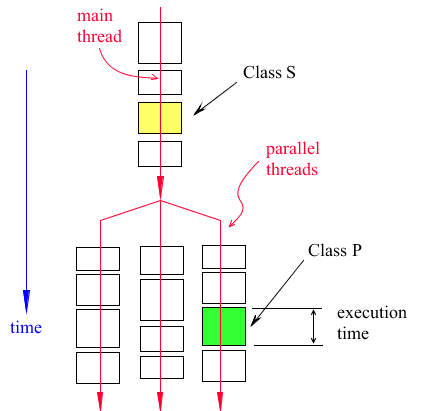
Figure 7 Evaluation of a Single Class P Subroutine in a Single Adams Parallel Thread
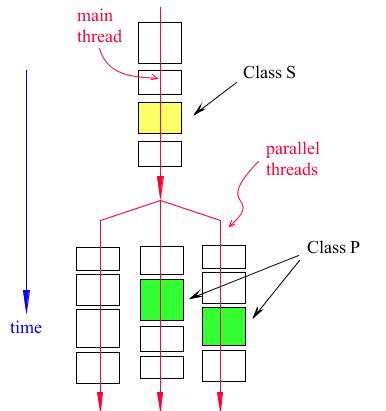
Figure 8 Execution of a Class P Subroutine in Two Adams Parallel Threads
1. Adams has no order of evaluation of the serial elements (class S) and no order of evaluation for class P subroutines.
2. Notice in Figure 8, the code for the class P subroutine is being executed in parallel by two Adams threads at the same time.
3. The length of the boxes (in the time direction) represents the evaluation time it takes to evaluate the elements.
4. Adams calls the subroutines every time it needs to evaluate a Jacobian, or the right-hand side, or both.
5. In both Figure 7 and Figure 8, it is assumed that there are 3 Adams parallel threads running on 3 CPUs.
6. Adams has a load balancing algorithm with the objective of having all threads finish their loads at the same time. The algorithm shuffles the elements between threads until the best performance is attained.
Case of more threads than CPUs
Would it be possible to add additional parallelization inside the code for a class P subroutine? In theory, yes, it is possible to parallelize the code inside a class P subroutine. However, the additional parallelization may be detrimental to performance. There are some scenarios, discussed later, showing that adding additional parallelization does provide improved performance. It may prove difficult to estimate whether adding additional parallelization is beneficial; therefore, users need to experiment.
As a reminder, we must point out that in both Figure 7and Figure 8, we have assumed that the computer executing Adams does have three CPUs. What would the evaluation diagram look like should the host have only two CPUs? Figure 9 answers that question showing the scenario of a single class P subroutine for the case of three threads running on two CPUs.
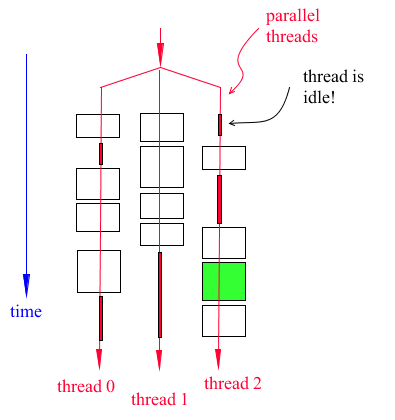
Figure 9 Case of three threads running on two CPUs
Notice the following in Figure 9:
1. The thin red boxes represent the time a thread is idle because there are only two CPUs. At the start of the parallel execution, Adams launches three threads, but the operating system must have one thread idle because there are only two CPUs. Later, notice the operating system puts thread 0 in idle mode and awakens thread 2 so it can do some work, and so on. Only two threads can work at the same time.
2. Performance is degraded because of the constant context switch [1] the operating system makes to manage the execution of the Adams threads. For example, to start the execution of thread 2, the operating system must stop thread 0. This operation is costly.
3. The diagram shown in Figure 9 is not optimal, as mentioned above, the load balancing will shuffle the elements to optimize the total wall time required to build the Jacobian.
Additional parallelization in class P subroutines
We now address the scenario of a user parallelizing a class P subroutine (adding user-threads). First, we handle the case of a single element with a class P subroutine as shown in Figure 7 above.
Let’s assume that (a) we have three Adams threads, (b) we have three CPUs, (c) there is a single class P element, and (d) the class P code will launch three user threads. Let’s also assume, for clarity, that the whole code of the class P element can be parallelized. Notice that regardless of the parallel technique used (OpenMP, POSIX, Intel TBB, etc.), we are assuming that the class P element will create three user-threads. In this scenario, we will have something like shown in Figure 10 below.
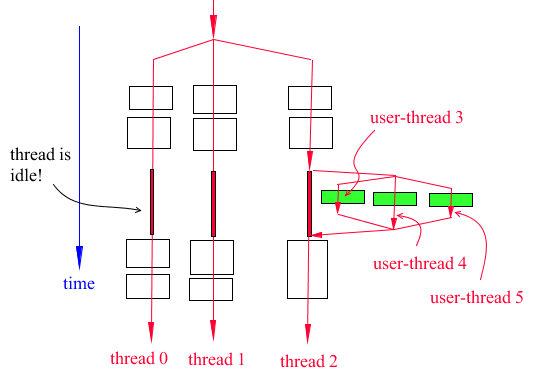
Figure 10 Additional parallelization of a class P subroutine
Notice in Figure 10 that the Adams threads (thread 0, thread 1 and thread 2) are idle while the user-threads are working because there are only three CPUs. Moreover, the diagram in Figure 10 is overly simplified because the operating system, at any time, may stop a user-thread to allow an Adams thread to run, and so on.
However, the question is this: is it faster to parallelize a class P subroutine as shown in Figure 10? In a perfect fictional world where there is no threading context switch (creating and managing the threads is negligible), then the execution time would be the same. See Figure 11 below which shows the total execution time, in a perfect fictional world, with and without additional parallelization in a class P subroutine. Figure 11 assumes there is perfect load balancing done by Adams and that each Adams thread takes 30 seconds to finish. On the left of Figure 11 is the original diagram without user-threading, on the right is the diagram with the additional parallel code in the class P subroutine. Notice there is no theoretical benefit.
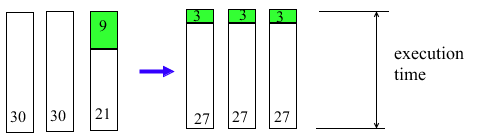
Figure 11 Total execution time with and without additional parallelization (fictional world)
However, the reality is that the threads’ context switch and the overhead of launching/stopping the threads can be very costly. This additional cost is spent by the operating system, and it results in worse performance. The situation is even worse if multiple class P elements have additional parallelization; this scenario is described in Figure 12 below.
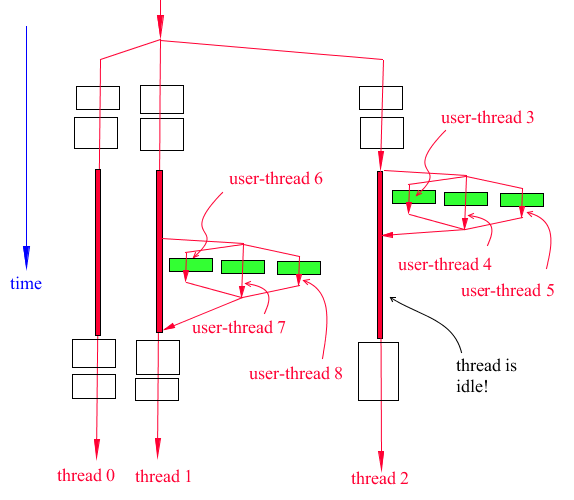
Figure 12 Case of two class P subroutines running on two Adams threads
The scenario described in Figure 12 is particularly important because it shows that multiple sets of user-threads are being launched by the code. Notice that user-threads 6, 7, and 8 must be different that user-threads 3, 4, and 5. Hence, users implementing OpenMP must review the limitations of OpenMP.
Users may argue that their additional parallelization can be launched on threads running on different CPUs (additional CPUs not used by Adams threads), however this document is based on the premise that Adams is already using the maximum number of CPUs available. See below a section on limitations and recommendations for adding additional parallel code.
Special cases where additional parallelization is recommended
There are three scenarios for which additional parallelization is recommended.
Scenario 1
The first scenario is the case of a class S element that requires a large CPU time to finish. Given that class S subroutines are evaluated serially (one by one on the main thread of the Adams process), users can safely use any parallelization method. Figure 13 shows this first scenario. Notice that launching user-threads does not provide an immediate performance improvement. See section on limitations on parallelizing a code.
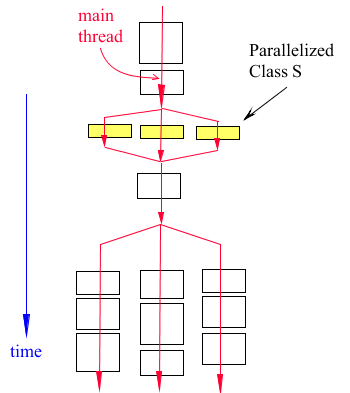
Figure 13 Parallelization of a class S subroutine
Scenario 2
The second scenario is that of a class P element that takes an enormous amount of time. Figure 14 describes that scenario. Notice that in this case (left side of Figure 14), no matter how many threads Adams has, the time to build the Jacobian would be the same because the time to finish the single class P element controls the execution time. Parallelizing the class P code (right side of Figure 14, will generate minimum context switching. The reason is that the other Adams parallel threads will finish quickly leaving the available CPUs for the user threads created by the class P code.

Figure 14 Case of beneficial additional parallelization in class P subroutines
Unfortunately, Adams does not have tools to detect the rare scenario described in Figure 14.
Scenario 3
The third scenario where parallelizing a class P code is beneficial, is described next. Sometimes, there are cases where the Adams parallelization saturates. That is the case of adding additional threads (increasing the value of parameter NTHREAD) does not show more gains in performance. Let’s assume that using more than 12 CPUs shows additional performance gains, but the host machine has 24 CPUs available. In that scenario, it is recommended to parallelize class P subroutines because the operating system will run the additional parallel threads on different CPUs than the ones used by Adams; hence, there are no frequent context switches.
Parallelization for this third scenario can be done two ways described in case (a) and (b) shown in Figure 15 below.
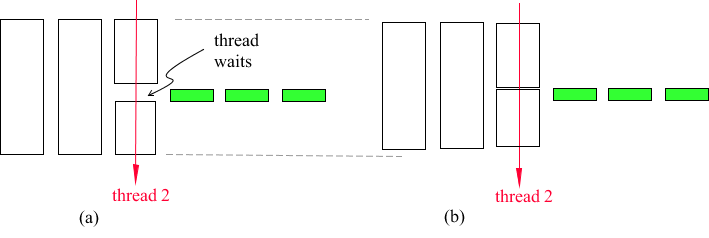
Figure 15 The third scenario shows there are two parallel architectures.
On the left side of Figure 15, the Adams thread (thread 2) executes a single class P code where the Adams thread waits for the additional parallelization to finish. All threading architectures (e.g., OpenMP) have tools to wait for a parallel job to end.
On the right side of Figure 15 the Adams thread does not wait. This means the user is doing some other work in the class P code. However, the user must wait for the additional parallel code to finish before returning from the class P subroutine. Notice case (b) in Figure 15 provides an additional performance gain.
Limitations and recommendations for writing additional parallel code
If the user decides to add user-threads to a class P or a class S user-written subroutine, there are limitations of the Adams code that must be considered.
Limitations
1. Calls to SYSFNC nor SYSARY are not allowed from user-threads. All calls to SYSFNC/SYSARY must be made before launching the user-threads and the obtained data from the calls must be placed in variables visible to the user-threads.
This limitation is based on the Adams architecture and no workaround is available.
This limitation is based on the Adams architecture and no workaround is available.
Recommendations
1. Launching user-threads (OpenMP, Intel TBB, POSIX, etc.) always involves additional overhead spent by the operating system to manage the starting/stopping/running of the user-threads. Users may experience that only above some load threshold, the additional parallelization pays off. If the load (the amount of work to be done) is small, then users will see a worse parallel performance.
Hence, if the load is controlled by say the value of a variable N that corresponds to the size of an array, we recommend putting an IF statement that determines whether the code is executed serially or in parallel depending on the value of N. The threshold will be determined experimentally.
Hence, if the load is controlled by say the value of a variable N that corresponds to the size of an array, we recommend putting an IF statement that determines whether the code is executed serially or in parallel depending on the value of N. The threshold will be determined experimentally.
2. OpenMP users must review the limitations of OpenMP. OpenMP should work in the case of a single class P element (see Figure 10) but it may not work for the case of multiple class P elements (see Figure 12).
If using OpenMP, notice that Adams Solver will check for the KMP_BLOCKTIME environment variable. If not set, Adams Solver will set it to zero.
Example (C++ code):
■For Linux: setenv(“KMP_BLOCKTIME”, “0”, 1);
■For windows: _putenv(“KMP_BLOCKTIME=0”);
For Windows only, if the OMP_WAIT_POLICY environment variable is not set, Adams Solver sets it to “PASSIVE”.
3. Hyperthreading is a great tool, however it does not help in the case of heavy scientific computation. Hyperthreading duplicates the number of CPUs by allowing one core to manage two threads. Unfortunately, there is only one ALU (the arithmetic logic unit) per core; therefore, performance of scientific code does not benefit from hyperthreading because the CPUs will make heavy use of the ALU. Most public utilities like Intel MKL Pardiso, ignore hyperthreading by launching no more threads than the number of physical cores. Hence, the number of physical cores (not the number of logical CPUs reported by the OS), should be considered as the maximum number of threads to be used in parallel for scientific computations.
Conclusions
Only in the three scenarios described above, additional parallelization of class P subroutines provides improved performance.
Parallelization of class S subroutines is always encouraged. However, as a general guideline for writing parallel code, users should put timers in the subroutine code to monitor the performance of the parallel code. Context switch and the natural overhead of thread management performed by the operating system, may be cancelling the gains in speed.
References
1. For Wikipedia article on Context Switch click here.