DEBUG
The DEBUG statement outputs data that helps you debug a simulation.
Format
Arguments
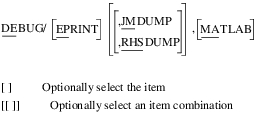
EPRINT | Prints a block of information for each kinematic, static, or dynamic step. This information helps you monitor the simulation process and locate the source of the error if there is a problem. Each step consists of two phases: 1) a forward step in time (the predictor for dynamics) and 2) the solution of the equations of motion (the corrector for dynamics). For the first phase, Adams Solver (C++) prints three or four pieces of information. The information includes: ■The step number. This is a running count of the number of steps taken and can be used as a measure of how hard Adams Solver (C++) is working. ■The order of the predictor for dynamics. This corresponds to the order of the polynomial Adams Solver (C++) uses to predict the solution at the end of the integration step. ■The value of time at the beginning of the step. ■The size of the step. For the second phase, Adams Solver (C++) prints out the cumulative number of iterations and a table of information about the iterations. The cumulative number of iterations is a running count of the iterations needed to solve the equations of motion and can be used as a measure of how many computations Adams Solver (C++) is performing. The table contains information about the largest equation imbalance (error) and maximum variable change for each iteration. For each iteration, Adams Solver (C++) prints out seven or eight pieces of the following information: ■The iteration number. This is one at the beginning of each step and increments by one until Adams Solver (C++) converges to a solution or exceeds the maximum allowable number of iterations. ■The absolute value of the largest equation residual error. Each equation should have an error value close to zero. This number is an indicator of how far Adams Solver (C++) is from a solution. This number should decrease after every iteration. ■The dataset element associated with the largest equation residual error. ■The equation that has the largest equation residual error for the above dataset element. ■The absolute value of the largest change in a variable. The final iteration should not need to change variables very much. This number is an indicator of how aggressive Adams Solver (C++) needs to change variables to approach a solution. This number should decrease after every iteration. ■The dataset element associated with the absolute value of the largest change in a variable. ■The variable with the largest change for the above dataset element. ■If Adams Solver (C++) has updated the Jacobian, YES appears under the new Jacobian header. Default: Off |
JMDUMP | Dumps the Jacobian matrix at each iteration. The Jacobian is dumped in the working directory in the file with extension *.jac and root name equal to the one of the message file. Default: Off |
MATLAB | When specified in conjunction with the RHSDUMP or JMDUMP flags it changes the output format to be such that the debug information can be easily imported into Matlab. Importing for example the Jacobian matrix in Matlab can be useful for purposes such as computing the condition number of the Jacobian, its norm and so on. |
RHSDUMP | Dumps the values of the right-hand-side vector and states in the solution of each AX=b linear problem. The states and right-hand-side are dumped in the working directory in the file with extension *.rhs and root name equal to the one of the message file. Default: Off |
Caution: | An indiscriminate use of the arguments JMDUMP and RHSDUMP can result in an extremely large tabular output file. If a dataset needs to be debugged, include these arguments in the DEBUG statement and execute only a brief simulation. |
Extended Definition
The DEBUG command section contains additional descriptions on the information returned by DEBUG/EPRINT command.
Examples
DEBUG/EPRINT
This DEBUG statement generates the information in Figure 10 that appears in the message file.
In this example, Adams Solver (C++) is printing the information for the third step of a dynamic analysis. For this step, Adams Solver (C++) uses a second-order polynomial to guess the solution. Using a time step of 7.25694E-04, the integration step goes from 6.458333333E-04 to 1.371527778E-03.
After the first iteration, the z velocity equation of PART/245330 has the largest error: its absolute value is 2E+00. The z coordinate of PART/245330 changes the most during the first iteration. The absolute value of the change is 8.E-04. Adams Solver (C++) updates the Jacobian before the first iteration, but not before the second or third.
Figure 10 Sample EPRINT Information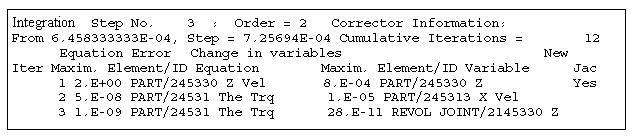
See other Analysis parameters available.