MFORCE
The MFORCE statement applies a force directly to the modal coordinates and rigid body degrees of freedom of a FLEX_BODY.
Format
Arguments
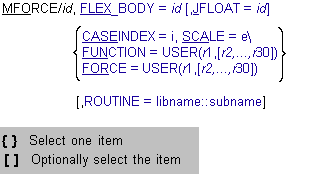
FLEX_BODY=id | Specifies the FLEX_BODY on which the modal load is applied. Multiple MFORCE elements can reference the same FLEX_BODY. |
JFLOAT=id | Specifies the floating marker on which the reaction force is applied. If you do not specify a floating marker, Adams Solver (C++) ignores the reaction force. |
CASE_INDEX=i | Specifies the modal load case number that defines the MFORCE. The modal load cases are force distributions that have been predefined and stored in a modal neutral file (MNF) for an associated FLEX_BODY. Specifically, CASE_INDEX refers to a column in the MODLOAD matrix that is referenced in the FLEX_BODY statement. The column contains the modal loads for the modes selected for an Adams simulation. For more information about how to generate modal load cases, see the Adams Flex Help. Note: You can use the CASE_INDEX/SCALE combination of arguments to define an MFORCE only if you have defined a MODLOAD matrix for the associated FLEX_BODY. |
SCALE=e | Specifies an expression for the scale factor to be applied to the load case referenced by CASE_INDEX. The scale factor and the load case are used in combination to define the modal load. If you use the SCALE argument, it must be the last argument in the MFORCE statement, or it must be followed by a backslash (\). Note: You can use the CASE_INDEX/SCALE combination of arguments to define an MFORCE only if you have defined a MODLOAD matrix for the associated FLEX_BODY. |
ROUTINE=libname::subname | Specifies an alternative library and name for the user subroutine MFOSUB. Learn more about the ROUTINE Argument. |
FORCE=USER(r1{r2,...,r30}) | Specifies up to thirty user-defined constants that Adams Solver (C++) passes to a MFOSUB to directly compute the modal force on the FLEX_BODY. Each component of the modal force can depend on time or the state of the system. |
FUNCTION=USER(r1{r2,...,r30}) | Specifies up to thirty user-defined constants the Adams Solver (C++) passes to a MFOSUB to directly compute the modal load case and scale function whose product is the modal force applied to the FLEX_BODY. The scale function can depend on time or the state of the system. The load case can only be a function of time. |
Extended Definition
The MFORCE statement allows you to apply any distributed load vector F to a FLEX_BODY. Such a load vector is typically generated with a finite element program. Examples of distributed load cases include thermal expansion or pressure loads. To help you understand how Adams handles distributed loads, the following section discusses the equations of motion of a flexible body, starting with the physical coordinate form that the finite element program uses.
Equations

where  and
and  are the finite element mass and stiffness matrices for the flexible component; x is the nodal coordinate vector; and F is the distributed load vector. This equation can be transformed into the modal coordinates, q:
and are the finite element mass and stiffness matrices for the flexible component; x is the nodal coordinate vector; and F is the distributed load vector. This equation can be transformed into the modal coordinates, q:
where  is the matrix of mode shapes. The modal form simplifies to:
is the matrix of mode shapes. The modal form simplifies to: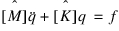
where  and
and  are the generalized mass and stiffness matrices, and f is a modal load case vector that Adams uses to define the MFORCE element.
and are the generalized mass and stiffness matrices, and f is a modal load case vector that Adams uses to define the MFORCE element.The projection of the nodal force vector on the modal coordinates:

is computationally expensive and is typically undertaken by a finite element program when the modal neutral file (MNF) is created. The modal load case f is then stored in the MNF and available to optionally define a modal force on a FLEX_BODY in Adams.
Because Adams only requires the modal form of the load, the expensive projection of the load from physical to modal coordinates is performed only once during the creation of the MNF, rather than repeatedly during the Adams simulation. The MNF can store several modal load cases, which are denoted here as f1, f2,…, fn. From the modal load cases, a total modal force fT can be applied to the FLEX_BODY by defining an MFORCE element in one of the following five ways.
Definition 1: Specifying Scalar Function and Modal Load Case
The easiest way to construct an MFORCE is to specify a scalar function expression using the SCALE argument and a single modal load case using the CASE_INDEX argument:
MFORCE/id, FLEX_BODY = id [,JFLOAT=id], CASE_INDEX = i
, SCALE = e
A modal force of the form
fT(q,t) = e(q,t) fi
is then applied to the FLEX_BODY, where CASE_INDEX = i references load case fi in the MNF, and SCALE = e defines the state-dependent scalar function e(q,t).
Definition 2: Defining MFOSUB Subroutine
If the scalar function expression is too complicated to define using the Adams Solver (C++) function expression language, you can use the MFOSUB user-written subroutine interface and specify the MFORCE as follows:
MFORCE/id, FLEX_BODY = id [,JFLOAT=id], FUNCTION = USER(r1,[r2,…r30])
The applied modal force is equivalent to Definition 1, that is:
fT(q,t) = e(q,t) fi
However, here the load case index is returned from the MFOSUB as well as the state dependent scalar function e(q,t). The dependency on q arises from calls to the SYSFNC and SYSARY utilities in the user-written subroutine.
Definition 3: Combining Modal Load Cases
Alternatively, you can use an MFOSUB to combine the modal load cases, f1,...,fn as follows:
fT(q,t) = e(q,t) [ g1(t) f1 + g2(t) f2 + … tgn(t) fn ]
where g1(t), g2(t), … gn(t) are scalar functions of time only. The MFORCE is specified the same way as Definition 2, namely:
MFORCE/id, FLEX_BODY = id [,JFLOAT=id], FUNCTION = USER(r1,[r2,…r30])
Rather than referencing a single modal load case, however, the MFOSUB computes a new modal load case by combining the existing load cases in a time-varying way. Adams Solver (C++) then scales the new modal load case by a scale factor that is also computed by the MFOSUB. The resulting modal force is then applied to the FLEX_BODY. It is important to note that although the scale factor can be a function of time and system state, the new modal load case may only be a function of time. In other words, using values obtained by calls to SYSFNC or SYSARY to define the functions gi(t) is not allowed.
Definition 4: Computing Modal Load Case
If the MNF does not contain modal load cases, then the MFOSUB can compute one. The MFORCE is defined in the same way as Definitions 2 and 3:
MFORCE/id, FLEX_BODY = id [,JFLOAT=id], FUNCTION = USER(r1,[r2,…r30])
Again, the computed modal load case can be a function of time only, while the scale factor that is applied to it can be a function of both time and system state:
fT(q,t) = e(q,t) fu(t)
where e(q,t) is the user-defined scale factor and fu(t) is the user-defined load vector. This method of specifiying an MFORCE is primarily provided for completeness, and will be used primarily by very experienced users.
Definition 5: Using the Force Form
The general force description:
fT(q,t) = f(q,t)
where each component of f(q,t) depends independently on time and system state can only be achieved through the MFOSUB interface and the following MFORCE specification
MFORCE/id, FLEX_BODY = id [,JFLOAT=id], FORCE = USER(r1,[r2,…r30])
Note that the keyword FORCE is used instead of FUNCTION. This instructs Adams Solver (C++) to ignore the scale function returned from the user-written subroutine and apply the load case defined in the subroutine directly to the FLEX_BODY. Furthermore, calls to SYSFNC and SYSARY establish state dependencies in the individual modal force components, not just the scalar function. An MFORCE defined in this way is more general, but less efficient than the previous forms. Therefore, it should only be used if your application does not allow for the previous definitions.
Definition 6: Combining Modal Load Cases using multiple scale factors
This is expanded definition of Definition 3 to allow you to indicate multiple scale factors. The force description is same as Definition 3 as follows:
fT(q,t) = e(q,t) [g1(t) f1 + g2(t) f2 + … + gn(t) fn]
The values of e(q,t) and g1(t), g2(t), … gn(t) are specified in MFOSUB instead of e(q,t) and the term of [] in Definition 3. The MFORCE specification is also same as Definition 3, namely:
MFORCE/id, FLEX_BODY = id [,JFLOAT=id], FUNCTION = USER(r1,[r2,…r30])
Note that the modeling is quite same as Definition 3 but this is useful for correct MFORCE visualization in Adams PostProcessor.
Resultant Forces
For distributed loads that have an external resultant, portions of the load will project on the rigid body modes of the flexible body. However, the rigid body modes must be disabled because Adams Solver (C++) will replace them with the non-linear, large motion, generalized coordinates: X, Y, Z,  ,
,  , and
, and  . In this case, the load on the rigid body modes are transferred to the large motion generalized coordinates.
, , and . In this case, the load on the rigid body modes are transferred to the large motion generalized coordinates.Part of this transfer occurs during the MNF2MTX translation of the flexible body's MNF, and, consequently, the MODLOAD matrix has a dimension that equals 6 plus the number of modes. The first 6 entries in each column correspond to the external force and torque acting on the flexible body for this modal load case, expressed relative to the body coordinate system (BCS). When the modal load case is an internal force (as would be expected in the case of a thermal load), this force and torque will be zero.
You should also be aware of the way modal truncation affects the application of modal loads. When you define a distributed load, it will be projected on the available modes. It is important to understand that the available modes form an efficient but incomplete basis for the flexible component. Therefore, it is inevitable that some portion of the load will be orthogonal to the modal basis. This portion of the load will be irretrievably lost. Furthermore, during mode selection within Adams, you should realize that a mode whose removal is being considered may also have a significant modal load associated with it. In this case, the mode should not be disabled.
Examples
MFORCE/1, FLEX_BODY = 1, CASE_INDEX = 1
, SCALE = SIN(TIME)*DX(1,4)
, SCALE = SIN(TIME)*DX(1,4)
Using the first load case defined for FLEX_BODY/1, this example defines a modal load on FLEX_BODY/1 by scaling the values of the load case by the function expression SIN(TIME)*DX(1,4). The reaction force that corresponds to this load is ignored.
MFORCE/2, FLEX_BODY = 2, JFLOAT = 4
, FUNCTION = USER(10,1e5,23.)
, FUNCTION = USER(10,1e5,23.)
This example defines a modal load whose reaction resultant force acts on the parent part of floating marker 2. The magnitude and shape of the load is provided by the MFOSUB user-written subroutine, based on the user parameters 10,1e5,23. Furthermore, Adams Solver (C++) builds the applied modal force by multiplying the scale and load case returned from the user-written subroutine, and only the scale function is assumed to depend on state.
MFORCE/2, FLEX_BODY = 2, JFLOAT = 4
, FORCE = USER(10,1e5,23.)
This example is identical to the previous one, except that Adams Solver (C++) builds the applied modal force directly from the load case returned from the user-written subroutine, and any component of the load case can depend on state or time.
See other Forces available.