SURFACE
The SURFACE statement defines a three-dimensional parametric surface that you can reference using the MARKER statement.
Format
Arguments
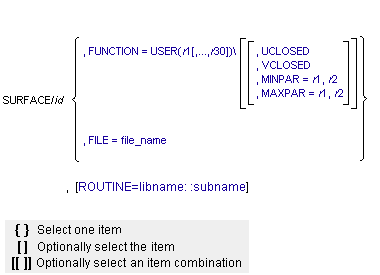
FILE=file_name | Specifies the name of a Parasolid geometry file. The file must contain a single face of a sheet body. |
FUNCTION=USER (r1[,...,r30])/ | Defines constants that are passed to SURSUB, the user-written subroutine that computes the surface coordinates and derivatives. The FUNCTION argument must be either the last argument in the SURFACE statement or followed by a backslash (\). |
MAXPAR=r1, r2 | Specifies the maximum values of the surface (u,v) parameters for a user-written surface. If a file is specified, the file is queried for the MAXPAR values. Default: (1.0, 1.0) |
MINPAR=r1, r2 | Specifies the minimum values of the surface (u,v) parameters for a user-written surface. If a file is specified, the file is queried for the MINPAR values. Default: (-1.0, -1.0) |
ROUTINE=libname::subname | Specifies an alternative library and name for the user subroutine SURSUB. Learn more about the ROUTINE Argument. |
UCLOSED | Specifies that a user-written surface is closed along the u parameter. If specified, you must ensure that the defined surface meets along the u edges and has continuous first and second derivatives across the closure. If a file is specified, the file is queried for UCLOSED. Default: surface is open in u |
VCLOSED | Specifies that a user-written surface is closed along the v parameter. If specified, you must ensure that the defined surface meets along the v edges and has continuous first and second derivatives across the closure. If a file is specified, the file is queried for VCLOSED. Default: surface is open in v |
Extended Definition
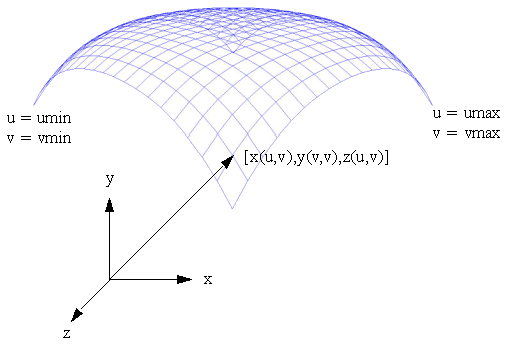
The x, y, and z coordinates of a point on a parametric surface are functions of independent parameters, (u,v). As (u,v) vary from their minimum to maximum values, the functions x(u,v), y(u,v), and z(u,v) sweep out points on the surface. A simple example of a parametric surface is defined by the following equations and illustrated in the figure below:
x = u
y = v
z = cos( u2 + v2)
y = v
z = cos( u2 + v2)
Example of a Parametric Surface
Adams Solver (C++) lets you create surfaces in two ways:
■Enter the name of a Parasolid geometry file containing one face of a sheet body.
■Write a SURSUB evaluation subroutine with which Adams Solver (C++) computes surface coordinates and derivatives.
To model an analytically defined surface such as a cylinder, you can write a SURSUB user-written subroutine. When providing a SURSUB, you can also specify MINPAR and MAXPAR to define the limits of the surface. These default to (-1,-1) and (1, 1), respectively.
A surface can be open or closed in both u and v. A surface closed in u (UCLOSED) meets along the edges defined by the maximum and minimum values of u. A surface closed in v (VCLOSED) meets along the edges defined by the maximum and minimum values of v.
Surfaces can be used in Adams constraints. A surface marker, allowed to only move on the surface, is provided for this purpose. Any valid constraint (joint, jprim, and so on) can be constructed using the surface marker.
A surface has parameterization limits as prescribed by MINPAR and MAXPAR. It is likely, however, that there are regions within the parameter space where the surface is not defined. The finiteness of the surface (including holes) are modeled using a penalty approach. The penalty approach applies a force to prevent the surface marker from moving off the edge of an open surface or from moving into a hole in the surface. This approach necessarily requires that the surface marker move off the surface for a short duration. In such a situation, the surface descriptor is provided with [u,v] values outside the domain of the surface. The descriptor is expected to extrapolate the surface definition to provide an estimated location of the surface marker at these [u,v] points. Linear extrapolation is adequate for most purposes.
Adams Solver (C++) automatically extrapolates the surface as needed when the surface description is provided as a Parasolid geometry file. You are required to perform such extrapolation when you provide the surface definition through a SURSUB user-written subroutine. See SURSUB for more details.
If [u,v] are the parameters corresponding to the current point on the surface, and [u*, v*] are the parameters for the closest material point on the surface to [u,v], the penalty force that is applied in the [u,v] domain is:
F = -K * [(u-u*)2 + (v-v*)2]
K = 108
K = 108
At this time, users have no control over the stiffness parameter, K.
Examples
SURFACE/2, UCLOSED, MINPAR=0,0, MAXPAR=6.2832, 0.5
, FUNCTION=USER(0.2)
, FUNCTION=USER(0.2)
This statement creates a user-written surface closed in u and open in v. The range of u is (0, 6.2832). The range of v is (0, 0.5).
SURFACE /8, FILE=hemisphere.xmt_txt
This statement creates a surface from a Parasolid geometry file. The file must contain a single face of a sheet body.
Applications
Each SURFACE is always associated with a surface marker. Surface markers, in turn, can be used to create a variety of higher-pair constraints. Typical examples include:
■A point sliding on a surface (spherical joint connecting a surface marker to an ordinary marker on a different body).
■Two surfaces sliding on each other (revolute joint connecting two surface markers).
■A robot end-effector executing a specific work-path while orienting the end-effector to be always normal to the surface of the work path (a fixed joint connecting a surface marker on one part to an ordinary marker on a second part).
The SURFACE statement can only be referenced by a MARKER statement. See the MARKER statement for more information.
See other Reference data available.