UNITS
The UNITS statement sets the appropriate units for an Adams Solver (C++) analysis. This ensures that computations, both on input and output, correctly conform to your choice of force, mass, length, and time units.
Format
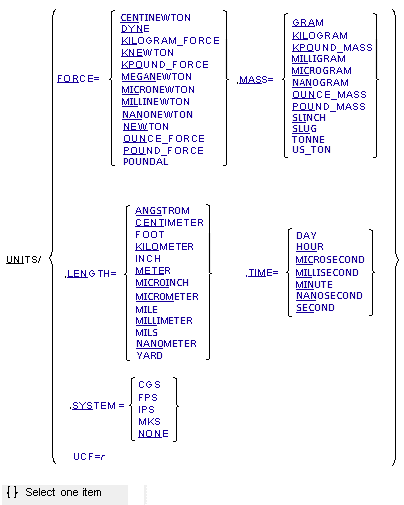
Arguments
FORCE = {CENTINEWTON, DYNE, KILOGRAM_FORCE, KNEWTON, KPOUND_FORCE, MEGANEWTON, MICRONEWTON, MILLINEWTON, NANONEWTON, NEWTON, OUNCE_FORCE, POUND_FORCE, POUNDAL} | Selects a predefined unit for forces. Must be used in conjunction with LENGTH, MASS, and TIME. |
LENGTH = {ANGSTROM, CENTIMETER, FOOT, KILOMETER, INCH, METER, MICROINCH, MICROMETER, MILE, MILLIMETER, MILS, NANOMETER, YARD} | Selects a predefined unit for lengths. Must be used in conjunction with FORCE, MASS, and TIME. |
MASS = {GRAM, KILOGRAM, KPOUND_MASS, MILLIGRAM, MICROGRAM, NANOGRAM, OUNCE_MASS, POUND_MASS, SLINCH, SLUG, TONNE, US_TON} | Selects a predefined unit for masses. Must be used in conjunction with FORCE, LENGTH, and TIME. |
SYSTEM = {CGS, FPS, IPS, MKS, NONE} | Selects a predefined units system instead of selecting each unit individually. MKS implies meter, kilogram, second and newton. CGS implies centimeter, gram, second and dyne. FPS implies foot, pound mass, second and pound force. IPS implies inch, pound mass, second and pound force. NONE implies that the dataset is written non dimensionally and that Adams Solver (C++) sets UCF = 1. |
TIME = {DAY, HOUR, MICROSECOND, MILLISECONDS, MINUTE, NANOSECOND, SECOND} | Selects a predefined unit for time. Must be used in conjunction with FORCE, LENGTH, and MASS. |
UCF = r | Specifies a Units Consistency Factor (UCF) when you prefer to work in a system of units not covered by any of the choices listed above. The UCF is the conversion factor from model mass units to dynamical mass units as shown by the following equation: 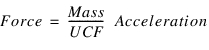 Examples of how to calculate the UCF for your choice of units are given below in the Extended Definition of the UNITS statement. |
Extended Definition
The UNITS statement sets the appropriate units for an Adams Solver (C++) analysis and allows Adams View to account for your choice. Usually the choice of units is simply a matter of preference or convenience. However, sometimes the choice of units can significantly affect the solution calculated by Adams Solver (C++), or even whether a solution can be found. The reasons for this are related to the scale of the problem, as discussed below.
In most cases, you select a system of units by using the SYSTEM argument or the FORCE, MASS, LENGTH, and TIME arguments. For cases not covered by the predefined choices, specifying the appropriate UCF still allows Adams Solver (C++) to make correct calculations. Note that if the UNITS statement is not used in a model, Adams Solver (C++) will treat the model the same as if the UNITS statement were used to specify SYSTEM = NONE. Adams Solver (C++) always uses radians as the unit for angular measurements.
Understanding the UCF
Adams Solver (C++) always calculates and uses a UCF, even when you don't use the option to specify it explicitly. It is worth understanding how this works because it can help you select the appropriate units for a model that may suffer from scaling problems.
To discuss the UCF, let us define the terms model units and dynamical units. Model units are whatever choices you make for units for force, mass, length, and time. That is, you write you model using model units. Dynamical units are any valid choice of units for force, mass, length, and time such that Newton's 2nd law (for a particle in one dimension)
(1)F = MA
is true when written using that choice of units. The CGS and MKS options for the SYSTEM argument of the UNITS statement are dynamical units. Model units may be dynamical units, but that is not a requirement.
To work with model units that are not dynamical units, the UCF is defined to make Newton's 2nd law valid with that choice of model units by dividing the inertia values by the UCF to account for the inconsistency of the model units. To see why this is legitimate, consider a system of model units (denoted by the "primes") F', M', L', and T', and any valid system of dynamical units F, M, L, and T, where the model units are related to the dynamical units by the scale factors sF, sM, sL, and sT:
(2)sFF' = F
(3)sMM' = M
(4)sLL' = L
(5)sTT' = T
Equation (4) and Equation (5) imply that acceleration expressed in model units is related to acceleration in dynamical units by
(6)
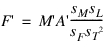
Using Equation (2), Equation (3), and Equation (6) to substitute F, M, and A, and into Equation (1) gives
(7)
By defining the UCF as
(8)
to combine the four scale factors into one, Equation (7) can then be rewritten as
(9)
And thus, UCF = 1 for any valid system of dynamical units.
So, in what units does Adams Solver (C++) actually express equations to perform computations? For quantities of force, length, and time, the units for computations are the same as model units. For quantities of mass and rotational inertia, they are model units divided the UCF. (Note that quantities of angle are always expressed in radians for internal computations. It is not possible make another choice with Adams Solver (C++).)
What if multiple systems of model units have the same UCF, as for the SYSTEM choices of CGS and MKS: how does Adams Solver (C++) "know" which it is using? The answer is, it does not, at least as far as the solving the equations of motion are concerned. But, you as the modeler must know what model units you have chosen. You will write your model with force, mass, length, and time expressed in these units, which will affect the numerical values of model parameters such as spring and damping rates. Forces and torques expressed in model units will then cause inertias expressed in model units, divided by the UCF, to have translational and angular accelerations in model units. The first and second integrals of the accelerations will then lead to translational and angular velocities, and translational displacements in model units. (To reiterate, angular displacements are always in radians.)
However, if you do use the UNITS statement to choose the force, mass, length, and time units explicitly, or use the SYSTEM argument to choose one of CGS, FPS, IPS, or MKS, Adams View will have information about the model units. It can then use this information for pre- and post-processing, such as for switching unit systems (even for angles) prior to sending a model to Adams Solver (C++) for analysis, and for putting unit-labels on output plots and charts. Thus, unless you must use the UCF argument for the UNITS statement, it is recommended that you avoid doing so.
Explicitly calculating the UCF
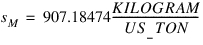
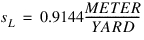
There are at least three reasons that you might need to calculate the UCF. One is if the available choice of units supported by the UNITS statement does not suit you needs. Say, for example, you want to work in model units of TON_FORCE, US_TON, YARD, and MINUTE. You would calculate the UCF according to Equation (8), taking note that the scale factors sF, sM, sL, and sT are the numbers by which you multiply numerical values expressed in model units to convert them to dynamical units. It does not matter with respect to what system of dynamical units the scale factors are expressed. (Adams Solver (C++) always expresses them with respect to the MKS system when it calculates the UCF when the SYSTEM (for FPS and IPS) or the FORCE, MASS, LENGTH, and TIME arguments of the UNITS statement are used.) In our example,
(10)
(11)
(12)
(13)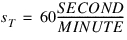
When these values are substituted into Equation (8), the result is UCF = 38608.858267716525. Note that sF, sM, sL, and sT are the same as the values in the scales array argument of the utility subroutine GTUNTS (although they are returned in scales in the order: (sT, sL, sF, sM)).
A second reason that you might need to calculate the UCF, even if you do not specify it explicitly with the UNITS statement, is if you write an expression that uses the numerical value of an inertia property, in model units, of a PART, FLEX_BODY, or POINT_MASS. If you use such an expression for the definition of a VARIABLE, as for example, a component of the angular momentum of a PART with respect to a fixed point, you must be aware of your use of this variable. If it is to be used such that it will play a role in the system dynamics (that is, not just for output purposes such as plot or charts), be sure to write the expression with the value of the inertia (in model units) divided by the UCF. Otherwise it will have the wrong scaling and the solution will be incorrect. However, this is not a concern when using the utility subroutine BODY_MASS_PROPERTY: it returns inertia properties in model units. That is, it multiplies Adams Solver (C++)'s internal values of the inertias by the UCF before returning them to the caller.
A third reason you might need to calculate the UCF is to see how it will affect the scaling of your problem, particularly with regard to the timescale over which you are simulating. This is discussed in a subsequent subsection.
The scale factors sF, sM, sL, and sT used by Adams Solver (C++) to calculate the UCF are listed in Tables 1 to 4. These are exact values in all cases except for the mass units of slinch and slug, which are approximate to 17 digits. The IEEE standard for computer arithmetic calls for using 17 digits for double precision calculations if a value cannot be represented exactly with fewer. Whether all 17 digits are actually used depends on the particular processor, operating system, and other factors. However, it is recommended that you use 17 digits for scale factors that you may need to compute to enter into Equation (8), as well as the resulting value of the UCF.
Table 1 Force Conversion Factors
(Value in model units) * SF = (Value in Newtons) | |
|---|---|
Model Units | SF |
CENTINEWTON | 0.01 |
DYNE | 1.0e-5 |
KILOGRAM_FORCE | 9.80665 (§) |
KNEWTON | 1000 |
KPOUND_FORCE | 4448.2216152605 (‡, §) |
MEGANEWTON | 1.0e6 |
MICRONEWTON | 1.0e-6 |
MILLINEWTON | 0.001 |
NANONEWTON | 1.0e-9 |
OUNCE_FORCE | 0.27801385095378125 (‡, §, ¶) |
POUND_FORCE | 4.4482216152605 (‡, §) |
POUNDAL | 0.138254954376 (‡, §) |
‡ Depends on the definition 1 lbm = 0.45359237 kg, exactly.
§ Depends on the definition standard gravity = 9.80665 m/s2, exactly.
¶ It may seem that SF is approximate for the OUNCE_FORCE, but it turns out that 17 digits are just enough to represent it exactly.
Table 2 Mass Conversion Factors
(Value in model units) * SM = (Value in kilograms) | |
|---|---|
Model Units | SM |
GRAM | 0.001 |
KPOUND_MASS | 453.59237 (‡) |
MILLIGRAM | 1.0e-6 |
MICROGRAM | 1.0e-9 |
NANOGRAM | 1.0e-12 |
OUNCE_MASS | 0.028349523125 (‡) |
POUND_MASS | 0.45359237 (‡) |
SLINCH | 175.12683524647638 (¶, ‡, §) |
SLUG | 14.593902937206365 (¶, ‡, §) |
TONNE | 1000 |
US_TON | 907.18474 (‡) |
‡ Depends on the definition 1 lbm = 0.45359237 kg, exactly.
§ Depends on the definition standard gravity = 9.80665 m/s2, exactly.
¶ Approximate to 17 digits.
Table 3 Length Conversion Factors
(Value in model units) * SL = (Value in meters) | |
|---|---|
Model Units | SL |
ANGSTROM | 1.0e-10 |
CENTIMETER | 0.01 |
FOOT | 0.3048 |
KILOMETER | 1000 |
INCH | 0.0254 |
MICROINCH | 2.54e-08 |
MICROMETER | 1.0e-6 |
MILE | 1609.344 |
MILLIMETER | 0.001 |
MILS | 2.54e-05 |
NANOMETER | 1.0e-9 |
YARD | 0.9144 |
Table 4 Time Conversion Factors
(Value in model units) * ST = (Value in seconds) | |
|---|---|
Model Units | ST |
DAY | 86400 |
HOUR | 3600 |
MICROSECOND | 1.0e-6 |
MILLISECOND | 0.001 |
MINUTE | 60 |
NANOSECOND | 1.0e-9 |
Choice of units for the timescale of the problem
Choosing units appropriate for the timescale of the problem you are analyzing can sometimes be critical. One example of this is related to the choice of units of time. If your model is to be simulated over very short durations, choosing time units that are smaller than the second is worth considering. One reason for this is because several of the numerical integrators in Adams Solver (C++) use the reciprocal of the integration time step to calculate some terms of the Jacobian matrix it must form and solve as part of a linear system of equations. If the time step is very small, its reciprocal will be very large, causing this matrix to be ill-conditioned. This can lead to more required iterations to find a solution, a less accurate solution, and in the worst case, the inability to find a solution.
Additionally, modeling elements that depend on time for updates, such as the dependence of a GSE with discrete states on its sample time, can benefit from using time units smaller that the second. This is because Adams Solver (C++) determines whether a sample time is “hit” within a temporal-error tolerance. For very small sample times, using smaller time units can improve the accuracy of the behavior of such modeling elements.
Examples
UNITS/FORCE=KILOGRAM_FORCE,
,MASS=KILOGRAM, LENGTH=MILLIMETER, TIME=SECOND
,MASS=KILOGRAM, LENGTH=MILLIMETER, TIME=SECOND
The UNITS statement selects force units of KILOGRAM _FORCE, mass units of KILOGRAM, length units of MILLIMETER, and time units of SECOND.
See other Analysis parameters available.